Interaction design shapes how users interact with digital products, ensuring tasks are intuitive, efficient, and satisfying. By 2026, advancements like AI, multimodal interfaces, and hyper-personalization are transforming user experiences. This guide covers:
- Key Principles: Feedback, consistency, and accessibility create user-friendly interfaces.
- Emerging Trends: AI-driven predictive design, multimodal interactions (voice, gestures), and personalized experiences dominate.
- Tools and Frameworks: Figma, Axure RP, and Nielsen’s Usability Heuristics streamline design processes.
- Business Impact: Poor design drives away 32% of users, while refined interaction design boosts retention and revenue.
Designing for clarity, trust, and inclusivity is now essential to meet user expectations and stay competitive.
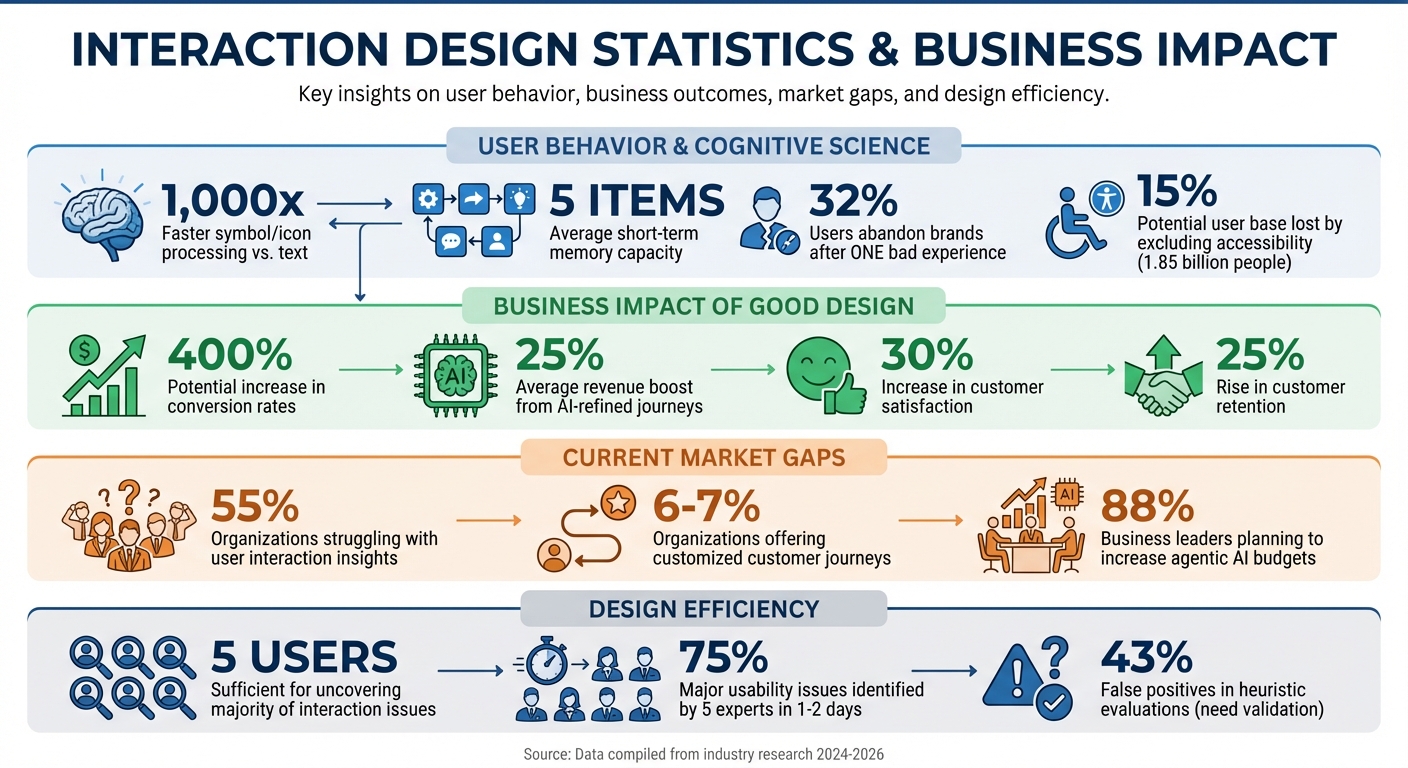
Interaction Design Impact: Key Statistics and Business Metrics for 2026
Interaction Design Basics. 5 Principles of Interaction Design. Interactive Design vs UX Design.
Core Principles of Interaction Design
Effective interaction design is built on principles that make digital products feel intuitive and easy to use. These guidelines shape how users behave and interact with a system. When applied well, they simplify tasks, reduce mistakes, and create a sense of trust.
Feedback and Learnability
Feedback is all about keeping users informed. When someone clicks a button, the system needs to respond right away - whether that’s showing a loading spinner, changing the button color, or displaying a confirmation message. This immediate response reassures users that their action worked. Without it, people may feel uncertain, wondering if they need to click again, which can lead to frustration or even duplicate actions.
Learnability focuses on how quickly new users can get comfortable with your interface. The easier it is to pick up, the faster users can achieve their goals. Familiar patterns are key here - think of the magnifying glass icon that instantly signals "search." This works because the human brain processes symbols and icons about 1,000 times faster than text. Design systems that prioritize recognition over recall. For example, progressive disclosure - showing basic features upfront and revealing advanced ones only when needed - helps users learn without feeling overwhelmed.
Consistency and Predictability
Consistency ensures that your product uses the same visual cues, terminology, and behaviors throughout. This helps users build muscle memory and reduces mental effort. As Jakob Nielsen, Co-founder of Nielsen Norman Group, explains:
"Users should not have to wonder whether different words, situations, or actions mean the same thing. Follow platform and industry conventions".
This principle goes beyond your own product. People bring expectations from using other digital platforms. If your e-commerce site places the shopping cart icon in an unusual spot, you’re working against years of learned behavior. Sticking to common standards - like placing logos in the top left or search bars in the top right - makes it easier for users to apply what they already know. It also minimizes errors. For instance, inconsistent button placements, like switching the positions of "Submit" and "Cancel" across different pages, can lead to accidental clicks and frustration.
Accessibility and Inclusivity
Designing for accessibility isn’t just about meeting legal requirements - it’s about making your product usable by everyone. Around 1.85 billion people live with disabilities, which means excluding them could shrink your potential user base by 15%. Plus, accessibility improvements often help all users. For example, high-contrast text is easier to read in bright sunlight, and closed captions are useful in noisy environments or for those learning English. This phenomenon, known as the Curb-Cut Effect, shows how solutions for specific needs can benefit a much wider audience.
Start with the basics. Ensure your interface works with keyboard-only navigation - no mouse required. Use semantic HTML with proper header tags so screen readers can understand your content structure. Write descriptive alt text that explains what an image does or represents, not just what it looks like. Aim for at least WCAG 2.x Level AA compliance to meet accessibility standards. Beyond technical requirements, inclusive design means considering the full spectrum of human diversity - different ages, languages, abilities, and economic backgrounds. Offer flexible options like dark mode, adjustable text sizes, and alternative ways to perform tasks, such as clicking, swiping, or using voice commands.
These principles set the stage for more advanced design techniques covered in the next section.
Interaction Design Strategies for 2026
The world of interaction design is evolving quickly. Users now expect interfaces that not only respond to their actions but also anticipate their needs and work effortlessly across different interaction methods. By building on core principles like feedback, consistency, and accessibility, new strategies are meeting these rising expectations and reshaping the way we think about interaction design in 2026.
AI and Predictive Design
AI has moved beyond simply reacting to user clicks - it's now capable of making its own decisions. Autonomous AI agents analyze user behavior and environmental data to address problems before users even notice them. By leveraging these insights, AI can predict needs and streamline interactions.
This shift has redefined the designer's role. Instead of manually mapping out every possible user journey, designers can rely on AI to handle repetitive tasks like A/B testing and user segmentation. And the payoff is huge - enhanced UX design can increase conversion rates by up to 400%.
However, with AI taking on more responsibility, transparency becomes critical. Users need to understand why an AI makes specific decisions, which is where Explainable AI (XAI) comes in. XAI provides clear explanations to build trust. For example, using a "suggest-and-confirm" pattern allows users to stay in control when AI confidence is low or when trust is still being established. As Will Webster aptly noted:
"AI won't take your job, but somebody using AI will".
Planning for edge cases from the start is equally important. AI systems should handle complex, real-world scenarios - like name changes or shared accounts - without breaking down. Tesler's Law reminds us to shift complexity to the system, not the user. Let the AI do the heavy lifting while keeping interfaces simple and user-friendly.
AI’s predictive capabilities are further amplified when paired with hyper-personalization.
Hyper-Personalization
Today’s users expect experiences tailored to their unique context, behavior, and goals. Hyper-personalization uses machine learning to analyze data from sources like CRM systems, social media, and customer feedback, customizing every interaction.
Context matters. The needs of a commuter on a crowded train differ from those of someone working at a desk. Design for these differences by employing progressive disclosure - revealing information or features only when they're relevant. This approach reduces cognitive load. For advanced users, hidden shortcuts like slash commands can provide faster navigation without overwhelming beginners.
The benefits of personalization are clear. Companies using AI to refine customer journeys report an average 25% boost in revenue, a 30% increase in customer satisfaction, and a 25% rise in customer retention. On the flip side, a single bad experience can drive away 32% of global consumers. To avoid this, ensure every personalized interaction includes immediate feedback, whether visual or auditory, to reduce user anxiety. Regular audits can help identify and fix potential issues before they escalate.
Goal-driven personalization takes things a step further. By defining specific interaction constraints based on user behavior and psychology, you can create more meaningful experiences. Mapping out the emotional journey of each interaction - understanding what users might feel at every step - helps craft responses that resonate. Familiar real-world metaphors, like shopping carts or trash cans, can also make digital interactions feel more intuitive.
While AI and personalization enhance the user experience, the rise of multimodal interaction is redefining how people interact with devices.
Multimodal Interaction
Multimodal interaction is changing the way users engage with technology. From voice commands to gestures, these interfaces leverage natural human skills to create intuitive experiences. Bill Gates summed it up well:
"Until now, we have always had to adapt to the limits of technology... With NUI, computing devices will adapt to our needs and preferences for the first time".
The key is aligning the interaction method with the context. For example, voice commands are ideal for hands-free tasks like driving or cooking, while gestures or touch may work better in quiet or crowded settings. Conducting a contextual audit can help identify how and where users interact with your product, guiding the design process. As Bill Buxton from Microsoft explains:
"NUIs exploit skills that we have acquired through a lifetime of living in the world, which minimizes the cognitive load and therefore minimizes the distraction".
| Industry | Leading Modalities | Primary Use Case |
|---|---|---|
| Automotive | Voice, Haptics | Hands-free navigation and climate control |
| Consumer Electronics | Touch, Multi-finger Gestures | Content browsing on tablets and smartphones |
| Gaming | Mid-air Gestures, Voice | Immersive gameplay and menu navigation |
| Smart Home | Voice, Ambient Sensing | Appliance control and automation |
Gestural interaction is set to be a major trend for 2025–2026, extending beyond touchscreens into mid-air gestures for VR, AR, and spatial computing. Designers can build on familiar patterns like "pull-to-refresh" or "pinch-to-zoom" to tap into users' existing muscle memory. And, as always, real-time feedback is essential. Without it, the seamless experience of multimodal interaction falls apart.
sbb-itb-97f6a47
Tools and Frameworks for Interaction Design
As interaction design continues to grow and adapt, selecting the right tools and frameworks becomes essential for turning ideas into smooth, user-friendly experiences. These resources help transform strategies into prototypes and provide structure to the design process. The right choice depends on factors like your project’s complexity, team structure, and the stage of the design cycle.
Prototyping and Design Tools
When it comes to prototyping, Figma is a standout tool. Known for its real-time collaboration features, Figma allows entire teams to work on the same file simultaneously. It scores highly on platforms like G2 and Capterra, with a rating of 4.7/5. Figma offers a free plan for basic needs, while its paid plans range from $12 to $15 per editor per month. Andrew Matthews, Design Director at YETI, summed up its impact well:
"When the developers see it, it feels real. They know exactly how to begin developing. Those prototyping tools are just elite".
For more complex projects involving conditional flows and adaptive views, Axure RP is a strong choice. While it has a steeper learning curve, its advanced features make it ideal for enterprise-level applications. Axure RP is rated 4.2/5 on G2, with pricing starting at $25–$34 per user per month.
In early design stages, low-fidelity tools like Balsamiq ($9–$12 per month) are great for sketching out structures without worrying about visual details. As the design evolves, tools like ProtoPie ($69 per user per month) allow for advanced mobile interactions, including multi-touch gestures and sensor-based features. Another standout is UXPin, which integrates with React components through its "Merge" technology. This feature ensures that prototypes are built using the same components developers will use, with plans starting at $19–$39 per editor per month.
Testing tools are equally vital in the design process. Platforms like UserTesting provide access to diverse participant pools, while Lookback supports real-time observation, and Lyssna enables quick usability tests. Research shows that testing with just five users can uncover the majority of major interaction issues before development begins.
By combining these tools, designers can create prototypes that are not only functional but also ready for evaluation through structured frameworks.
User-Centered Design Frameworks
Once prototypes are ready, structured frameworks ensure that designs are both user-friendly and aligned with business objectives. These frameworks act as a guiding structure, helping designers maintain usability without limiting creativity. They also complement key principles like feedback, consistency, and accessibility.
One of the most respected frameworks is Nielsen's 10 Usability Heuristics, which has been a cornerstone of design since 1994. These principles - such as visibility of system status, user control, and error prevention - provide a shared language for identifying and addressing design issues.
Heuristic evaluation is an efficient way to catch usability problems early. Studies show that involving five usability experts can identify about 75% of major issues within just 1–2 days. William Hudson, a well-known interaction design expert, explains:
"Heuristics are these rules of thumb based on good practice and known problems in design".
However, not all issues flagged during heuristic evaluations are genuine. Research indicates that 43% of identified "problems" might not actually impact usability. This is why heuristic evaluations work best when paired with real user testing. Early-stage sketches and prototypes benefit from heuristic evaluations, while usability testing with actual users validates whether the design functions effectively in real-world scenarios.
Frameworks also help prioritize design decisions by linking user insights to business goals. For instance, the human brain processes visual symbols about 1,000 times faster than text, and short-term memory can only hold around five items at a time. These cognitive limits aren’t barriers - they’re opportunities to design smarter. By using techniques like recognition over recall and progressive disclosure (revealing information only when needed), designers can create interfaces that feel natural and intuitive.
Working with Consulting Firms
How Consulting Firms Support Interaction Design
Many companies recognize the importance of interaction design but often face challenges in implementing it effectively. In fact, 55% of B2B and B2C organizations struggle with gaining sufficient insights into user interactions. As interaction design continues to evolve, consulting firms play a critical role in ensuring these advancements translate into real business results. Their role goes far beyond creating attractive interfaces - they focus on aligning digital experiences with measurable goals.
Consulting firms bring structured strategies to the table, using tools like the CX Maturity Model® and the Process Transformation Framework® to uncover friction points in the customer journey. These tools are not just about improving aesthetics but about identifying where poor user experiences are causing issues like low conversion rates or high abandonment rates, which directly impact revenue. By addressing these challenges, consultants help businesses create seamless user experiences that enhance retention and drive growth.
Another key offering is their ability to map the relationships between technology, business processes, and performance metrics. Using tools like the CX Matrix®, consultants provide executives with a clear understanding of how interaction design decisions influence the bottom line. This kind of insight is invaluable for making informed, strategic decisions.
As ICX Consulting aptly states:
"Strategic interaction design transforms digital platforms into business assets that drive engagement, loyalty, and measurable growth."
Consulting firms also bring specialized talent to the table, including interactive designers and UX strategists. They embed user-focused principles into corporate strategies, ensuring that initiatives align with business objectives at every level. Whether a company is addressing low conversions, improving customer retention, or launching a new digital product, consultants craft tailored solutions that address specific challenges rather than relying on generic approaches. This combination of expertise and strategic alignment helps bridge the gap between design innovation and business impact.
Finding Specialists Through Top Consulting Firms Directory

Once businesses understand the value of these strategic frameworks, the next step is finding the right consulting partner. This can be daunting, especially when niche expertise in interaction design is required. The Top Consulting Firms Directory simplifies this process by connecting companies with firms that specialize in digital transformation and user experience design.
The directory allows businesses to filter firms based on their specific needs - whether that’s conducting a CX Maturity Model assessment, leveraging AI-assisted prototyping, or finding experts who can seamlessly integrate technical upgrades with user adoption. This is especially crucial during digital transformation projects, where intuitive interfaces can determine the success or failure of your investment.
Instead of spending weeks researching individual firms, the directory offers a curated starting point. It highlights consultants who use advanced methodologies, such as the Process Transformation Framework, or who have a proven track record of optimizing operating models for efficiency. The platform covers a wide range of expertise, including cloud services, data analytics, cybersecurity, revenue growth, and organizational change - areas that often intersect with modern interaction design strategies.
For businesses aiming to implement cutting-edge strategies like AI-driven personalization or multimodal experiences, the directory provides a practical way to find partners who can bring these concepts to life. It’s about matching your specific challenges with consulting firms that have the tools, expertise, and experience to deliver tangible results.
Conclusion
By 2026, interaction design has evolved to deliver experiences that feel intuitive, personal, and deeply human. The transition from single-mode interactions to multimodal, responsive systems means users now anticipate interfaces that respond not just to clicks and taps but also to voice commands, gestures, and even emotional cues. AI has shifted from being just a feature to becoming the central framework for these interactions, with 88% of business leaders planning to boost budgets specifically for agentic AI capabilities. This shift is no longer a future prediction - it’s the reality we’re living in.
The business impact of these advancements is undeniable. Enhanced interaction design has proven to drive ROI and improve conversions. On the flip side, poor design comes at a steep cost - 32% of consumers are willing to abandon a brand after a single bad experience. The stakes couldn’t be higher.
Arin Bhowmick, Chief Design Officer at SAP, succinctly captures the essence of this transformation:
"In 2026, success will belong to teams that design with empathy and collaboration, treating users as partners rather than endpoints".
Empathy, accessibility, and sustainability are no longer optional - they’re essential pillars of modern design strategy. With over one in four adults living with a disability, accessible design isn’t just about compliance; it’s a massive market opportunity. Similarly, sustainability is gaining traction as a policy-driven requirement, with guidelines like the W3C Web Sustainability Guidelines urging designers to minimize digital carbon footprints.
The competitive landscape is clear: only 6-7% of organizations currently offer customized customer journeys tailored to individual interactions. This gap presents a huge opportunity for businesses ready to invest in refined interaction design. Whether it’s AI-driven personalization, multimodal interfaces, or accessibility baked into every layer of your design, the strategies outlined here provide a clear path forward. Leveraging tools like predictive AI and hyper-personalization can turn digital platforms into powerful assets that drive growth.
The resources and frameworks to create memorable, impactful experiences are already at your fingertips. The choice is yours - start designing for the future today.
FAQs
How will AI transform interaction design by 2026?
By 2026, advancements in AI are set to transform interaction design in groundbreaking ways. Imagine tools that can automatically create user interfaces, turn natural language prompts into fully fleshed-out prototypes, and incorporate explainable AI into chat systems. These developments promise to make user experiences more intuitive, tailored, and efficient.
AI will also bridge the gap between users, interfaces, and AI models, enabling smoother collaboration. This means faster design workflows and the ability to customize designs to meet individual preferences. For businesses and users, this evolution could redefine usability and simplify the entire design process.
What are the advantages of using multimodal interaction in design?
Multimodal interaction combines various input methods like touch, voice, gestures, and visual cues to create a more seamless and user-friendly experience. One of its standout advantages is the ability to let users pick the interaction method that fits their needs or environment. This approach can make digital tools more accessible to everyone, particularly individuals with disabilities, and it promotes a more inclusive experience overall.
This type of design also feels more natural and intuitive, cutting down the learning curve and reducing the mental effort needed to use technology. By incorporating multiple channels, it provides richer feedback - think of how a visual alert paired with a vibration can grab your attention more effectively. Plus, it adds a layer of reliability by offering backup input options. For example, if voice commands don’t work in a noisy setting, touch controls can step in. Whether you're multitasking or in a challenging environment, multimodal interaction makes achieving your goals easier and more enjoyable, leading to higher satisfaction.
Why is accessibility important in interaction design?
Accessibility plays a crucial role in interaction design because it ensures that digital products are usable by everyone, including individuals with disabilities. Designing with accessibility in mind creates inclusive experiences, enabling all users to access information, engage with content, and use services without unnecessary obstacles. Beyond meeting ethical and legal obligations, accessible design widens your audience and improves overall usability.
Features like proper color contrast, keyboard-friendly navigation, and clear captions not only support users with specific needs but also enhance the experience for everyone. Focusing on accessibility often results in cleaner, more intuitive designs that align with modern expectations for seamless and user-friendly interactions. For businesses looking to incorporate accessibility into their design strategies, the Top Consulting Firms Directory offers a connection to experts in digital transformation and inclusive design to help you achieve these objectives.