CRM testing is about one thing: making sure sales, service, data, and reports still work before and after release. If lead routing breaks, data loads fail, or reps can see the wrong accounts, the business feels it fast. And with 37% of CRM users reporting lost revenue from poor data quality, testing has to focus on business risk first.
Here’s the short version of what matters most:
- I start with the highest-risk workflows, like lead routing, quote approvals, SLA timers, and forecast rollups
- I test with production-like data, roles, and permissions, not clean demo records
- I check core areas in order: functional flows, integrations, migration, performance, security, usability, regression, and UAT
- I adjust testing by platform, since Salesforce, Dynamics 365, and HubSpot fail in different ways
- I use automation for the top 20–30 repeat tests, then keep manual testing for edge cases and user judgment
- I treat go-live as a checkpoint, not the end, with 4–6 weeks of hypercare and post-launch regression
A simple rule runs through the whole process: if the system looks fine in QA but fails in daily work, testing did not do its job.
If you want a CRM release to stick, I’d focus less on bug counts and more on whether people can do their work, data stays clean, integrations hold up, and access rules stay in place.
How to Build a CRM Test Strategy Around Business Risk
Build CRM testing around the workflows that can stop revenue or hurt customer service: lead routing, SLA handling, handoffs, and reporting. That’s the core idea. A risk-based test plan makes go-live less of a gamble and more of a controlled release.
Use that risk map to decide what gets tested first, who signs off on each scenario, and what counts as ready for release.
Define Scope, Roles, and Release Priorities
Start with a compact catalog of 20–30 end-to-end scenarios that cover Sales, Service, and Marketing handoffs. These should mirror how work happens in the business. So instead of testing one field or one rule in isolation, test a full flow like lead capture → routing → stage change → quote → handoff. Then assign each scenario to a business owner for sign-off.
Prioritize based on operational impact. The items with the biggest revenue risk should go first, including:
- Lead routing
- Discount approvals
- SLA timer behavior
- Forecast rollups
Those are the workflows that can create immediate pain if they fail. Lower-priority usability issues can wait until after go-live.
Roles matter just as much as scope. QA leads build and maintain test scripts. CRM admins and developers fix configuration issues and keep test environments stable. Business users - frontline sellers and service agents - run UAT.
A simple benchmark helps here: if a frontline manager can’t run a pipeline review in the test environment, and a service leader can’t run an SLA review there either, the system isn’t ready to go live.
Set Up Realistic Test Environments and Test Data
High-risk scenarios only mean something if the environment and data look like production. Match production permissions, integrations, and data patterns. If your sandbox doesn’t reflect role-based access or live integration behavior, it can make things look fine when they’re not.
Build a set of approved sample accounts and deals that reflect normal business structure, including account hierarchies, territory rules, and edge cases like global parent accounts with multiple U.S. subsidiaries. That kind of detail matters. A clean demo record won’t show the same problems a messy enterprise account will.
Use anonymized production records where needed to stay compliant. Also check U.S. date formats, currency handling, and state tax logic in critical quote-to-cash flows.
When to Bring in Outside CRM Testing Help
If the scope starts to outgrow the internal team, bring in outside help before execution slips. One of the clearest warning signs is when status updates focus on finished configuration tasks instead of proven end-to-end workflows.
If readiness is being measured by what's been built rather than what's been proven to work, an independent review can surface risks that internal reporting may miss.
Outside partners can help most with:
- Large data migrations
- Automation framework development
- Cross-system integration validation
- Objective go/no-go assessments near launch
These are common pressure points, especially close to launch. For specialist CRM testing help, the Top Consulting Firms Directory connects organizations with vetted consulting partners matched to those needs.
Once scope, data, and roles are set, move into functional, integration, and migration testing.
sbb-itb-97f6a47
How to Run the Core CRM Testing Process
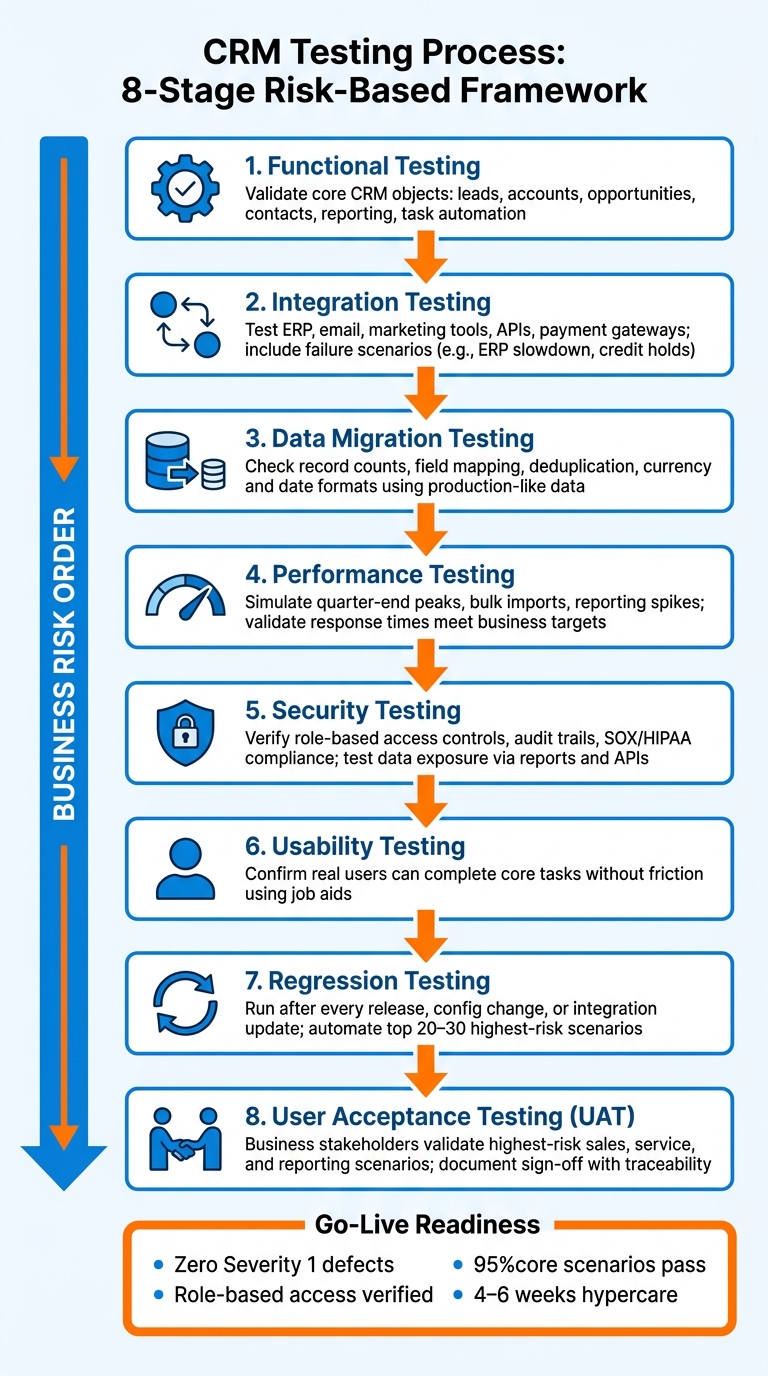
CRM Testing Process: 8-Stage Framework for Risk-Based Releases
With scope, data, and roles in place, run tests in business-risk order: core workflows, integrations, migration, performance, security, usability, then regression and UAT. That sequence turns earlier risk priorities into evidence you can use for a release decision.
Functional, Integration, and Data Migration Testing
Functional testing is the first gate. Start by checking that core CRM objects - leads, accounts, opportunities, contacts, reporting, and task automation - work the way they should. Test routing, approvals, and other workflow rules on their own before you connect the CRM to outside systems. If a rule breaks here, the damage tends to spread later.
Once those core functions are stable, move to integration testing. The point isn't just to show that the happy path works. You also need to test what happens when things go sideways. For example, what if the ERP slows down? What if pricing data doesn't come through? What if an order gets rejected because of a credit hold? Test the interfaces that move orders, customer data, and billing status across systems, including ERP, email, marketing tools, APIs, and payment gateways.
Data migration testing should happen alongside integration testing, or right after it. Use the approved production-like records to check record counts, field mapping, deduplication, and currency and date formats. That helps the test environment match production closely enough to catch data issues before go-live.
| Testing Type | Objective | Scope | Common Defects | Success Metrics |
|---|---|---|---|---|
| Functional | Validate core features work as specified | Leads, accounts, opportunities, contacts, reporting, task automation | Broken workflows, rule or automation failures | Test pass rate; requirements covered |
| Integration | Ensure seamless data flow between systems | ERP, email, marketing tools, APIs, payment gateways | Sync errors, data mapping mismatches, API authentication failures | Data latency, synchronization accuracy, error recovery rate |
| Data Migration | Verify accuracy of legacy data transfer | Historical records, field mapping, deduplication, account hierarchies | Duplicate records, missing mandatory fields, corrupted date/currency formats | Data completeness, zero critical data loss, record count matching |
Performance, Security, and Usability Testing
After workflows and data are stable, test how the CRM holds up under load and under access limits. Performance testing should mirror the moments that put production under pressure, like quarter-end peaks in concurrent users, bulk lead imports, and reporting spikes. Set response-time targets based on what the business actually needs, not just what looks good in a lab.
Security testing needs more than basic access checks. Verify role-based access controls and audit trails. Then dig into the paths where data can leak through reports, exports, or APIs outside a user's allowed scope. For U.S. organizations, include SOX checks when financial reporting is part of the system and HIPAA checks when health-related data is involved. After that, usability testing confirms that real users can finish core tasks without friction.
| Testing Type | Goal | Example Scenarios | Pass Criteria |
|---|---|---|---|
| Performance | Ensure stability under load | Peak concurrent user load; bulk lead imports; reporting spikes | Response times meet business targets; no system timeouts |
| Security | Protect sensitive customer data | Sales rep attempting to view out-of-territory enterprise accounts | Role-based access prevents unauthorized create, read, update, and delete actions; audit trails capture all PII changes |
| Usability | Optimize user experience | New agent routing a case using only provided job aids | High task completion rate; positive user satisfaction scores |
Regression Testing and User Acceptance Testing
Regression testing protects what already works. Every release, config change, or integration update can break lead routing, discount approvals, or entitlement enforcement. So regression suites should run after each of those changes, not just once before go-live.
Once the build is stable, key integrations are working, role-based security is set, and a baseline data load is ready, business stakeholders can run the highest-risk sales, service, and reporting scenarios. Their job is to confirm that the system supports the agreed processes with acceptable residual risk and to document known issues for sign-off.
Each UAT scenario should tie back to a named business requirement. Add evidence at every step - screenshots, logs, or reports. That traceability from requirement to test case to defect to fix to sign-off is what makes a release decision defensible.
After these checks pass, apply the same controls to each CRM platform's release and automation rules.
Adjust Testing for CRM Platforms and Automation
Once core workflows, integrations, and UAT are set, the next step depends on the CRM itself. Each platform has its own failure points, and plain test cases often miss them.
Platform-Specific Checks for Salesforce, Dynamics 365, and HubSpot
Salesforce Lightning uses Shadow DOM, which can break standard element locators. That’s why teams often lean on tools with self-healing features to keep regression suites from falling apart. Governor limits matter too. Limits on queries, writes, and CPU time tend to show up only under realistic data volumes, which makes them a release risk, not some small platform quirk. Salesforce also requires at least 75% org-wide code coverage before production deployment, while many teams aim for 85% to 90% with strong assertions.
Dynamics 365 testing revolves around Dataverse, Finance & Operations, and outside integration points. When those areas fail, the damage can hit order flow, revenue, and reporting. Microsoft’s native Regression Suite Automation Tool, or RSAT, gives teams a simple way to record and replay guided workflows, so it’s often a solid starting point for regression coverage. Plugin logic and model-driven app customizations need direct testing too, especially when guided workflows are part of the process.
HubSpot testing is mostly about the handoff from marketing to sales. The riskiest cases usually involve lifecycle stage changes, lead scoring accuracy, and the triggers that launch email sequences or route leads to reps. A lead can score above the threshold and still fail to route the right way. When that happens, revenue and customer experience can take a hit fast. So the main test targets are lead scoring, lifecycle stage rules, sequence triggers, and routing logic.
| Platform | Common Customizations | Testing Focus Areas | Primary Automation Tools |
|---|---|---|---|
| Salesforce | Apex code, Lightning Components, Flows, AppExchange apps | Lightning Shadow DOM stability, governor limits, 75%+ code coverage | Provar, Copado, Selenium |
| Dynamics 365 | Model-driven apps, plugins, workflows, ERP connections | ERP integration points, guided workflows, plugin logic | RSAT, Leapwork, testRigor |
| HubSpot | Lifecycle stages, deal pipelines, lead routing, email sequences | Lead scoring accuracy, lead handoff from marketing to sales, sequence triggers | Katalon Studio, Postman (API), Selenium |
Use those platform differences to shape both manual checks and regression coverage.
Build Automation for Repeatable CRM Tests
After platform-specific checks, the next move is to lock down repeatable coverage for the tests that fail most often.
Automate the checks that need to run after every release, config change, or integration update. The best fits are:
- Regression suites for critical business paths
- API checks for integration points
- Smoke tests that confirm core objects load after deployment
These are the places where a quiet failure can disrupt the business before anyone spots it.
Manual testing still has a clear role. Keep it for exploratory work, usability checks, and edge cases that need human judgment. A practical approach is to automate the 20–30 highest-risk end-to-end scenarios, then backfill with manual testing where interpretation matters.
There’s also a maintenance issue teams need to plan for: scripts have to be updated as CRM UIs and configurations change from release to release.
Use that same automation logic to keep regression steady as the CRM changes.
Review Results, Decide on Release Readiness, and Maintain Quality
Defect Triage, Metrics, and Go-Live Criteria
After execution wraps up, the next step is simple: turn test results into a release call.
That means sorting defects by business impact, not just by how bad they look from a technical angle. Severity levels should map to what the issue does to the business in practice.
Track the basics, but track the right basics:
- Scenario completion
- Defect trends by severity
- Migration accuracy through record counts and sample-match checks
You should also keep an eye on higher-risk warning signs. That includes broken lead-to-opportunity conversion flows, shaky integrations in critical paths, and security flaws that expose restricted customer data.
| Severity Level | What It Means | Business Impact |
|---|---|---|
| Severity 1 (Showstopper) | Blocks critical end-to-end scenarios like lead routing or quote approval | High: Prevents revenue generation or service delivery |
| Severity 2 | Forces a workaround that materially increases effort or risk | Medium: Reduces productivity and increases operational friction |
| Severity 3 | Cosmetic or low-impact usability issues | Low: Minor annoyance; does not stop core business processes |
Every defect needs an owner, a target fix release, and a clear disposition. No issue should drift into a silent backlog.
For go-live readiness, practical thresholds beat gut feel. Zero unresolved Severity 1 defects is non-negotiable. Teams should also confirm that at least 95% of core business scenarios finish without critical workarounds, and that role-based access controls have been checked.
Performance still matters at this stage too. Peak-load response times should hit the release target for critical actions like account searches, dashboard loads, and lead routing.
Before sign-off, put together a go-live evidence pack. It should include cutover rehearsal timing, reconciliation results for open pipeline and cases, integration smoke test results, and a documented list of any remaining Severity 1 and 2 defects with agreed mitigations.
Sign-off should say two things plainly: the system supports the agreed scenarios with acceptable risk, and any gaps that remain will be handled during hypercare.
Keeping CRM Quality After Go-Live
Once the release gets approved, that same discipline needs to carry straight into hypercare and monitoring. Post-launch oversight shouldn't feel like a separate phase tacked on at the end. It should feel like the next move in the same play.
Go-live is not the finish line. CRM quality can slip fast without a structured post-launch operating model. A 4–6 week hypercare period, or about two full selling cycles, gives teams a command center to catch friction before people start working around the system.
Post-launch support works best when it's split into three lanes:
- How-to questions handled the same business day
- Data and access issues resolved within 4–8 business hours
- High-impact defects and integration failures acknowledged within 4 hours
When you measure adoption, login counts don't tell the full story. Usage indicators like opportunities updated within 7 days say more. So do data-quality indicators like duplicate creation rates.
Data quality needs active monitoring tied to the same workflows used during testing: lead routing, pipeline updates, SLA handling, and data integrity. That matters because 37% of CRM users have lost revenue directly because of poor data quality.
Run weekly completeness audits on required fields during the first 60 days. After that, quarterly regression cycles aligned with platform update schedules help keep automated suites current and stop silent failures. Salesforce and Microsoft Dynamics 365 both ship updates quarterly.
"CRM should be run as a product with a release cadence, not as a project that ends at go-live." - Umbrex
Conclusion: The Key Points of a Reliable CRM Testing Process
Reliable CRM testing ties scope to business risk, uses realistic environments and data, covers core functional and nonfunctional checks, and continues after go-live with monitoring and regression.
FAQs
How do I prioritize CRM tests by business risk?
Prioritize CRM tests based on what happens to the business if something breaks. Put your deepest testing into high-risk areas like payment processing, data security, core sales lead routing, and key integrations.
A simple way to do this is with priority levels:
- P0: Functions that stop operations if they fail
- P1: Major features that matter day to day
- P2: Nice-to-have features
Also, test the workflows people use in real life, not just isolated features. And don’t just check the happy path. Spend time on failure conditions too, because that’s where a lot of costly problems show up.
What should a realistic CRM test environment include?
A realistic CRM test environment should be an isolated sandbox that closely matches your live setup. That means workflows, triggers, and external integrations should work the same way they do in production.
For data, use anonymized production records or synthetic data that reflects the messiness of day-to-day use. In plain English: include inconsistent formatting, duplicates, and mixed data structures. If your test data is too clean, your results can give you the wrong picture.
It should also support end-to-end testing across user roles and mobile platforms. On top of that, keep separate sandboxes for development, integration validation, UAT, and performance testing.
When should I automate CRM testing instead of testing manually?
Automate CRM testing when you need to protect critical, repeatable business processes during updates and releases. It fits best for stable, high-stakes scenarios where a failure would disrupt day-to-day work, like lead routing, opportunity stage gates, discount approvals, and case intake workflows.
Don’t try to automate everything. Start with a small set of repeatable regression checks after each release or config change. For new UI patterns, keep exploratory testing manual.