If your data arrives late, your campaign reacts late. In marketing, that usually means wasted ad spend, weak attribution, and messages that miss the moment.
Here’s the short version: I’d separate use cases by latency, connect only the data sources that affect live decisions, set firm rules for IDs and consent, and choose tooling based on volume and team skill - not hype. The article backs that up with examples like 85% of marketers saying live-response experiences matter for future success, and Samsung’s 275% conversion lift tied to AI-driven routing.
If I were boiling the piece down for a marketing leader, I’d focus on 5 things:
- Match sync speed to the job
- Real-time for suppression, personalization, and lead routing
- Near real-time for dashboards and spend alerts
- Batch for finance and attribution reviews
- Prioritize the right inputs
- Web/app events
- CRM changes
- Commerce events
- Ad platform signals
- CDP profile data
- Pick the right delivery method
- Streaming for high-volume, low-latency event flows
- APIs, native connectors, or iPaaS for simpler needs
- Control data quality
- Shared naming rules
- UTC timestamps
- Monitoring for schema drift, failed webhooks, and rate limits
- Treat governance as part of the build
- Consent handling
- RBAC
- Audit logs
- Staging vs. production
- Clear ownership across Marketing Ops, RevOps, CRM, and Data teams
My main takeaway: real-time marketing is less about buying one platform and more about making sure identity, timing, and activation all work together without errors.
If you’re deciding what to build next, I’d use this article as a guide for where speed matters, where it does not, and when outside integration help is worth the cost.
Core Marketing Data Sources and Destination Tools
Sources: Web, App, CRM, Commerce, CDP, and Ad Platform Data
These five source types shape real-time campaign decisions in different ways.
Web and app behavior sends campaign tools data like page views, user sessions, navigation paths, clicks, and feature usage. That helps teams see where users drop off and which content keeps attention. CRM records add business context - lead status, account owner, sales activities, and service requests. If a lead moves to qualified, that change can kick off nurturing right away.
Commerce data adds cart contents, order values, purchase history, and subscription events. That powers abandoned-cart messages and post-purchase campaigns.
A CDP pulls these inputs into one customer profile and passes that profile to activation tools. Without that unified ID layer, the same person can show up as several different profiles across tools. When that happens, personalization and attribution start to fall apart.
Ad platform signals - spend, impressions, cost-per-lead, and real-time bids from major ad platforms - help teams shift budget by showing which paid activity is producing results. That lets spend move toward what is working
The source mix decides which activation tools can move fast enough to make a difference.
| Source Category | Key Data Contributed | Activation Example |
|---|---|---|
| Web/App | Clicks, page views, search queries, sessions | Browse abandonment email triggers |
| CRM | Lead status, account owner, sales activities, service requests | Personalized sales outreach sequences |
| Commerce | Cart items, order value, purchase history | Abandoned cart recovery and post-purchase upsells |
| Ad Platforms | CPA, CPL, impressions, real-time bids | Automated budget shifts to high-ROI ad sets |
| CDP | Unified profile, predictive intent signals | Next-best-action routing across channels |
Destinations: Email, Paid Media, Personalization, and Reporting Tools
Once data is collected and unified, it moves into three functional layers: engagement, orchestration, and intelligence.
The engagement layer includes tools like Braze, Klaviyo, Iterable, and MoEngage. These platforms handle real-time message delivery across email, SMS, and push. They use behavioral triggers to send the right message within minutes of an action. The orchestration layer includes HubSpot, Marketo, and Salesforce, where lead scoring logic and CRM-linked workflows live. The intelligence layer - platforms like Improvado and Google Marketing Platform - pulls everything into executive dashboards so teams can spot weak segments and reallocate budget in near real time.
Real-time marketing runs on connected tools, not a single all-in-one platform.
Paid media destinations also rely on real-time syncs. If you want to suppress a converted customer from a retargeting list on Meta Ads or Google Ads, the purchase event has to arrive fast enough to matter. On-site personalization tools like Adobe Experience Cloud and Insider One use live interaction data to swap content blocks on the fly - for example, showing location-specific offers or recently viewed products. Email, CRM, and reporting tools can handle longer delays. Suppression and personalization tools usually cannot.
That map shows whether the next layer needs streaming, API access, or a managed sync.
sbb-itb-97f6a47
Marketing Data Integration is Broken - Here’s How Teams Are Fixing It
How Real-Time Data Moves Into Campaign Tools
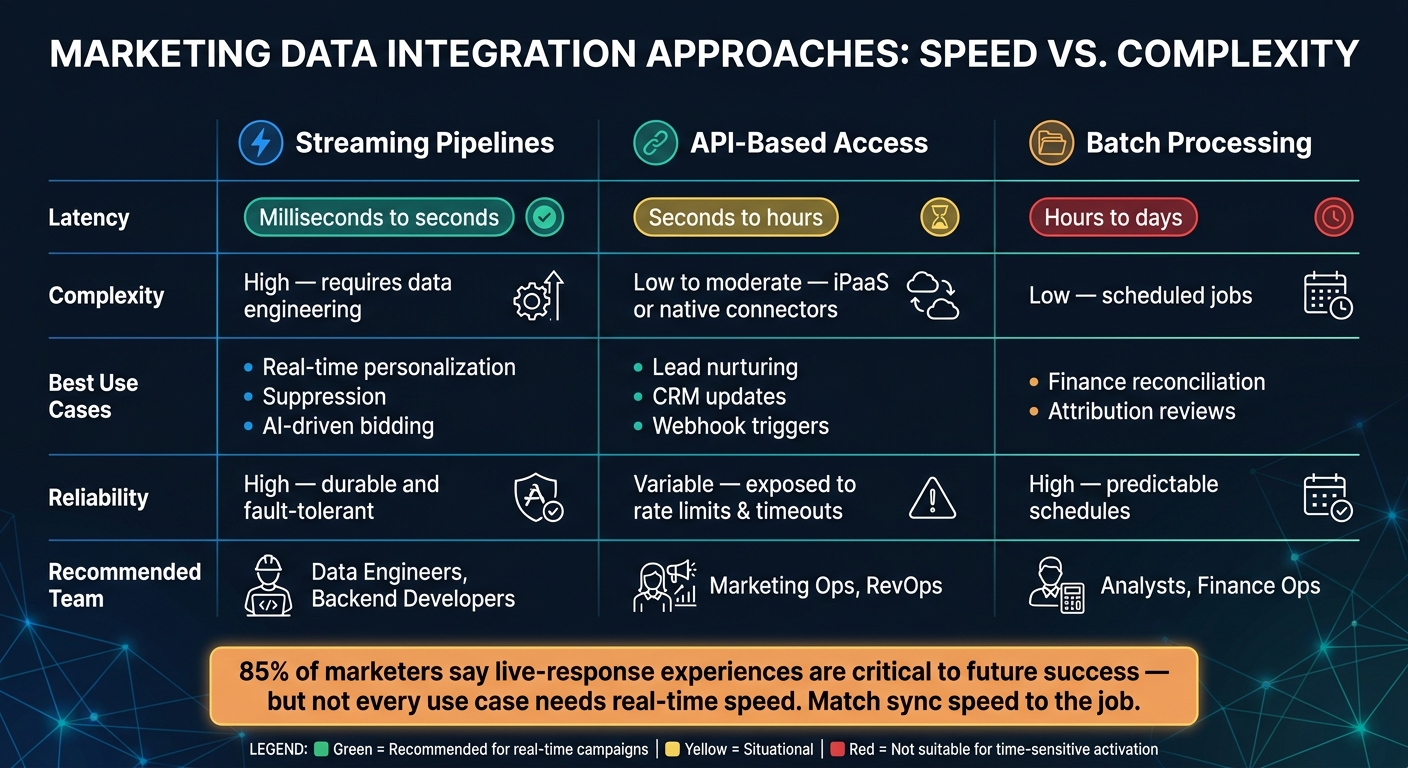
Real-Time vs. API-Based vs. Batch Data Integration for Marketing
Collection, Standardization, and Streaming Pipelines
Once teams pick the source systems and the tools that will use the data, the next step is simple to ask and harder to execute: how does the data move?
Collection starts at the point where the customer does something. Mobile apps use SDKs to record events. Websites use server-side tracking. CRMs, commerce platforms, and ad platforms send updates through APIs and webhooks. That flow is what makes suppression, personalization, and routing work.
Before teams can use raw events, they need to normalize them. Different systems often label the same thing in different ways. A CRM might store "United States" while a commerce platform stores "US." Those mismatches seem small, but they can break downstream logic. Timestamps need cleanup too. Convert them to UTC before transformation so attribution doesn't drift.
After normalization, data moves through a streaming pipeline. Tools like Apache Kafka and AWS Kinesis are built for high-volume event streams and can push data to downstream campaign tools with millisecond-to-second latency. If update volume is lower, teams often don't need that level of plumbing. API-based connectors or iPaaS tools like Zapier or Fivetran usually do the job.
Identity Resolution, Profile Updates, and Activation Triggers
Normalization comes first. Then the system has to answer a tougher question: who does this data belong to?
That's where identity resolution comes in. It links scattered identifiers into a single customer profile. Platforms usually do this with either deterministic matching or probabilistic models.
Once the profile updates, the orchestration layer steps in. A cart-abandonment event, for example, can update the profile and trigger an email within seconds. The sequence is pretty direct: the abandonment event streams into the CDP, the profile updates, and the system sends a trigger to the email platform - all within seconds.
Streaming Pipelines vs. API-Based Access: A Side-by-Side Comparison
The main tradeoff comes down to speed and scale versus simplicity. Streaming pipelines are built for high volume and low latency. API-based access is easier to set up and often fits normal marketing workflows just fine.
Native integrations are often enough for lead nurturing and daily reporting. ETL or iPaaS tools start to matter when systems don't share a native connector, or when data needs transformation before it lands in the next tool.
| Feature | Streaming Pipelines | API-Based Access |
|---|---|---|
| Use case | High-volume, continuous data synchronization across multiple systems | Point-to-point, specific event triggers |
| Latency | Milliseconds to seconds | Seconds to hours (subject to rate limits) |
| Complexity | High - requires data engineering and cluster management | Low to moderate - often handled by iPaaS or native connectors |
| Best-suited campaigns | Real-time personalization, fraud detection, AI-driven bidding | Standard lead nurturing, CRM updates, daily reporting |
| Reliability | High - durable and fault-tolerant by design | Variable - exposed to rate limits and webhook timeouts |
One more piece matters here: dead letter queues. Add them to catch failed webhooks and retry them. If you skip that step, a single timeout can silently drop a trigger like an abandoned cart email.
Governance, Data Quality, and Compliance in Real-Time Marketing
Ownership, Taxonomies, and Monitoring for Clean Campaign Data
Fast pipelines are only useful when the data stays clean, usable, and easy to trust. That starts with clear ownership. Marketing Ops, Martech, RevOps, CRM, and Data Engineering should each own specific parts of definitions, QA, and incident response.
Naming rules matter more than most teams think. If UTMs, audience IDs, creative names, placement keys, and event names aren't aligned, things get messy fast. The fix is simple in theory, but teams often skip it under launch pressure: agree on a shared taxonomy before launch and document it in a schema-defined data model. That early work helps stop fragmentation that becomes expensive to clean up later.
You also need automated checks in place. Monitor for schema drift, rate limits like 429s, and webhook failures. If you don't, bad data can slip into live reporting before anyone notices. Improvado, for example, ships 250+ pre-built validation rules to catch schema errors, budget mismatches, and sync failures before they affect live campaigns. Those controls help keep the pipeline steady. From there, the focus shifts to who can use the data - and what they're allowed to change.
Consent, Privacy, and Access Controls for U.S. Teams
Real-time workflows need to enforce CCPA opt-outs and CAN-SPAM email rules. CCPA requires a working "Do Not Sell" mechanism and the ability to fulfill data access requests. CAN-SPAM requires unsubscribe links and physical address disclosure in every commercial email. In practice, that means your CDP and activation tools should enforce these rules by default, not rely on manual steps.
RBAC should limit who can view, edit, and publish campaign data. Agencies, analysts, and operators shouldn't all have the same level of access. Audit logs should track configuration and publishing changes. Separate staging and production environments also matter because they help stop untested changes from touching live customer data. When you're picking vendors, look for SOC 2 Type II and documented CCPA support.
Identity resolution ties directly to consent. If one customer shows up across multiple records, an opt-out might not carry across every system unless identity stitching is handled correctly. That's where many teams get tripped up.
Custom Streaming Architecture vs. Managed CDP Setup: A Side-by-Side Comparison
The choice between a custom streaming architecture and a managed CDP affects almost every governance decision that comes after it. A custom build gives engineering teams full control, but they also have to build RBAC, audit logging, and retry logic themselves. Managed CDPs like Segment, mParticle, or Adobe include those controls out of the box, but teams have to work within vendor-defined schemas.
| Feature | Custom Streaming Architecture | Managed CDP Setup |
|---|---|---|
| Control over data | High; full ownership of logic and storage | Moderate; dependent on vendor schemas |
| Implementation speed | Slow; requires extensive engineering | Fast; pre-built connectors and UI |
| Cost | High initial Dev/OpEx; lower licensing | High recurring license fees |
| Governance complexity | High; must build RBAC and audit logs | Lower; built-in governance tools |
| Recommended team | Data Engineers, Backend Developers | Marketing Ops, RevOps, Data Analysts |
Teams with strong data engineering resources and complex, proprietary data models often do well with a custom build. They get more control, but they also take on more setup and maintenance. Teams that need to move fast - and don't have dedicated infrastructure staff - will often get more mileage from a managed CDP.
Cost and feature set matter, of course. But governance overhead deserves equal weight. It shapes how safely teams can move, how much manual oversight they need, and how much strain falls on internal operators. That same governance model will also shape what you should expect from any consulting partner involved next.
How to Evaluate a Consulting Partner for Real-Time Marketing Integration
Technical Fit, Platform Experience, and Proof of Outcomes
Once your architecture and governance model are in place, the next call is partner fit. And this part matters more than it may seem at first glance. The integration path you pick shapes the kind of consulting partner you need.
Start with hands-on experience across engagement, orchestration, and analytics tools. Don’t stop at broad claims. Ask how the firm deals with API rate limits, time-zone and timestamp mismatches, identity mismatches across systems, and failed webhook deliveries. A good partner should walk you through specific protocols for each case, including dead-letter queues and retry logic. They should also fit the setup you already chose, whether that’s streaming or a managed CDP.
Proof matters too. Ask for documented outcomes, not just a slide full of client logos. Chacka Marketing cut manual reporting time by 90% after unifying its marketing data.
Using the Top Consulting Firms Directory to Shortlist Specialists
Use the Top Consulting Firms Directory to narrow your list by the exact stack and maturity level you need. The directory includes categories for digital transformation, revenue growth, and data integration expertise.
Conclusion: The Decisions That Matter Most
When you compare consulting partners, put weight on platform depth, pipeline troubleshooting, governance, and measurable outcomes. If AI-driven workflows are part of the plan, make sure the firm can support autonomous optimization decisions with human oversight. The right partners keep data quality, latency, identity resolution, and activation reliability at the center of every integration decision.
FAQs
Which marketing use cases truly need real-time data?
Real-time data integration matters when teams need to act fast on customer behavior and turn that moment into engagement or conversions.
Common use cases include:
- Cart abandonment triggers
- Dynamic email personalization based on a customer’s latest interests or current stock availability
- Real-time monitoring of conversion rates and social sentiment so teams can spot live opportunities and respond right away
How do we choose between streaming pipelines, APIs, and batch syncs?
Choose based on speed and use case:
- Streaming pipelines for real-time triggers, personalization, and sub-second workflows
- APIs for on-demand data, profile updates, and programmatic campaign management
- Batch syncs for reporting and analytics when 6 to 24 hours of latency is acceptable
Also check whether your platform supports real-time ingestion or only batch updates. Then review API rate limits and available endpoints for custom integrations.
What should we verify before hiring a real-time marketing integration partner?
Verify that the platform supports your stack through pre-built connectors and flexible APIs. Then make sure those integrations can handle the sync cadence you need - whether that’s real-time event ingestion or scheduled batch updates.
You should also check how identity resolution works in practice. Ask for a proof of concept in production-like conditions, not a polished demo.
From there, confirm the basics that tend to cause trouble later:
- Data residency support
- SOC 2 status
- Custom API rate limits
- Webhook error management
Those details can look minor at first. They usually aren’t.