I would reject any BYOD tool that fails to protect personal data, regardless of its feature count. For an October 5, 2026 shortlist, I would test 3 management models and give data separation and selective-wipe precision a combined 40% of the privacy score.
- Android Enterprise Work Profile: Separates work apps and data from the personal profile.
- Apple User Enrollment: Limits management to work resources and does not permit a full-device wipe.
- App-level MAM or containers: Controls data in supported apps, with removal timing and coverage tied to those apps.
Quick Comparison
| Model | Management scope | Removal scope | Main purchase check |
|---|---|---|---|
| Android Work Profile | Work profile | Work apps, accounts, and local files | Verify personal data survives removal |
| Apple User Enrollment | Managed work resources | Managed resources and related encryption keys | Verify required apps and policies fit enrollment limits |
| App-level MAM or containers | Supported apps and work data | Corporate data within protected apps | Check app coverage, exported files, and offline delays |
I would also check employee notices, location collection, administrator permissions, report fields, audit logs, and supported enrollment modes. For your P&L, compare license costs alongside support workload and offboarding effort - not just the quoted subscription price.
Documentation is a starting point, not purchase approval. I would require device tests that confirm <u>personal content stays intact</u>, work access is revoked, and removal is complete. Failed safeguards rule a tool out; unresolved gaps keep it conditional.
1. Android Enterprise Work Profile on Personally Owned Devices
Work-data separation
Test whether the work profile keeps work data separate in daily use.[1][8][9] For Android BYOD, check cross-app sharing, copy-and-paste limits, screen-capture controls, and work notification content on the lock screen. Distinguish profile-level restrictions from device-wide settings, which can vary by Android version and policy.
Selective-wipe precision
Work-profile removal must leave personal data untouched. It should erase only managed apps, work accounts, and local work files.[6] Test normal offboarding, lost-device wipe, and offline wipe behavior. Confirm queueing, managed eSIM removal, offline-file handling, and console status for success, pending, or failure.[7] Google documents different WIPE behavior for personally owned and company-owned devices. Confirm the enrollment classification before testing.[12]
Employee disclosure and visibility
The employee notice must match what IT can actually access. State exactly what IT can see: work apps, managed accounts, and any location or network data from work apps. Make clear that personal apps, personal data, and personal usage remain out of scope.[8][10][11] Disable location collection unless it serves a documented purpose. Retain the notice version and acknowledgment timestamp.
Administrator access and reporting
Limit access by role and verify what the console records. Require separate permissions for help desk, security, admins, and auditors. Keep reports, exports, APIs, and support access limited to work-profile compliance signals, such as encryption, profile lock, policy version, and last check-in. Require a documented audit-log specification and retention policy. Treat personal app names, private messages, files, or browsing history in reports as a blocker.
sbb-itb-97f6a47
2. Apple User Enrollment on Personally Owned Devices
Work-data separation
Use Apple User Enrollment, not device-wide MDM, on personal devices. A Managed Apple Account separates work identity from the employee’s personal Apple Account. Separate encryption keys protect managed data.[13][15][20] Require vendors to document supported MDM payloads for each Apple platform and show that required work apps, accounts, certificates, and files fall within that scope. Use this boundary to test what administrators can remove, report, and audit.
Selective-wipe precision
Unenrollment destroys managed-data keys without a factory reset.[15][17] Test voluntary unenrollment, admin-initiated unenrollment, account disablement, and individual managed-app removal as separate actions. For lost devices, verify managed-data removal and access revocation. User Enrollment does not support a full-device wipe.[18]
Employee disclosure and visibility
Match the employee notice to the on-device management details. Apple lets users see managed-device details after enrollment.[13][16] Explain that User Enrollment does not let MDM inspect personal accounts, list personal apps, or locate the device.[18][19] Describe only the controls the product exposes.
Administrator access and reporting
Unavailable personal data is a platform limit, not a reporting choice. Inspect exports and API responses for personal app inventories, location, and device identifiers, which Apple restricts under User Enrollment.[14][18] Require vendors to distinguish “unavailable” from “not collected.” Confirm that delegated administrators can manage work resources and review audit events without broader device control.[14] If this boundary does not meet your requirements, compare app-level MAM next.
3. App-Level MAM and Containers for BYOD
Work-data separation
App-level MAM limits control to protected apps and their data, not the device. Use it when OS-level enrollment grants more control than needed. Define “container” as a vendor-managed app workspace or protected-app set. Require vendors to document supported apps, then test copy-and-paste, sharing, backups, and offline storage on Android and iOS.[4][24]
Selective-wipe precision
A MAM wipe may not remove data immediately. In Microsoft Intune, corporate app data is removed the next time the app runs after a wipe request. The matching app protection policy must already be deployed. Check the delay, cached attachments, multiple accounts, and previously exported files rather than assuming removal is immediate or complete.[2][7]
Employee disclosure and visibility
Tell employees which apps are protected, what triggers a wipe, and what diagnostics reveal. Disclose any visibility into IP addresses, device details, or security signals. Specify which personal information falls outside the policy.[4][22] Avoid blanket claims that the company cannot see anything.
Administrator access and reporting
Assign policy editing, support, reporting, and wipe permissions by role. Ask vendors to demonstrate restricted exports and approval controls for wipe actions. Require audit records showing who requested each wipe, the targeted app or device, and when completion was confirmed. Check whether blocked sharing or screenshot attempts are logged.
These checks inform the next comparison: app-only control versus work-data separation across the device, including how work data stays separate and can be removed.
Protecting Corporate Data on Personal Cell Phones | Microsoft Security
Work-Data Separation and Removal
A supported removal command protects company data only if offboarding triggers it. Separate platform guarantees from the vendor’s workflow. The table shows each model’s removal scope, what remains, and the controls that govern the wipe.
| Enrollment model | Separation controls | Selective-wipe scope | Removal response | Full-wipe safeguards | Dependencies |
|---|---|---|---|---|---|
| Android Enterprise Work Profile on personally owned devices | Separate work profile for managed apps, accounts, and data | Removes the work profile; personal apps and data remain [6] | Removes the work profile when the administrator or user initiates removal | Limit full-device reset to authorized company-owned devices and require separate confirmation | Android version, OEM behavior, device-policy controller, and administrator configuration |
| Apple User Enrollment | Managed accounts, apps, configurations, and corporate data | Removes enrollment settings, managed apps, and corporate data; unenrollment destroys relevant encryption keys [20][15] | Removes the enrollment profile or retires managed resources | Remote full-device erase is unavailable; restrict destructive actions through roles and workflows [18] | OS version, enrollment method, Managed Apple Account, MDM, and managed-app/key-management behavior |
| App-level MAM or container | App protection policy, container, and account boundaries | Corporate data inside supported apps or containers | Removes corporate app data when the app checks in or launches; access may also be blocked [21][2] | Do not substitute full wipe for app-data removal | Supported apps, SDK integration where required, licensing, sign-in state, network access, and policy enforcement |
Boundaries for Work Apps, Accounts, and Files
Define what stays personal, what becomes managed, and what administrators can remove.
Require a boundary map covering managed-app installation and removal, accounts, encryption, copy-and-paste, sharing, “Open in,” and backups. On Android, test work-profile pause and resume, cross-profile contacts, and whether passcode, VPN, or certificate policies affect the entire device.
For Apple User Enrollment, verify that removal destroys managed-data encryption keys without affecting personal data [15]. Test downloaded files, temporary files, app databases, and backups. Document whether removal deletes the data, makes it unreadable, or only removes account references.
Offboarding, Lost Devices, and Offline Limits
Removal depends on command delivery. Test delivery timing and offline behavior rather than treating a submitted command as completed removal.
Revoke sessions, tokens, and certificates before using the narrowest supported removal action. On Android BYOD, a device that remains offline for more than 30 days after deletion or deprovisioning may miss the wipe command, leaving company data on the device [12]. A delayed wipe also delays privacy protection: local work data remains exposed even after access is revoked.
Require separate evidence of command submission, device response, and completed removal. Test online and offline behavior, then check cached-data handling after reconnection and reboot. Record the configured response to offboarding, loss, noncompliance, and enrollment cancellation, including confirmation prompts and failure handling.
Selective Wipe vs. Full Wipe
Use selective wipe as the default BYOD response. NIST recommends preserving personal data and limiting selective-wipe authority to a small number of administrators [25]. Where enrollment supports full erase, require explicit ownership checks and separate approval. A console label such as “wipe” is not enough.
Compare scope, privacy impact, and recovery cost using the matrix below.
| Criterion | Selective wipe | Full wipe, where supported |
|---|---|---|
| Corporate-data protection | Removes managed resources but cannot guarantee removal of unmanaged copies | Broadly removes local content but may exceed authority over personal hardware |
| Employee privacy | Preserves personal content when work/personal boundaries are accurate | Erases personal photos, messages, and apps; reserve for authorized company-owned devices |
| Recovery impact | Keeps the personal device usable; work resources may need resynchronization | Can establish a clean state after compromise but disrupts use and may destroy evidence |
| Platform availability | Available through Work Profile, User Enrollment, and many MAM implementations; scope depends on enrollment and app support [21][6][20] | More common in fully managed modes; unavailable through Apple User Enrollment [18] |
Employee Notices and Data Access Controls
Compare the minimum data each task requires, not the number of reports a product offers. Once work-data separation is defined, verify what employees see, what administrators can access, and what gets logged. Separate platform-enforced, vendor-configurable, and company-policy-dependent safeguards.
Enrollment Notices and Acknowledgment
Check how each model records acknowledgment and what employees can see before enrollment. Store the notice version, publication date, employee identity, enrollment identifier, timestamp, and accepted policy version in a tamper-evident log. Acknowledgment proves that a notice was communicated - it does not establish legal authority to collect data. Review applicable U.S. employment, privacy, and labor rules before rollout.
| Enrollment model | What the user is told | Acknowledgment proof | What the user can see | Audit evidence | Control source |
|---|---|---|---|---|---|
| Android Enterprise Work Profile | Work-profile boundaries, managed apps, permissions, location behavior, selective removal, personal-profile exclusions, and any device-wide settings | Employee identity, enrollment identifier, notice and policy versions, and timestamp | Work-profile status, managed apps, privacy details, and removal options | Enrollment, notice version, policy changes, administrator actions, and wipe records | Platform: profile boundary; vendor: notice, acknowledgment, and logs; company policy: disclosures |
| Apple User Enrollment | Managed Apple Account, managed apps and accounts, organization-managed data, personal-data exclusions, and selective removal | Acceptance through enrollment or a linked HR/privacy system, with notice and policy versions and timestamp | On-device management details, managed resources, and unenrollment options | Enrollment, profile installation, policy changes, account actions, and managed-data removal | Platform: enrollment boundary and management details; vendor: acknowledgment and logs; company policy: disclosures |
| App-level MAM or container | Protected apps and data, sharing restrictions, corporate-data removal, and separately permissioned device data | Acceptance before app access, with notice and app policy versions and timestamp | Protected-app list and app-specific data-handling rules | App registration, policy assignment, data removal, and administrator activity | Vendor: app controls, acknowledgment, and logs; company policy: disclosures |
Test whether the telemetry collected matches the notice.
Location, Telemetry, and Personal-Data Limits
Location permission, collection, and administrator visibility are separate controls. Test location, device, network, and app telemetry individually. Enrollment scope does not necessarily limit every installed app.
| Enrollment model | Location test | Telemetry by purpose | Personal-data exclusions | Retention and export | Control source |
|---|---|---|---|---|---|
| Android Enterprise Work Profile | Verify availability, defaults, user controls, and administrator visibility. Test controls that prevent work apps from sharing location.[1][7] | Device posture: OS and compliance; network signals: available connection data; app inventory: managed apps and versions | Personal-profile apps, data, and usage remain outside organizational visibility under Android’s privacy model.[5][23] | Require configurable retention, documented deletion, role-restricted exports, and field-level controls | Platform: profile boundary and available controls; vendor: collection and exports; company policy: retention and access |
| Apple User Enrollment | Verify that location is unavailable through MDM. For separately permissioned apps, test whether location access is scoped or blocked.[18][19] | Device posture: OS and compliance; network signals: verify available fields; app inventory: managed apps and account status | Personal accounts, apps, files, and content remain outside management scope | Confirm retention, export fields, deletion workflows, and logs for any app-based location access | Platform: enrollment limits; vendor: reporting and app collection; company policy: retention and access |
| App-level MAM or container | Verify whether the MAM layer receives location. Review separately permissioned apps separately. | Device posture: app-policy compliance; network signals: access-event data; app inventory: protected apps and versions | The MAM layer should not collect personal content outside protected apps | Confirm app-event retention, field-restricted exports, access limits, and deletion of app-associated records | Platform: app permissions; vendor: MAM collection and reporting; company policy: retention and access |
Then verify who can view, export, or change those records.
Administrator Roles, Exports, and Audit Logs
Assign view, change, wipe, and export rights to separate roles. Test restrictions through bulk actions, APIs, scheduled reports, and vendor-support access - not just console menus. Require scoped roles, multifactor authentication, just-in-time elevation, and approvals for destructive actions.
The role controls below are vendor-configurable. Role assignments, approval rules, and permitted purposes are company-policy-dependent. Platform limits still apply.
| Administrator role | Visible data | Permitted actions | Export rights | Audit coverage |
|---|---|---|---|---|
| Help desk | Enrollment status, device model, OS version, work-app status, and basic compliance result | Troubleshoot enrollment, resend instructions, and initiate approved support workflows | No bulk export; no location or personal-data export | Views, changes, impersonation, and support actions |
| Security operations | Security posture, risk signals, work-app compliance, and relevant authentication events | Quarantine work access, change approved security settings, and request wipe | Limited, field-scoped export for an incident | Queries, policy changes, quarantine, wipe requests, and approvals |
| HR or offboarding | Enrollment association and employment-related workflow status | Trigger approved offboarding or access removal; no direct device administration | No raw telemetry; only required workflow fields | Request origin, authorization, completion, and exceptions |
| Privacy or compliance | Notices, acknowledgment records, retention settings, reports, and audit events | Review controls, investigate access, and approve policy or retention changes | Restricted, purpose-specific export with redaction | Tamper-evident records of access, export, deletion, and policy changes |
| Third-party administrator | Only explicitly assigned tenant, group, or support data | Time-limited troubleshooting or delegated management | Disabled by default or limited to approved fields | Vendor access, session duration, actions, downloads, and revocation |
Require logs to record who acted, what they did, which device or employee was involved, when, from where or which session, and the result. Track dashboard views separately from CSV exports, API requests, and scheduled reports. Verify tamper resistance, searchable records, SIEM export, retention, and deletion. Credit products only when custom roles, audit coverage, and retention controls are included in the license and verified in live tests.
Conclusion: Shortlist by Privacy Controls and Test Results
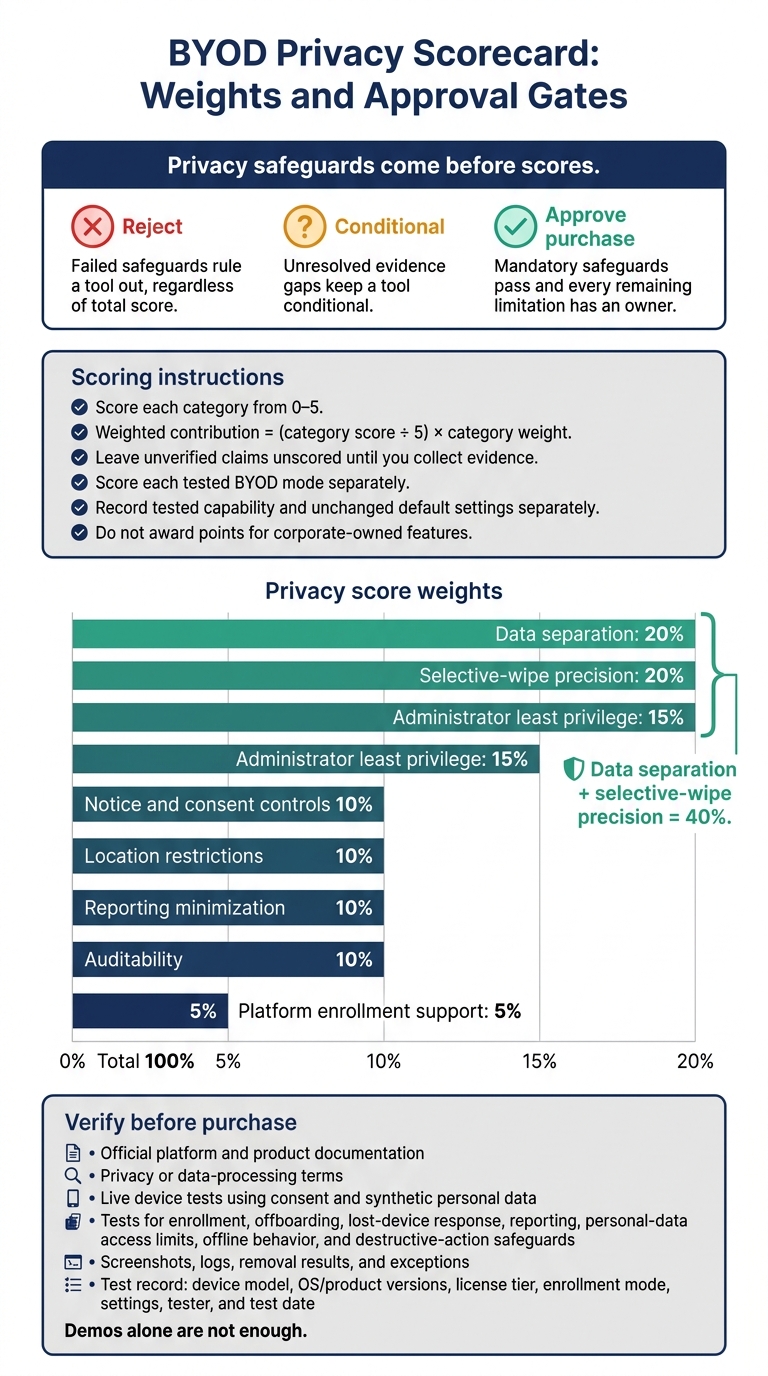
BYOD Privacy Scorecard: Weights and Approval Gates
Rank only tools that pass mandatory privacy checks. Reject tools with failed safeguards, regardless of their total score. Mark unresolved evidence gaps Conditional. Match the BYOD mode to the device and required app coverage. Use app-level MAM only if it covers every required work app and sharing path.
Weighted Privacy Scorecard
Score verified privacy boundaries and removal behavior, not feature count.
Apply these weights: data separation 20%; selective-wipe precision 20%; notice and consent controls 10%; location restrictions 10%; administrator least privilege 15%; reporting minimization 10%; auditability 10%; and platform enrollment support 5%. Score each category from 0–5, then convert it to a weighted percentage. Leave unverified claims unscored until you collect evidence.
Score each tested BYOD mode separately. Record tested capability and unchanged default settings; do not award points for corporate-owned features. Use the worksheet below for each candidate, replacing the placeholders with the product name and tested BYOD mode.
| Candidate tool and tested BYOD mode | Weighted capability score | Default-settings score | Verified evidence | Limitations |
|---|---|---|---|---|
| Tool under review - Android Work Profile | Unscored until tested | Unscored until tested | Platform/product documentation and live device results | Mark unsupported or unverified controls |
| Tool under review - Apple User Enrollment | Unscored until tested | Unscored until tested | Enrollment documentation and live device results | Record OS and identity requirements |
| Tool under review - app-level MAM | Unscored until tested | Unscored until tested | Supported-app documentation and removal results | Record uncovered apps and sharing paths |
Documentation and Device Tests Before Purchase
Verify privacy behavior on actual devices before purchase. Demos alone are not enough. Require official platform and product documentation, privacy or data-processing terms, and live test results from devices used with consent and populated with synthetic personal data.
Test enrollment, offboarding, lost-device response, reporting, personal-data access limits, offline behavior, and destructive-action safeguards. Record the device model, OS/product versions, license tier, enrollment mode, settings, tester, and test date.
Keep screenshots, logs, removal results, and exceptions. Repeat critical tests across representative Android and Apple devices and network conditions. Require explanations for any gaps between documented and observed behavior. Approve purchase only when mandatory safeguards pass and every remaining limitation has an owner.
FAQs
How do I choose between MDM and app-only protection?
Choose based on security requirements, employee privacy, and device ownership. Mobile Device Management (MDM) gives your organization device-wide control to enforce strict security policies, apply encryption, and manage different hardware remotely.
App-only protection, such as containerization, keeps corporate data within specific apps and leaves personal content untouched. It offers a more privacy-focused option without device-wide control.
How can I protect work data if a device stays offline?
Isolate work data and encrypt stored data. Use application containerization and strong encryption. Tools such as Microsoft Intune App Protection or VMware Workspace ONE keep work data in a secure workspace on the device, protecting it even when the device is offline.
Enforce device-level encryption, such as BitLocker with TPM, so stored data remains unreadable to anyone without authorized access.
What should I do if a wipe deletes personal data?
Restore deleted data from a backup, preferably a cloud backup [1]. If your enterprise platform supports point-in-time restore, use it to recover information deleted by mistake [2].
To prevent future data loss, maintain regular backups and use selective wipe across your organization. Selective wipe removes only corporate data and leaves personal content intact [3].