A weak BYOD policy creates legal risk fast. If employees use personal phones or laptops for work, your policy needs 7 clear clauses: acceptable use, monitoring, lost-device response, remote wipe, offboarding, data ownership, and enforcement.
For U.S. operators, this is a control issue with direct cost exposure. The article points to breach costs of $4.56 million in professional services and notes that rules such as HIPAA, CCPA, and the NY SHIELD Act still apply when company data sits on personal devices. The core takeaway is simple: separate work data from personal data, limit company access, log each action, and stop wipe actions when a legal hold applies.
If I were reviewing this for a portfolio company, I’d pressure-test 4 things first:
- Consent - Is employee notice plain, signed, and matched across HR, Legal, and IT documents?
- Control scope - Is access limited to the work container or managed apps rather than the whole device?
- Trigger rules - Are loss, theft, termination, policy breach, and legal hold events defined in writing?
- Proof - Are monitoring, wipe, offboarding, and hold actions time-stamped and retained?
A few points stand out:
- Selective wipe is the default for employee-owned devices
- Full wipe belongs to company-owned devices or high-risk cases only
- Offboarding starts with access shutdown first, then data removal
- Corporate records remain company property even on a personal device
- Preservation comes before deletion when litigation or an internal review is active
| Clause | What legal teams are checking | Main failure point |
|---|---|---|
| Acceptable use | Eligible devices, approved apps, employee notice | Policy is too broad or vague |
| Monitoring | What IT can and cannot see | Privacy limits are not stated |
| Lost or stolen device | Reporting deadline, account lock, wipe authority | Delay after device loss |
| Remote wipe | Consent, scope, liability | Personal data gets touched without clear notice |
| Offboarding | Access removal order, wipe steps, logging | Former staff keep app access |
| Data ownership and e-discovery | Ownership, collection rights, hold process | Wipe starts before preservation |
| Enforcement | Breach types, remedies, records | Inconsistent response across cases |
My short read: this is less about device management and more about legal drafting discipline. If each clause has 1 rule, 1 owner, and 1 record trail, you have a policy that Legal can review, HR can explain, and IT can enforce.
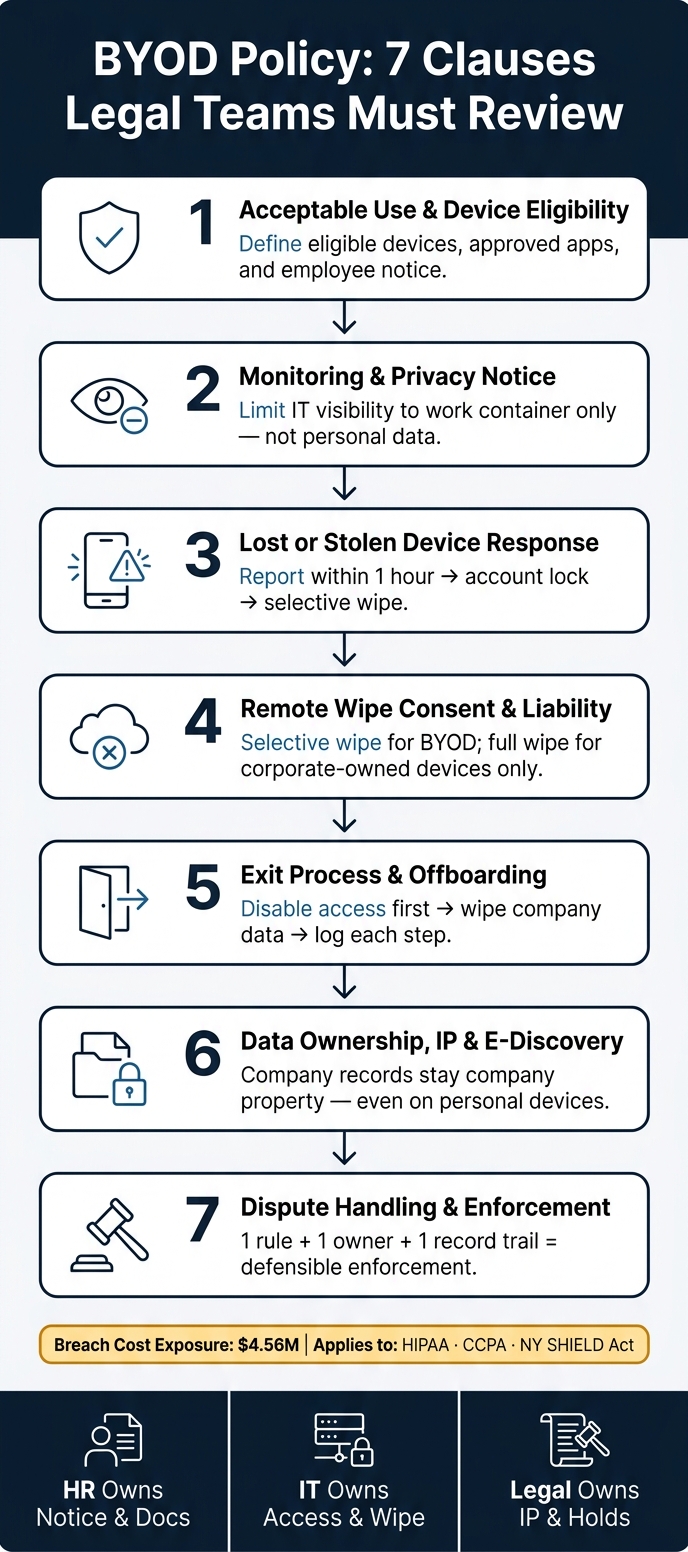
BYOD Policy: 7 Clauses Legal Teams Must Review
Auditing BYOD (Bring Your Own Device) Policies | Exclusive Lesson
sbb-itb-97f6a47
Why BYOD Clauses Need Careful Legal Review
BYOD language needs tight legal review because one device holds 2 different worlds - personal data and company data. That split creates tension fast. Employees worry IT might see personal photos, text messages, or browsing history. Employers worry client data, internal files, and SaaS access could walk out the door when someone leaves. Both sides are right, which is why the policy needs precise wording.
Vague monitoring terms create legal and operating risk. If employees think the company can monitor anything on their phone or laptop, resistance goes up. In practice, that often pushes work into shadow IT and unauthorized apps, which makes discovery harder and leaves data outside managed systems. At that point, device-health rules and access limits stop being just IT controls. They become legal terms that need to be stated plainly.
Personal devices can also become a direct path into company systems. An outdated, unencrypted, or compromised device can expose corporate data and connected apps. The policy should set device-health requirements before access is granted. It should also spell out how lost or stolen devices must be reported, so corporate data can be removed fast. At the same time, the company needs to keep the right to retrieve corporate data later if a matter comes up.
Litigation and investigations add another layer. Company records stored on a personal device may still fall under litigation holds, forensic review, or internal investigation. If that happens, the policy should say how personal data will be handled during review. That point matters. A company may need access to business records without opening the door to claims that it overreached into private content.
Alignment across documents is non-negotiable. If the BYOD policy conflicts with employment agreements, acceptable use policies, or offboarding steps, control breaks down at exactly the wrong time. A departing employee may keep access to SaaS apps, retain company records, or take proprietary data. The matrix below shows where the gaps tend to show up and how each clause should address them.
| Risk Area | Impact of Non-Alignment | Mitigation Strategy |
|---|---|---|
| Offboarding | Departing staff retain access to SaaS/cloud apps; data theft risk. | Selective wipe triggered by termination or transfer. |
| Privacy | Legal action over personal data loss or unauthorized monitoring. | Containerization (work profiles) to isolate corporate data. |
| Security | Unpatched or jailbroken devices accessing sensitive systems. | Conditional access requiring device health checks. |
| E-Discovery | Inability to retrieve records for litigation holds. | Clause granting right to seize or audit device for investigations. |
| Shadow IT | Employees use unmanaged apps, creating untracked data silos. | Curated managed app catalog with easy-to-use tools. |
1. Acceptable Use and Device Eligibility Clause
This clause sets the legal line between company data and personal data. It spells out which personal devices can reach company systems, what work those devices can do, and which approved apps must be used inside secure containers. That line matters because it decides how far company access can extend.
Employee Consent and Notice
Before a personal device connects to company systems, the employee should sign an AUP that states what IT can and cannot view: device model, OS version, and work app activity, not personal texts, photos, or browsing history [8]. Adoption usually improves when companies share a clear "What we see vs. What we don't see" one-pager [8]. Once that visibility is clear, the policy should define exactly where it ends.
Scope of Employer Access
Employer access should be limited to the encrypted work container, not the full device, so IT can manage company data without reaching personal content [8]. Tools such as Android Enterprise Work Profiles and Apple User Enrollment make that separation practical by keeping personal and corporate data apart [8]. That limit matters, but it only holds if the device remains compliant.
Security and Incident Response Triggers
The policy should require biometric authentication, full-disk encryption, supported operating system versions, and automatic access blocks for missing patches, rooted or jailbroken devices, unsecured public Wi-Fi without a VPN, or corporate files sent to personal webmail [8][2][1][7].
Record Retention and Legal Defensibility
The AUP should include language clarifying that the organization has immunity if private information is incidentally viewed during a legitimate security assessment or other investigation involving the device [2]. Pair that consent with a signed acknowledgment and audit trail, and the policy is easier to defend if challenged.
With access boundaries set, the next clause should define what monitoring is permitted.
2. Monitoring and Privacy Notice Clause
Be explicit about what the company can see and what stays private. Once access boundaries are set, employees should know where monitoring starts and where it stops on a personal device.
Employee Consent and Notice
The monitoring clause should spell out what IT may review on a personal device and what remains private. State it in plain English. IT can monitor device health signals such as OS version, encryption status, and whether a passcode is turned on. It should also state just as plainly that personal photos, text messages, and browser history remain private.
Scope of Employer Access
Keep monitoring inside the work container or managed apps. App-only management is the cleanest way to do that. It limits control to managed apps such as Outlook and keeps personal use outside the company’s line of sight. After those limits are set, the policy should define the few cases where access may expand.
| Monitoring Category | IT Can Access | IT Cannot Access |
|---|---|---|
| Device Info | Model, OS version, serial number, battery health | Personal phone number |
| Applications | Corporate-managed apps such as Slack and Outlook | Personal apps such as TikTok, Instagram, and personal banking |
| Data/Content | Documents and emails within the work container | Personal photos, videos, and text messages |
| Network/Web | Corporate DNS traffic and Wi-Fi connection logs | Browser history and private Wi-Fi usage |
| Location | Last-known location if enabled for recovery | Real-time tracking for non-business purposes |
Security and Incident Response Triggers
Expanded review rights should be tied to a short list of defined events, not left open-ended. Those events include a security incident, a lost-device report, an internal investigation, a regulatory request, or a litigation hold.
Every access event should create a time-stamped audit log. That gives the company a record it can defend and supports an independent review process.
The next clause should define reporting deadlines, containment steps, and responsibility when a device is lost or stolen.
3. Lost or Stolen Device Response Clause
This clause needs to be explicit. When a device goes missing, there should be no debate about timing, authority, or next steps. Define the reporting deadline, wipe authority, and account-lock actions the moment a device is lost.
Employee Consent and Notice
Require employees to report a lost or stolen device to IT or Security immediately and to consent to a remote wipe of company data [2][6].
Scope of Employer Access
For BYOD, spell out that the company may perform a selective wipe that removes only the encrypted work container - email, managed apps, and company documents - while leaving personal photos and texts intact [6]. For corporate-owned devices, the company may apply a full wipe instead [6].
| Wipe Type | What Gets Removed | Device Ownership |
|---|---|---|
| Selective Wipe | Corporate apps, email, and work container only | BYOD (employee-owned) |
| Full Device Wipe | All data, factory reset | Corporate-owned devices |
Reserve the right to lock accounts, revoke credentials, and bring in forensic support when sensitive client data is involved [9].
Security and Incident Response Triggers
A lost-device report should trigger revocation of the user's access credentials across connected systems [1][6]. Require biometric authentication to narrow the window between loss and wipe [2].
Record Retention and Legal Defensibility
Log the report time, wipe time, and wipe type for every incident [2][6][8]. State that incidental exposure during a lawful assessment does not create liability [2].
The next clause should define consent and liability for the wipe itself.
4. Remote Wipe Consent and Liability Clause
This clause needs to do 3 things: define when a remote wipe is allowed, limit what can be erased, and set the liability position if personal data is touched in the process.
Employee Consent and Notice
Provide written notice at onboarding and require a signed acknowledgment in the BYOD policy. Repeat that acknowledgment during annual training. Once the employee has signed, the policy should state the exact events that let the company act.
Scope of Employer Access
Make the default rule selective wipe only. Limit the wipe to managed apps, work email, and company documents. The wipe should apply only to corporate data and should not permit access to unrelated personal content.
Security and Incident Response Triggers
Permit a wipe only in defined cases: loss or theft, termination, security breach, or legal hold [6][2]. Those same triggers should match the exit process so access is cut off before data leaves the company.
Record Retention and Legal Defensibility
State that incidental access to personal data during a lawful security review does not create liability if the company is acting under the policy [2]. Keep the signed policy, the wipe log, and the offboarding record.
5. Exit Process and Offboarding Clause
Set the rule upfront: when employment ends, company access stops, work data is removed from the device, and each step is logged. The exit clause should spell out the order - disable access, wipe company data, and record completion.
Employee Consent and Notice
At onboarding, tell employees in plain terms that a resignation or termination may lead to immediate selective wipe and access revocation. This should not come as a surprise on the last day.
Scope of Employer Access
Keep employer access narrow. It should apply only to the managed work container, including:
- corporate email
- approved apps
- company documents
Do not extend that access to personal photos, messages, or other non-work content on the device.
Security and Incident Response Triggers
On resignation or termination, disable identity system access first. Then, on the last day, trigger a selective wipe through MDM. If behavioral alerts show unusual downloads or exports after the departure is announced, permit immediate access revocation rather than waiting for the final day.
Record Retention and Legal Defensibility
Keep a clear log of the offboarding trail:
- when access was disabled
- when the wipe command was sent
- when the wipe completed
The next clause should define who owns any data left behind and how that data is preserved.
6. Data Ownership, Intellectual Property, and E-Discovery Clause
The policy needs to settle ownership up front. If offboarding, an internal review, or a legal hold starts, the company cannot afford a debate over whether records on a personal device are personal or corporate. The rule should be plain: all company information - including self-developed code, customer lists, and other work product - belongs to the company, no matter which device stores it [7].
That point matters most when business records and personal privacy sit on the same phone or laptop. If the policy is vague here, the company risks delays, missed evidence, and fights over access right when timing matters.
Employee Consent and Notice
Employees should get notice before any issue comes up, not during a dispute. The policy should say that if a personal device is used for company access, the company may collect or image that device during a security assessment or investigation [2].
It should also say that a lawful search, forensic imaging, or litigation-hold process may lead to incidental exposure to personal data. That notice sets expectations early. It should then narrow the company’s reach by stating that access is limited to corporate data and the steps needed to preserve, review, or collect it.
Scope of Employer Access
Corporate data stays corporate wherever it sits. That sounds obvious, but it needs to be written down because this is where many disputes start.
Use containerization or sandboxing so company apps and data stay in a separate, encrypted environment [3]. The policy should also require approved, auditable business apps so records remain under company control [1][2]. In practice, that gives the company a cleaner line between business and personal content and makes collection far less messy.
A good access rule should make 3 things clear:
- The company’s access is tied to corporate data, accounts, and systems.
- Approved business tools must be used for company work.
- Personal content outside the business container is not the target unless law or court process requires it.
Security and Incident Response Triggers
The policy should not leave room for side-channel workarounds. Approved, auditable channels must be required for business communications, and off-channel messages may be treated as company records and trigger retention failures [10].
This matters in incident response too. If a hold is active, preservation comes before any wipe workflow. In other words, once the company has a duty to preserve data, no selective wipe or cleanup step should move ahead until that hold issue is cleared.
Record Retention and Legal Defensibility
Ownership drives collection and preservation. If the company owns the business record, it needs a clear path to preserve, collect, or image that data when a legal hold applies.
When a litigation hold is issued, the policy must spell out how data on personal devices is preserved, including whether the device must be surrendered for forensic imaging [4]. It should also require an audit trail showing what data was accessed or moved, without drifting into personal content that has nothing to do with the matter at hand [7].
Timing matters here. If a departing employee is under an active hold, that call has to be made before any selective wipe starts. Once data is erased, you do not get a second shot at preservation.
Next, define the dispute process and enforcement remedies when employees challenge policy actions. The final clause should define how disputes, remedies, and enforcement work when an employee objects to the company's action.
7. Dispute Handling, Remedies, and Enforcement Clause
This clause sets the enforcement rules. It should say what counts as a breach, what action the company may take, and how that action will hold up if challenged. The goal is simple: tie each type of violation to a defined remedy so enforcement stays consistent.
Employee Consent and Notice
Require employees to sign a written Acceptable Use Policy (AUP) before they connect a personal device to company systems [8]. The AUP should spell out violations such as failing to report a lost or stolen device, installing unauthorized apps, copying company data to personal cloud storage, or using a rooted or jailbroken device [2][9][7][6].
That matters for a basic reason: if the rule is vague, enforcement gets messy. If the rule is clear and signed, the company has a cleaner record when an issue turns into an HR or legal matter.
Scope of Employer Access
Be specific about the remedies and when each one applies. For example:
- Selective wipe for minor breaches or standard offboarding [2][6][8]
- Auto-quarantine when a device fails a health check [2][6][8]
- Device collection or inspection only for security assessments or investigations [2][6][8]
The policy should also address employment consequences, not just technical controls. Serious or repeated breaches - such as deliberate data extraction, destruction, or malware installation - can justify termination [7][9].
Security and Incident Response Triggers
Define the triggers in plain terms. Unusual download patterns, confirmed loss or theft, or discovery of unsanctioned apps are valid reasons for investigation or quarantine [7][6].
This is where many policies drift into gray areas. Don’t leave the security team guessing. If a trigger leads to quarantine, review, or escalation, say so upfront.
Record Retention and Legal Defensibility
Documentation is the first line of defense when an employee challenges enforcement. MDM logs should record the violation, the action taken, and the timestamp [6][8]. Those records help the company apply the clause the same way across cases.
If leadership ever has to explain an action to counsel, HR, an auditor, or the board, clean records matter. A policy without a record trail is hard to defend.
Tables to Help Readers Apply the Clauses
Use these tables as a working check for Legal, HR, IT, and line managers. The point is simple: if a clause is not specific, it will be hard to enforce. These tables help teams test the language before it goes into policy.
Acceptable vs. Prohibited BYOD Behaviors
| Category | Acceptable | Prohibited |
|---|---|---|
| Connectivity | Using a VPN on public Wi-Fi | Accessing company systems on unsecured public Wi-Fi without a VPN |
| Applications | Using approved work apps | Using unvetted personal apps for work tasks ("Shadow IT") |
| Passwords | Unique passphrase with 2FA | Password sharing or simple PINs |
| Device State | Current, patched OS | Jailbroken or rooted devices |
| Data Storage | Saving firm files to encrypted, approved containers | Copying company data to personal Dropbox or iCloud |
| Authentication | Biometric lock (Face ID or fingerprint) enabled | Disabled lock screen or simple 4-digit PIN |
This table gives managers and control owners a direct way to separate allowed conduct from policy breaches. If your BYOD clause says employees must use devices "securely", that is too loose. If it says they must use a VPN on public Wi-Fi, keep the OS patched, and store firm data only in approved encrypted containers, you have something IT and HR can act on.
Selective Wipe vs. Full Wipe
| Feature | Selective Wipe | Full Wipe |
|---|---|---|
| Data Removed | Corporate apps, work email, and managed documents only | All data; device resets to factory settings |
| Personal Data | Preserved - IT cannot access or delete personal files | Destroyed - personal photos, texts, and settings are gone |
| When It Applies | Standard offboarding, resignation, or minor policy breach | Confirmed lost or stolen device, or high-risk security compromise |
| Employee Consent | Required via BYOD enrollment agreement | Broad consent typically included in employment or equipment agreement |
| Liability Risk | Low | High - policy must include a liability waiver for personal data loss |
| Reversibility | Often reversible through re-enrollment | Permanent |
This distinction matters because wipe rights drive both legal drafting and employee consent. A selective wipe usually fits normal offboarding and routine control failures. A full wipe is a different step with more legal exposure, especially where personal photos, messages, and settings are erased. If the policy does not spell out when each action applies, expect disputes later.
Incident Reporting Timeline: Lost or Stolen Device
| Phase | Timeline | Action |
|---|---|---|
| 1. Discovery | T+0 (Immediate) | Employee identifies device as lost, stolen, or compromised [2] |
| 2. Reporting | Within 1 hour | Employee notifies IT via emergency hotline or incident portal [2] |
| 3. Containment | Within minutes of report | IT triggers selective or full remote wipe based on risk level [2][3] |
| 4. Account Revocation | Concurrent with wipe | IT disables user account in directory (e.g., Azure AD, Google Workspace) |
| 5. Notification | Within 24 hours | Notify insurance provider; involve law enforcement if theft is confirmed [5] |
| 6. Audit | Within 48 hours | Security team reviews logs for unauthorized access to PII or client data [5] |
A timeline like this removes guesswork. "Report promptly" is weak. "Notify IT within 1 hour" is enforceable. It also gives the company a clean audit trail if the incident later turns into a client notice issue, an insurance claim, or a board-level review.
Offboarding Responsibilities by Team
Use this table to assign owners for the exit steps in Clause 5.
| Team | Responsibility |
|---|---|
| HR | Notify IT and Legal immediately; conduct exit interview; review confidentiality and IP terms |
| IT | Revoke network and SaaS access; trigger selective wipe of BYOD; retrieve company-owned hardware; reset shared credentials |
| Manager | Confirm all project files and firm documents are transferred to company servers; collect physical assets (badges, keys, tokens) |
| Legal | Review signed agreements for IP exposure; enforce litigation holds; verify data retention compliance |
This is where many policies break down. The clause may be fine, but ownership is fuzzy. HR owns notice and documentation. IT owns access removal and wipe actions. Managers own file transfer and physical asset recovery. Legal owns IP, hold, and retention review. If those handoffs are not named, offboarding drifts - and that is where data loss, access gaps, and post-exit claims tend to show up.
Next, align these actions with legal, HR, and IT drafting responsibilities.
Drafting Considerations for Legal, HR, and IT Teams
A BYOD policy fails when ownership is vague. Legal, HR, and IT need joint drafting responsibility, with named owners for each clause and action. Silos leave gaps, and those gaps turn into disputes, data loss, and compliance failures.
Written acknowledgment is mandatory. Every employee who enrolls a personal device should sign a formal Acceptable Use Policy (AUP) that sets acceptable behavior, support limits, and data ownership. Pair that with a 1-page privacy notice that spells out monitoring limits and employee expectations. Terms like "Selective Wipe" or "Corporate Data Removal" tend to reduce pushback because they describe the action in plain language.
Containerization is the cleanest split between work and personal data. It gives IT a clear line between company information and personal content, and it makes selective wipe and data separation easier to defend if a dispute lands with Legal.
Use the map below to tie each clause to a document and owner.
| Clause | Documentation Method | Primary Owner |
|---|---|---|
| Acceptable Use | Signed AUP / Employment Contract | HR / Legal |
| Monitoring Consent | Privacy notice | IT / HR |
| Remote Wipe Rights | Written Acknowledgment in BYOD Policy | Legal / IT |
| Data Ownership | Intellectual Property Agreement | Legal |
| Offboarding | Exit checklist / acknowledgment | HR |
Name the approver and escalation path for each action. The policy should say who can approve a remote wipe, who signs off on a litigation hold before a device goes back to personal use, and who owns a stolen-device report. If those roles are missing, decisions get made under pressure by whoever happens to be available. That is a weak control model. Assign named ownership across HR, IT, and Legal for both the policy and the escalation map.
Set review cycles on a fixed cadence. Monthly compliance audits let IT flag non-compliant devices before they turn into a liability. Annual policy reviews, owned jointly by Legal, HR, and IT, help keep the language aligned with privacy rules and employment practices.
Once ownership, documents, and review cycles are in place, the policy is ready for sign-off.
Conclusion
A BYOD policy needs clear clauses. If it does not, you get confusion that could have been avoided. The main issue is simple: you have to balance employee privacy with company access. These 7 clauses give Legal, HR, and IT a shared framework for acceptable use, monitoring, lost-device response, remote wipe, offboarding, ownership, and disputes.
Ambiguity leads to privacy and enforcement disputes. Once policy language gets vague, that turns into a legal issue. Plain-language drafting is not optional - it is a practical requirement.
Each clause should tie to 1 risk, 1 owner, and 1 documented process. That is the operating standard: define the rule, assign the owner, and document the action.
In healthcare and financial services, HIPAA, FINRA, and SEC obligations make clear BYOD clauses even more important. Audit-ready documentation is the baseline for defensible enforcement.
FAQs
What is the safest default BYOD wipe option?
The safest default for BYOD is a remote wipe. It lets you remove company data without needing the device in hand.
Use a selective wipe through MDM when possible. That removes corporate data while leaving personal files, photos, and apps alone. Trigger it right away after loss, theft, or offboarding instead of depending on a user-initiated wipe you can't enforce.
When should a legal hold stop a device wipe?
A legal hold should stop any remote device wipe if the device contains information tied to litigation or an active legal investigation.
A wipe permanently destroys data. That means organizations need to confirm whether a litigation hold is in place before offboarding a user or taking remote device management action. If they don’t, they risk erasing information that may be required for legal discovery.
Who should approve BYOD actions across Legal, HR, and IT?
BYOD actions should be approved by Legal, HR, IT, and management together. That keeps policy decisions tied to risk, employee impact, system access, and day-to-day enforcement.
- IT owns technical controls, device settings, monitoring, and incident response.
- HR handles employee communication, onboarding, and disciplinary action.
- Legal reviews compliance, privacy terms, and incident procedures.
- Managers enforce the policy, set access needs, and provide feedback from their teams.