Mobile devices are now central to enterprise operations, but deploying secure access control systems comes with challenges. Here's what you need to know:
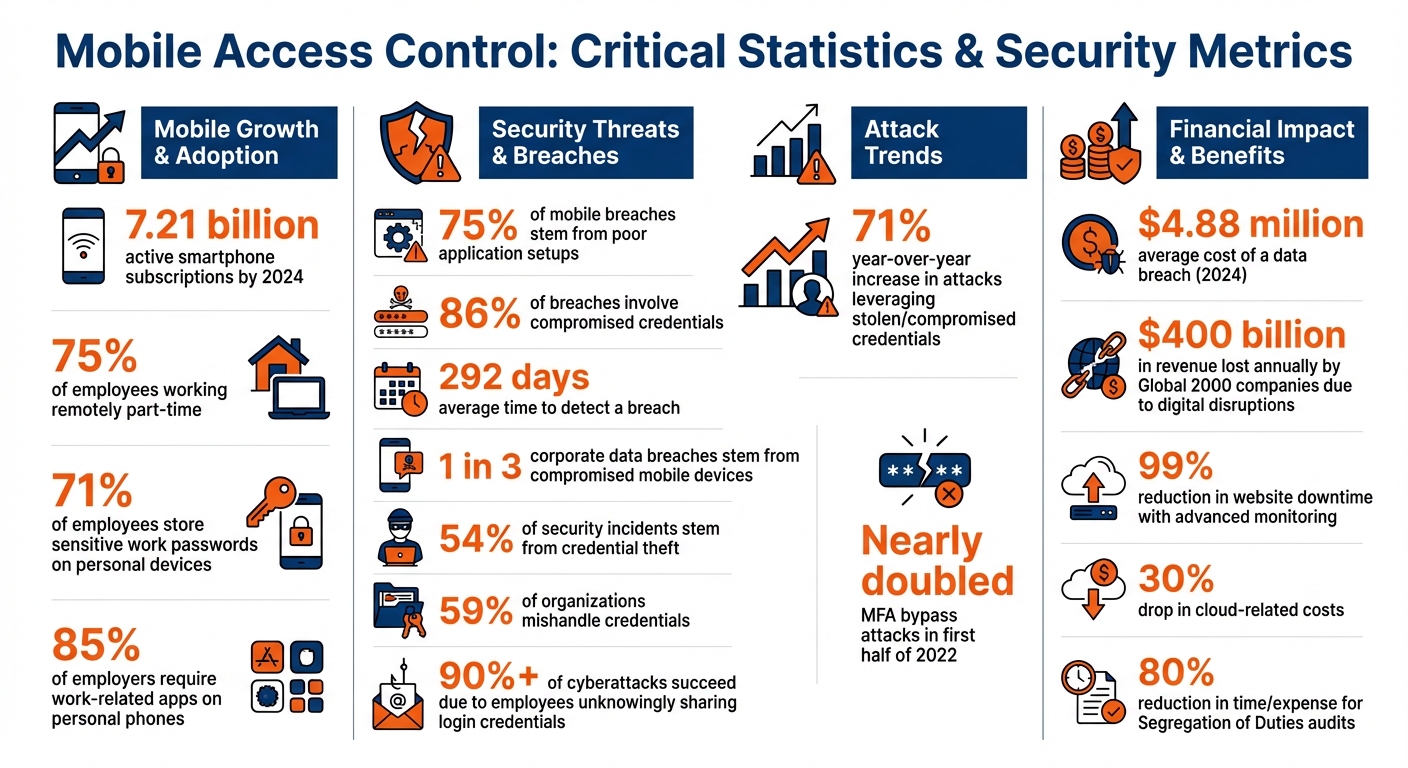
- Mobile Growth: By 2024, there were 7.21 billion active smartphone subscriptions, with mobile adoption growing faster than traditional computers.
- Security Risks: Common threats include malware, phishing, and misconfigured apps. 75% of mobile breaches stem from poor application setups.
- Structured Deployment: A streamlined rollout minimizes downtime, cuts costs, and enhances security. SaaS-based models are cost-effective and scalable.
- Key Safeguards: Use centralized management, multi-factor authentication (MFA), encryption, and role-based access controls (RBAC) to protect sensitive data.
- Pre-Deployment Assessments: Identify user needs, security gaps, and infrastructure requirements before rollout.
- Lifecycle Management: Include policies for device setup, usage, and secure disposal to avoid data breaches.
Mobile access control isn't just about handing out devices - it requires careful planning, strong policies, and continuous monitoring to ensure security and efficiency.
Mobile Access Control Security Statistics and Key Metrics
How To Deploy Mobile Device Management Policies?
Policy Development and Pre-Deployment Assessments
Before rolling out mobile access control systems, it’s crucial to establish clear policies and carry out thorough assessments. Mobile devices have evolved far beyond simple communication tools - they’re now integral to enterprises, handling sensitive data and connecting to advanced networks. Without proper preparation, deploying these systems can lead to security vulnerabilities, compliance breaches, and operational hiccups. That’s why a robust policy framework and detailed pre-deployment evaluations are essential.
To manage mobile devices effectively throughout their lifecycle - from setup to disposal - organizations should develop unified policies for both corporate-owned and BYOD (Bring Your Own Device) systems. According to NIST SP 800-124 Rev. 2, successful policies rely on centralized management, endpoint protection, and advanced tools like Mobile Application Vetting (MAV) and Mobile Threat Defense (MTD) to tackle emerging threats. This approach not only reduces security risks but also ensures compliance with industry standards.
"Mobile devices were initially personal consumer communication devices, but they are now permanent fixtures in enterprises and are used to access modern networks and systems to process sensitive data." - NIST SP 800-124 Rev. 2
Pre-deployment assessments help identify potential challenges early on. These evaluations examine user roles to determine which apps are essential, where devices will be used - such as desks, vehicles, or hospital wards - and any existing security or connectivity limitations. They also highlight infrastructure needs, like ensuring there are enough power outlets and charging stations, to avoid delays once deployment begins.
Establishing Mobile Device Management (MDM) Policies
Building on initial assessments, Mobile Device Management (MDM) policies are key to securing devices throughout their lifecycle. These policies should address access control, device configuration, and system integrity. Organizations must also establish clear procedures for securely disposing of devices to prevent data breaches, alongside continuous monitoring for real-time insights into device security.
A strong policy framework should distinguish between corporate-owned and personal devices, as each poses unique privacy and security risks. Conducting risk assessments before deployment helps pinpoint necessary safeguards for the specific types of sensitive data devices will handle. For organizations dealing with regulated information, policies need to align with compliance standards like HIPAA or OMB Circular A-130.
Clear Acceptable Usage Policies (AUP) and BYOD guidelines are critical to ensuring employees understand their responsibilities. With 71% of employees storing sensitive work passwords on personal devices and 85% of employers requiring work-related apps on personal phones, explicit rules are non-negotiable. These policies should outline usage scenarios, define lifecycle management for devices at every stage, and integrate monitoring to maintain compliance from a centralized control point.
Conducting Site Readiness Assessments
Site readiness assessments turn high-level policies into practical deployment strategies. These evaluations identify key business needs, such as which roles require specific peripherals and the security standards that must be in place before hardware is distributed. With approximately 75% of employees working remotely part-time, these assessments are crucial for ensuring secure mobile access control.
"A modern mobile device deployment strategy is no longer just 'hand out the hardware and hope.' It's a cross-functional discipline that blends security, logistics, automation, and change management."
- Jennifer Lichtie, VP of Marketing, LocknCharge
These assessments also involve reviewing the current mobile landscape - examining the number, types, and status of existing devices - to ensure uniform security standards. This process might include auditing for vulnerabilities like jailbroken or rooted devices. It’s also an opportunity to set measurable success goals, such as ensuring devices are ready for new hires within 24 hours or achieving zero unmanaged devices with access to core systems.
The assessment phase is ideal for selecting deployment and logistics models. BYOD may be the most cost-effective option, but it carries higher security risks. On the other hand, a corporate-owned, business-only (COBO) model offers maximum control but might require employees to carry two devices. A corporate-owned, personally enabled (COPE) approach strikes a balance by allowing limited personal use while maintaining organizational oversight. Similarly, centralized logistics ensure consistent security standards but may respond slower to local needs, whereas decentralized models offer faster repairs but risk inconsistent configurations.
Physical security planning is another critical aspect. Assessments should include strategies for secure storage, such as locked carts or smart lockers, to keep devices safe and charged. With MFA bypass attacks nearly doubling in the first half of 2022, implementing phishing-resistant authentication methods is a priority. Finally, involving end-users and stakeholders during the design phase helps create a deployment strategy tailored to the organization’s needs, laying the groundwork for long-term success.
Implementing Secure Authentication Mechanisms
When it comes to safeguarding enterprise mobile access, secure authentication is non-negotiable. Once policies and deployment strategies are in place, verifying user identities securely becomes the next critical step. Relying on traditional password-only systems is no longer a viable option. In fact, 86% of breaches involve compromised credentials, with detection often taking an average of 292 days. A stark reminder of this risk is the Colonial Pipeline attack in May 2021, where attackers exploited a single-factor legacy VPN account to gain access.
"The attack occurred using a legacy VPN that did not have multifactor authentication… It only had single-factor authentication." - Joseph Blount, CEO, Colonial Pipeline
Adaptive Multi-Factor Authentication (MFA)
Modern mobile access control demands a smarter, risk-adaptive approach. Adaptive Multi-Factor Authentication (MFA) steps up by analyzing user context - such as location and device health - to adjust authentication requirements dynamically. This not only strengthens security but also helps counter emerging threats like MFA fatigue attacks. These attacks involve bombarding users with repeated push notifications until they mistakenly approve access.
A high-profile example occurred in September 2022, when Uber fell victim to unauthorized access after attackers combined MFA fatigue tactics with social engineering to breach the company’s password vault. To combat such risks, organizations should pivot to phishing-resistant methods, such as biometric authentication or hardware security keys, instead of relying solely on push notifications.
Multi-Factor Authentication and Biometrics
Biometric tools - like fingerprint scanners, facial recognition, and voice recognition - offer a passwordless and secure way to verify user identities. These methods are not only convenient but also significantly reduce the risk of credential-based attacks.
For sensitive administrative accounts, implementing Just-in-Time (JIT) access can further enhance security. JIT grants elevated permissions only when needed, limiting exposure and reducing risk. This is particularly important given that the average cost of a data breach has climbed to nearly $4.88 million as of 2024. Tools like Microsoft Entra ID P2 (starting at $9.00 per user per month) and Okta Workforce Identity (ranging from $2 to $5 per user per month) allow organizations to configure both adaptive MFA and JIT access for critical roles.
Role-Based Access Controls (RBAC)
While authentication protects user identities, Role-Based Access Control (RBAC) ensures that access is limited based on job responsibilities, strengthening overall enterprise security. By assigning permissions tied to specific roles - such as Developer, HR Manager, or Field Technician - RBAC minimizes insider threats and reduces the potential damage from compromised accounts.
This approach is especially vital as attacks leveraging stolen or compromised credentials have surged 71% year-over-year. To implement RBAC effectively, organizations should enforce strict separation of duties, ensuring no user has conflicting responsibilities (e.g., initiating and approving sensitive transactions).
Integrating identity management systems with HR platforms can automate processes for new hires, role changes, and departures. This prevents "access creep", ensures immediate deactivation of orphaned accounts, and maintains the principle of least privilege. Regular access reviews also play a key role in identifying outdated permissions, keeping the mobile workforce secure and compliant.
sbb-itb-97f6a47
Data Protection and Encryption Strategies
Once you’ve established strong authentication, the next step is safeguarding the data itself. Mobile devices are particularly at risk - they’re easy targets for theft, loss, or compromise. If a device with weak security falls into the wrong hands, sensitive information becomes accessible. Alarmingly, over 54% of security incidents stem from credential theft, and around 59% of organizations mishandle credentials. Protecting data on mobile devices requires a combination of robust encryption and meticulous credential management.
Encryption at Rest and In Transit
To secure mobile devices accessing your enterprise network, encrypt both stored data and data in transit. This dual-layer approach ensures that even if a device is compromised, the information remains unreadable. For communications, use HTTPS, SSL/TLS protocols, and certificate pinning to ensure apps only interact with servers presenting a verified certificate.
Mobile Device Management (MDM) or Enterprise Mobility Management (EMM) solutions can enforce encryption settings across all devices. These tools also enable containerization, which separates organizational data from personal data on the same device, reducing the risk of unauthorized access to sensitive enterprise credentials. Before allowing any device to access company resources, establish a "trusted device" configuration process to verify compliance with your security standards. These encryption strategies lay the groundwork for effective credential management.
Remote Wipe and Secure Credential Storage
Incorporate remote wipe capabilities for managing devices throughout their lifecycle. If a device is lost, stolen, or no longer in use by an employee, you need the ability to erase all enterprise data remotely as part of your de-provisioning process.
When it comes to credential storage, never hard-code API keys or sensitive credentials into application source code, as they can be easily extracted through decompilation. Instead, rely on dedicated secrets managers to securely store, rotate, and manage certificates, API tokens, and encryption keys. Modern access platforms can ensure that credentials are never exposed or stored on the user’s device, eliminating the risk of local credential theft. Use temporary credentials with automatic expiration and rotate API keys regularly. Considering that over 90% of cyberattacks succeed because employees unknowingly share their login credentials with malicious actors, securing how credentials are stored is absolutely essential.
Monitoring, Auditing, and System Integration
After securing encryption and credentials, the next critical layer is real-time monitoring. Without it, the risk of data breaches remains alarmingly high - studies show that one in three corporate data breaches stems from compromised mobile devices. Digital disruptions cost Global 2000 companies a staggering $400 billion in revenue annually, making proactive monitoring not just a precaution but a necessity.
Real-Time Monitoring and Incident Response
Real-time monitoring equips security teams to identify unauthorized access attempts and unusual activity as they happen. Imagine a scenario where a device logs into the system at odd hours or repeatedly fails login attempts. Automated alerts in such cases allow for immediate action to prevent potential breaches.
"Real-time monitoring not only ensures that applications are running smoothly but also supports better decision-making by providing up-to-date information." - Pathlock
The benefits are hard to ignore. Companies leveraging advanced monitoring tools report up to a 99% reduction in website downtime and a 30% drop in cloud-related costs. Automated transaction monitoring also slashes the time and expense of Segregation of Duties audits by as much as 80%. Beyond financial savings, continuous logging creates detailed audit trails, crucial for meeting regulations like HIPAA, ISO 27001, or SOC 2. For example, if a mobile device is lost or stolen, administrators can swiftly revoke access credentials and remotely lock the device - capabilities far superior to traditional keycards.
Integration with Physical and IT Security Systems
To strengthen mobile controls further, integrating multiple security systems is key. Mobile access solutions work best when they’re part of a unified security ecosystem. By linking mobile access control with Identity and Access Management (IAM) systems, video surveillance, and HR platforms, businesses can create a seamless identity framework. This setup allows one mobile device to handle building access, network logins, and application authentication, all while enforcing consistent security policies.
Connecting mobile monitoring tools with Security Information and Event Management (SIEM) systems adds another layer of protection. It helps correlate mobile-specific anomalies with broader network threats, offering a more comprehensive view of potential risks. Integration with HR systems ensures access is automatically granted during onboarding and revoked upon termination, closing any security loopholes. This continuous oversight ties together authentication and data protection, forming a cohesive enterprise mobility security strategy.
Conclusion and Key Takeaways
Implementing mobile access control in enterprise environments is an ongoing process that requires careful planning, consistent management, and a commitment to security at every stage. From the initial setup and policy creation to daily operations and eventual device disposal, each step demands attention to detail. As highlighted in NIST SP 800-124 Rev. 2, "Mobile devices... are now permanent fixtures in enterprises and are used to access modern networks and systems to process sensitive data". This underscores the need for a structured and secure deployment approach.
Using centralized management tools like MDM (Mobile Device Management) or EMM (Enterprise Mobility Management) ensures strong authentication, maintains device integrity, and separates personal data from enterprise information. These tools are essential for addressing vulnerabilities identified in earlier assessments. Key safeguards, such as multi-factor authentication and role-based access controls, further enhance security. Coupled with encryption for data at rest and in transit, these measures create a robust defense, protecting sensitive data even in the event of device loss or theft.
However, establishing these defenses is only part of the solution. Enterprises must also prioritize ongoing oversight. Security controls alone cannot guarantee protection. As NIST SP 1800-4 points out, "The challenge lies in ensuring the confidentiality, integrity, and availability of the information that a mobile device accesses, stores, and processes". This makes real-time monitoring and seamless integration with existing security systems essential. Features like automated alerts and de-provisioning help detect and address threats quickly, minimizing potential damage.
Successful strategies rely on standards-based solutions, regular readiness assessments, and proper lifecycle management, including secure disposal of devices. By integrating clear policies, advanced technologies, and continuous monitoring, enterprises can develop a comprehensive mobile access control system. Striking the right balance between usability and security is key. Adopting best practices - such as layered security, comprehensive encryption, and vigilant oversight - allows organizations to confidently embrace mobile technology while minimizing risks. Regularly updating policies and evaluating controls ensures these measures remain effective against evolving threats, enhancing both security and operational efficiency.
FAQs
What are the essential security measures for deploying mobile access control systems?
To build a secure mobile access control system, start by establishing device trust. Only devices that comply with enterprise security standards should be granted access. This means they must run up-to-date operating systems, remain free from jailbreaking or rooting, and be managed through an Enterprise Mobility Management (EMM) or Mobile Device Management (MDM) platform. Devices should also be enrolled with strong, certificate-based credentials or cryptographic tokens stored in secure environments, reducing the risk of tampering or cloning.
Authentication and encryption play a key role in safeguarding your system. Implement multi-factor authentication (MFA) that combines something the user has (like a mobile credential), something they know (such as a PIN or password), and optionally, biometrics. Ensure all communication between devices and servers is encrypted using secure protocols. Additionally, sensitive data like credential keys should be securely stored on the device. Regular software updates, delivered via MDM, are crucial for addressing vulnerabilities.
Lastly, enforce policy-driven controls to enhance security. This includes applying least-privilege access principles, using network segmentation to isolate credential traffic, and enabling remote-wipe capabilities for lost or compromised devices. For expert guidance, consider working with consulting firms specializing in mobile security and digital transformation. The Top Consulting Firms Directory can help you find professionals to support your implementation efforts.
What are the best practices for managing the lifecycle of mobile devices in an organization?
To manage mobile devices effectively throughout their lifecycle, start with a clear and structured enrollment and provisioning process. Leverage tools like Mobile Device Management (MDM) platforms to streamline enrollment, enforce security protocols, and assign access-control profiles tailored to your needs. Devices should be categorized as corporate-owned, corporate-owned, personally-enabled (COPE), or bring-your-own-device (BYOD) to align with your organization's security requirements.
Ongoing management requires consistent monitoring, timely updates, and strict compliance checks. Enable automatic updates for both operating systems and applications, ensure devices remain secure (avoiding jailbreaking or rooting), and block access for any untrusted devices. When a device reaches the end of its lifecycle, prioritize secure de-provisioning and data wiping to protect sensitive information and prevent potential breaches.
For businesses seeking expert assistance in setting up and optimizing these processes, the Top Consulting Firms Directory offers connections to trusted firms specializing in IT security and digital transformation.
What are the advantages of integrating mobile access control with other security systems?
Integrating mobile access control with other security systems creates a strong, interconnected security setup that not only simplifies daily operations but also boosts overall protection. By linking mobile credentials with tools like video surveillance, intrusion detection, and identity management, businesses can implement unified policies, cut down on repetitive administrative tasks, and make provisioning processes more straightforward.
Here’s why this matters:
- Streamlined operations: Employees can rely on a single smartphone credential for both physical and digital access, eliminating the need for multiple access tools.
- Stronger security measures: Real-time data sharing enables automated actions - like locking doors based on camera alerts or disabling access if a device is compromised.
- Lower costs: Combining hardware, software licenses, and support contracts helps trim down expenses.
For organizations looking to adopt these integrations, the Top Consulting Firms Directory is a great starting point to connect with experts in security system design and digital transformation.