Did you know that only 2–5% of website visitors interact with chatbots on their own? But when chatbots start conversations based on user behavior, engagement skyrockets. Visitors who respond to these prompts are 3.5x more likely to convert, and businesses see up to 105% ROI compared to reactive-only approaches.
Here’s the key takeaway: Chatbots that take the first step - like offering help when a visitor lingers on a pricing page or hesitates at checkout - can boost conversions, reduce abandoned carts by up to 25%, and even cut operational costs by 65–80%.
Quick Wins:
- Smart Triggers: Use time spent, scroll depth, or exit intent to start chats.
- Personalization: Reference user data like past purchases or browsing behavior.
- Efficiency: AI chatbots resolve issues for $0.50–$2.00 per case vs. $5.00–$15.00 for human agents.
This guide breaks down how to design, implement, and measure effective chatbot strategies that engage users and drive results.
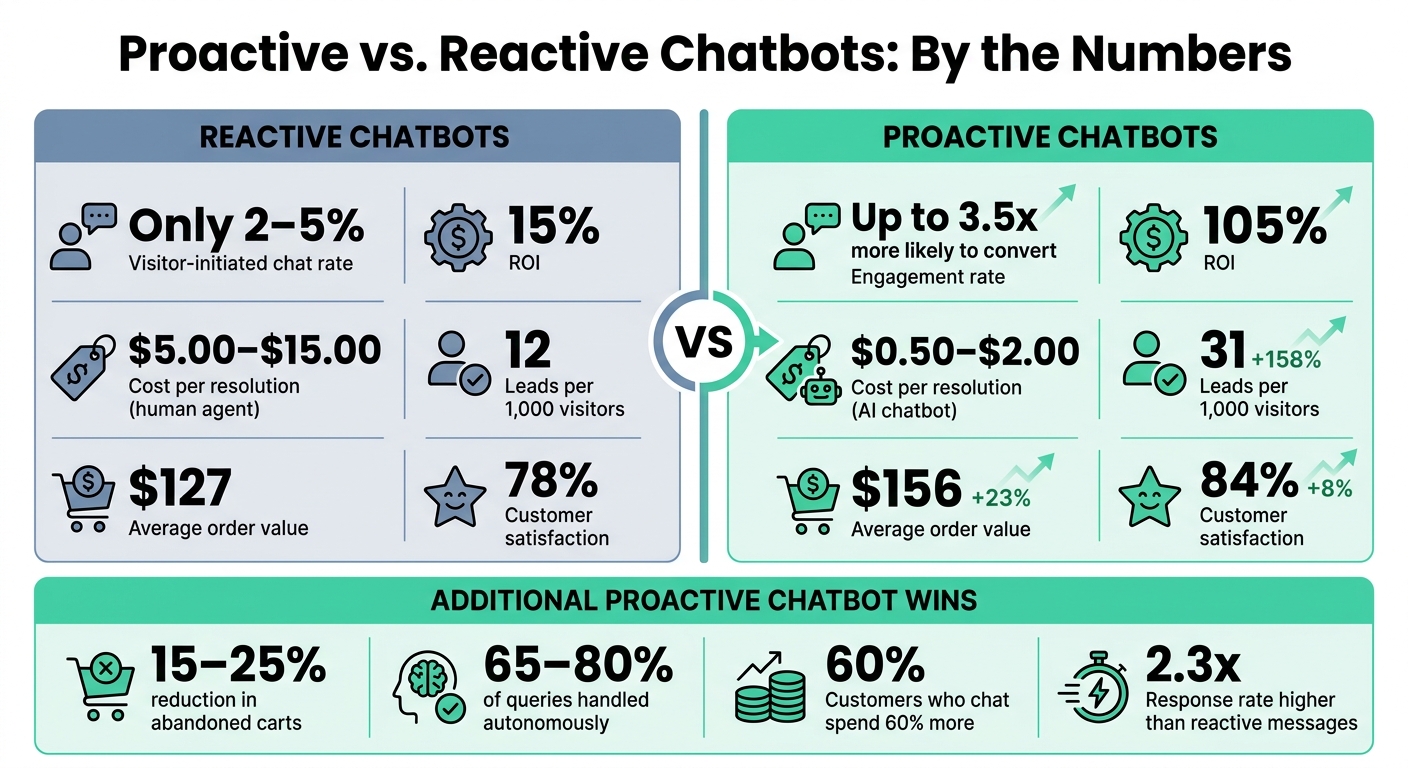
Proactive vs Reactive Chatbots: Key Stats & ROI Comparison
Designing a Proactive Context-Aware AI Chatbot for People's Long-Term Goals
sbb-itb-97f6a47
Key Benefits of Proactive Chatbots
Proactive chatbots bring a lot to the table, especially when it comes to keeping users engaged, driving conversions, and cutting down on operational costs. Let’s break it down.
How Proactive Chatbots Keep Users Engaged
Timing is everything. Proactive chatbots don’t wait for users to make the first move - they step in at just the right moment. By analyzing user behavior, like how far someone scrolls or how long they stay on a page, chatbots can initiate conversations that feel natural and timely. This approach makes a big difference, with targeted messages generating responses that are 2.3 times higher than reactive ones.
"Most people don't want to ask for help. But they're happy when it's offered." - LiveChat
This kind of engagement doesn’t just improve the user experience - it lays the groundwork for better conversion rates.
How Proactive Chatbots Drive Conversions
When it comes to turning visitors into customers, speed and precision are key. Proactive chatbots excel at both. They can respond instantly and use targeted prompts to address potential issues, like cart abandonment or exit intent. The results? A 15–25% reduction in abandoned carts and a 10–15% recovery of visitors about to leave. Altogether, these efforts can boost conversions by 20–30%.
Here’s another compelling stat: customers who interact with chatbots tend to spend 60% more than those who don’t.
| Metric | Reactive Only | With Proactive | Improvement |
|---|---|---|---|
| Leads per 1,000 visitors | 12 | 31 | +158% |
| Average order value | $127 | $156 | +23% |
| Customer satisfaction | 78% | 84% | +8% |
But it’s not just about boosting revenue - proactive chatbots also help businesses save money.
How Chatbots Cut Operational Costs
Once properly set up, advanced AI chatbots can handle 65–80% of customer queries on their own. This takes repetitive tasks - like tracking orders, resetting passwords, or answering FAQs - off your support team’s plate, freeing them up for more complex and meaningful interactions.
And here’s where AI really shines: a single chatbot can manage thousands of conversations at once, something no human team could ever do. Using RAG (Retrieval-Augmented Generation), these systems can pull accurate answers straight from your existing documentation. This approach avoids the expense of fine-tuning AI models, delivering about 90% of the value at just 10% of the cost.
Core Proactive Chatbot Engagement Strategies
Creating an effective chatbot strategy means using visitor data smartly, setting up well-timed triggers, and ensuring smooth integration with your existing business systems.
Personalizing Chatbot Interactions with Visitor Data
Generic chatbot messages? They just don’t cut it anymore. Personalized experiences grab attention and drive action. In fact, 80% of customers are more likely to buy when brands personalize their interactions. And companies that prioritize personalization generate 40% more revenue from it.
So, how do you make personalization work? By combining data from multiple sources like CRM records, past chat logs, real-time browsing behavior, and user preferences. For instance, if a returning customer visits your site, your chatbot should recognize them and pick up the conversation seamlessly - whether that’s referencing their last interaction or pulling up specific details like order IDs or product names. This approach saves customers from repeating themselves, which is a huge win.
Pair this with sentiment analysis to adjust the chatbot’s tone based on the customer’s mood. If the bot senses frustration or confusion, it can escalate the chat to a human agent. On the flip side, if it detects excitement, it can respond with enthusiasm to keep the momentum going.
"I didn't know I needed help until the chat popped up. It was honestly perfect timing." - Customer Survey Participant, LiveChat
One more tip: avoid bombarding users with too many chat prompts. Stick to one proactive message per session to keep things helpful, not annoying.
Now, let’s talk about behavior triggers - your secret weapon for starting the right conversations at the right time.
Using Behavior Triggers to Start Conversations
Here’s the reality: only 2% to 5% of website visitors will open a chat widget on their own. That means most visitors need a little nudge, and behavior triggers are perfect for this.
The trick? Match the trigger to what the visitor is doing. For example, if someone spends 30–45 seconds on your pricing page, they’re probably comparing options. A timely message like, “Need help picking the right plan?” can make all the difference. Or, if someone’s cursor drifts toward the close button on the checkout page, an exit-intent message addressing their hesitation could save the sale.
Here’s a quick guide to common triggers and their best use cases:
| Trigger Type | Best Use Case | Recommended Delay |
|---|---|---|
| Time-Based | Homepages / Landing Pages | 20–30 seconds |
| Scroll-Based | Blog Posts / Case Studies | After 60–70% scroll depth |
| Exit-Intent | Checkout / Cart Pages | Fires on cursor movement |
| Page-Based | Pricing / Product Pages | 25–45 seconds |
| Inactivity | Forms / Sign-up Pages | After 45–60 seconds |
One golden rule: don’t fire a chat invitation as soon as the page loads. That’s a sure way to annoy visitors and increase bounce rates by 12–18%. Instead, give users 15–30 seconds to settle in before offering help. And if someone dismisses a chat prompt, suppress further messages for at least 24 hours to maintain trust.
Finally, for a truly seamless experience, your chatbot needs to connect with your business tools.
Integrating Chatbots with Business Tools
To make your chatbot smarter and more efficient, integrate it with tools like your CRM, help desk, and other business systems. For example, CRM integration lets the bot access customer details like purchase history and past support tickets. This means the bot can greet returning customers by name, reference their last order, and even route them to the right team - all without asking repetitive questions.
Using APIs and middleware, you can connect your chatbot to your entire tech stack, breaking down data silos and creating a unified user profile. This ensures that when a customer moves from your website to your mobile app, their context follows them, delivering a consistent experience.
One important note: be transparent about data collection. Whether you’re tracking behavior or pulling data from your CRM, make sure users know what’s being collected and comply with regulations like CCPA. When customers trust your data practices, they’re more likely to engage, which makes your personalization efforts even stronger.
Best Practices for Chatbot Design
Even the best strategies can fall flat if the design doesn't encourage engagement. Where you place your chatbot, how it starts the conversation, and how it guides users all play a huge role in whether people interact with it - or ignore it. By refining these design elements, you can ensure that your proactive strategies actually lead to meaningful user interactions. A well-thought-out design ensures that technical features are paired with a smooth, user-friendly experience.
Chatbot Placement and Visibility
Where your chatbot appears matters. What works on your homepage might not work on your checkout page. The key is to align chatbot placement with the intent of the page.
For example, on high-intent pages like pricing, a quicker trigger (8–15 seconds) makes sense because these visitors are actively evaluating options - they’re 3.5x more likely to convert than the average visitor. On blog posts or content-heavy pages, wait longer - 45–90 seconds - or until the user scrolls 50–70% down the page. Interrupting someone mid-research is a surefire way to lose their attention.
Mobile adds another layer of complexity. Your chatbot widget should never take up more than 15% of the screen, and it’s best to avoid placing it near key action buttons like checkout or form fields. Since mobile sessions are typically 60% shorter than desktop, reduce trigger delays by 40–50% to keep up with the faster pace.
| Page Type | Optimal Desktop Delay | Recommended Trigger |
|---|---|---|
| Homepage | 20–35 seconds | Time-based or scroll-depth |
| Pricing Page | 8–15 seconds | Immediate or time-based |
| Product/Service Page | 15–25 seconds | Time-based or inline embedded |
| Blog Post | 45–90 seconds | Scroll-depth (50–70%) |
| Contact Page | 5–8 seconds | Passive (click-to-open) |
| Checkout/Cart | 5–10 seconds | Exit-intent only |
Once you’ve nailed the placement, the next step is crafting welcome messages that grab attention and feel relevant.
Writing Effective Welcome Messages
A strong welcome message should feel personal, not like a generic pop-up. The best ones follow a simple three-step formula: acknowledge the context, offer value, and make it easy to respond.
For instance, instead of using something generic like, "Hi! How can I help you today?", a visitor on a pricing page might see: "I see you're comparing plans - want me to help you find the right fit?" This kind of context-aware message achieves response rates 2.3x higher than generic greetings. It shows users that the bot is relevant to their needs, not just there for the sake of it.
"The best chat trigger is the one that makes the visitor feel like the bot read their mind - not like it was watching them through a window." - BotHero
Here’s a tip: provide value upfront - like a price estimate or a quick recommendation - before asking for contact details. This small shift can boost form submission rates by up to 28%.
Once you've hooked the user with a strong opening, quick reply options can make the next steps seamless.
Adding Quick Reply Options
After the chat starts, make things easier by removing the need for typing. Pre-set reply buttons simplify the process, especially on mobile, where typing interactions have a 45% abandonment rate compared to just 12% for button-based ones.
"Providing suggested prompts reduces user effort by removing the burden of formulating questions." - NN/G
Stick to 2–3 buttons initially. Examples might include options like "Get a quote", "Check availability", or "Talk to someone." These buttons don’t just make the conversation easier - they also help guide users to the right path, ensuring the chatbot understands their intent. As the conversation unfolds, update the buttons to reflect the user’s current needs instead of showing static options throughout.
How to Implement a Proactive Chatbot
Creating a proactive chatbot isn't just about designing a sleek interface - it’s about building a system that delivers real value. To do that, you need clear objectives, rigorous testing, and a commitment to ongoing improvement. Here’s how to make it happen.
Setting Clear Engagement Goals
Before diving into development, define specific and measurable goals. Vague ambitions like "improve customer experience" won’t cut it. Instead, aim for something concrete, like "reduce support ticket volume by 20% within 90 days".
Start by analyzing your existing data - support tickets, live chat transcripts, and FAQs - to uncover common customer intents. This research will help you identify which tasks your chatbot should handle first. As Drake Q., Co-founder & CPO at Chatty, explains:
"The most effective chatbots are built to solve real customer problems. Instead of assuming what your users want, dive into your existing data to discover their true intents."
Focus on automating high-volume, low-complexity tasks initially. Once you’ve mapped out these priorities, you can move on to designing and testing your chatbot.
Building and Testing the Chatbot
When designing conversation flows, keep them simple and focused. Each flow should address a specific user intent and guide users toward a clear outcome. To make interactions smoother, use progressive disclosure - break information into smaller steps (Ask → Confirm → Act → Summarize) instead of overwhelming users with too much at once. This approach minimizes errors and reduces abandonment.
Testing is crucial before launching. Run your chatbot in a controlled environment to identify and fix any weak points. Focus on three key areas:
- Functional accuracy: Can the bot correctly understand user intents?
- Usability: Does the conversation feel natural and intuitive?
- Performance: Can the system handle multiple users without slowing down?
When you're ready to deploy, start with a soft launch to 25–50% of your traffic. This strategy reduces risk and lets you gather real-world feedback before a full rollout.
Tracking and Improving Chatbot Performance
Once live, your chatbot’s performance should be closely monitored. Set up a weekly review cycle to evaluate metrics and make adjustments as needed. Keep your goals in mind and track metrics that align with them. Here’s a helpful framework:
| Metric Level | Key KPIs | Purpose |
|---|---|---|
| Exposure | Prompt views, dismissals, click-through rate | Measures how well triggers and placements work |
| Conversation | Replies, chat starts, qualified chats | Assesses the quality of message engagement |
| Outcome | Demo bookings, purchases, ROI | Tracks the chatbot’s business impact |
Pay special attention to your fallback rate - the frequency with which the bot fails to respond and escalates to a human agent. A high fallback rate often points to issues with your natural language understanding (NLU) model or missing content. To address this, retrain your model using real user interactions, including informal phrases and misspellings, to improve its accuracy over time.
Measuring and Improving Chatbot Engagement
Once proactive strategies are in place, the next step is measuring engagement to ensure your chatbot performs well and evolves over time. The right metrics separate a chatbot that drives business results from one that simply looks busy. The secret lies in balancing efficiency metrics with quality metrics - these two together provide the foundation for ongoing improvement.
Key Metrics to Track Chatbot Success
To evaluate your chatbot’s performance, focus on three main categories: efficiency, quality, and business impact.
- Efficiency: Metrics like your automation rate (ideal range: 60–80%) and containment rate (aim for 70% or higher) show how much your bot handles independently.
- Quality: This includes customer satisfaction (CSAT) scores - target a minimum of 4.0 out of 5.0 - and an answer accuracy rate above 95%.
- Business Impact: Here, the cost per resolution is key. AI chatbots typically resolve issues at $0.50–$2.00 per case, compared to $5.00–$15.00 for a human agent.
"If your chatbot metrics don't connect to workload, customer experience, or revenue signals, you're reporting activity instead of performance." - DocsBot
It’s important to differentiate between containment rate and resolution rate. Containment measures whether users stayed within the chat channel, while resolution shows whether their issues were successfully solved. High containment but low resolution often signals unresolved problems - not a win by any measure.
| Metric Category | Key KPI | Target Benchmark |
|---|---|---|
| Efficiency | Automation Rate | 60% – 80% |
| Quality | CSAT Score | ≥ 4.0 / 5.0 |
| Quality | Answer Accuracy | > 95% |
| Business | Cost Per Resolution | $0.50 – $2.00 |
| Operational | Escalation Rate | < 20% |
To stay ahead of issues, set up real-time alerts for CSAT scores dropping below 3.8 or escalation rates exceeding 30%. Also, avoid relying solely on aggregate data. Break down performance by channel (e.g., web vs. WhatsApp), intent type (e.g., billing vs. technical support), and customer segment (e.g., new vs. returning). Aggregate numbers can mask specific problem areas.
Once you’re tracking these metrics, use A/B testing to fine-tune your chatbot’s performance.
Using A/B Testing to Improve Results
A/B testing helps you move from guesswork to informed decisions. The key is to test one variable at a time - changing too many things at once (like welcome messages, trigger delays, and routing logic) makes it impossible to pinpoint what’s working.
Focus your experiments on four areas: trigger timing, message copy, routing logic, and frequency capping. For example, test different trigger delays (15, 30, or 45 seconds) to find the optimal timing for your audience. On the messaging front, compare a generic opener like "How can I help?" with a more specific one, such as "I see you're comparing plans - want a quick breakdown?" The latter, tailored approach often performs better.
Here’s a real-world example: In 2023, Amtrak revamped its chatbot strategy by prioritizing analytics and seamless human escalation. The result? They doubled the number of customer queries handled, boosted CSAT by 25%, and reduced support costs by 20%.
To keep your chatbot improving, adopt a weekly optimization loop:
- Monday: Review resolution and escalation trends.
- Mid-week: Address knowledge gaps.
- Thursday: Sample 20–30 real conversations for quality checks.
- Friday: Implement and test changes.
This consistent rhythm ensures your chatbot evolves instead of stagnating after launch.
Chatbot Case Studies and Insights
Real-world examples show how proactive chatbot strategies can significantly improve both customer engagement and business outcomes. The following case studies illustrate these results with concrete data.
Case Study: Reducing Cart Abandonment in E-Commerce
A mid-sized fashion retailer partnered with ROBORA to implement a proactive AI chatbot designed to engage customers based on cart value, time spent on a page, and exit intent. Instead of passively waiting for customer inquiries, the chatbot initiated conversations directly on product pages using prompts tailored to the items shoppers were viewing. The impact was impressive:
- 78% reduction in average response time
- 65% decrease in support ticket volume
- 156% improvement in abandoned cart recovery rates
Customer satisfaction climbed to 89%, and conversions increased by 34%.
"The AI chatbot has been a phenomenal success. Our customers love the instant support, and our team can now focus on more complex, high-value interactions." - Head of Customer Experience, Leading Australian eCommerce Brand
Shoppers who interacted with the chatbot converted at a rate of 12.3%, compared to just 3.1% for those who didn’t - a fourfold difference. These results highlight how proactive engagement can directly drive sales and satisfaction.
Case Study: Faster Customer Support with Chatbots
In March 2026, a multilingual lighting and electrical e-commerce company introduced five SiteGPT AI chatbots - Mateo, Lucas, Gaston, Thiagho, and Tom - across five language-specific markets. Each chatbot was embedded into technical product pages to provide instant answers to compatibility questions, replacing the need for time-consuming phone calls or email exchanges.
Within just three months, the results were clear:
- 33% drop in phone support demand
- 12% year-over-year revenue growth
This shift allowed the support team to dedicate more time to complex, high-priority tasks.
"We no longer talk about 'the bot' as just a tool. Over these months, we've expanded our team with five new virtual colleagues who work 24/7, never get tired, and are surprisingly competent and pleasant." - SiteGPT Client
These examples demonstrate how proactive chatbots, when thoughtfully implemented, can achieve measurable results - boosting efficiency, customer satisfaction, and revenue in as little as 90 days.
Conclusion: Key Takeaways
The data in this guide highlights one undeniable fact: proactive chatbots consistently deliver better results than passive ones. Visitors engaging with proactive chat are 3.5 times more likely to convert. Even more striking, proactive support models yield a 105% ROI, compared to just 15% for reactive-only approaches. Simply put, taking the first step in customer interactions has become a competitive necessity.
However, success hinges on execution, not just implementation. Timing is often the biggest challenge. Sending a message too early can drive visitors away, while a well-timed, context-aware prompt can feel helpful rather than disruptive. As Natalia Misiukiewicz from LiveChat explains: "Most people don't want to ask for help. But they're happy when it's offered."
The Trigger → Message → Routing → Tracking framework is the cornerstone of effective chatbot strategies. Each element is interconnected: a well-designed trigger is wasted without a relevant message, and even the best conversations lose value if their impact isn’t measurable. Before launching, set clear benchmarks - like Average Handling Time, Cost Per Interaction, and First Contact Resolution - to track progress and improvements after deployment.
Lastly, avoid treating your chatbot as a one-and-done project. Allocate 15–25% of your annual chatbot budget for ongoing updates, such as refining natural language understanding (NLU), testing message variations, and fine-tuning triggers based on real-world data. The companies seeing the best results are those that continuously improve their chatbot strategies.
"Proactive live chat should appear when it increases clarity, confidence, or speed. If it adds noise, it is probably hurting performance." - Chattsy Team
FAQs
How do I choose the best triggers for my site?
To make triggers effective, pay attention to visitor behavior, timing, and context. The goal is to create interactions that feel helpful rather than intrusive. Look for high-intent moments, such as when someone spends a long time on a page or shows exit intent. Set up behavior-based rules and customize triggers using details like whether the visitor is returning or their location. Regularly test and tweak your triggers by analyzing performance metrics to keep them timely, relevant, and non-disruptive.
How do I keep proactive chat from annoying visitors?
To keep visitors engaged without causing frustration, prioritize timing, relevance, and a subtle approach. Use behavior-based triggers like time spent on a page or signs of exit intent to activate chats. Avoid bombarding users with repetitive or overly aggressive messages. Instead, ensure the chat appears at moments when it’s most helpful, such as when a visitor seems unsure or hesitant. Add frequency controls to minimize interruptions. By striking the right balance, you can make proactive chat feel like a helpful assistant rather than an unwelcome distraction.
Which KPIs prove my chatbot is actually working?
When evaluating the performance of a chatbot, certain key performance indicators (KPIs) can help paint a clear picture of its success. Here are three critical ones to focus on:
- Automation Rate: Aim for an automation rate between 60–80%. This measures how effectively your chatbot handles tasks without needing human intervention.
- Customer Satisfaction Score (CSAT): Strive for a CSAT of at least 4.0 out of 5. This reflects how satisfied users are with their interactions.
- Cost per Resolution: Target a cost per resolution that is 50–70% lower than the baseline for human-only support. This highlights the cost-saving potential of using a chatbot.
Beyond these, it’s essential to track metrics related to efficiency, quality, business impact, and operational health. These ensure the chatbot is not only performing well but also delivering meaningful value to your business and your customers.