ERP data sync tools solve a common problem: disconnected systems that waste time, cause errors, and hurt business outcomes. These tools ensure your ERP, CRM, and other systems stay synchronized, so every team has access to accurate, up-to-date information in real time. Whether you're managing inventory, processing orders, or updating customer records, these tools eliminate manual reconciliation and reduce costly mistakes.
Why You Need ERP Sync Tools:
- Prevent Data Silos: Sync tools unify systems, ensuring consistent information across departments.
- Real-Time Updates: Avoid delays with instant synchronization, critical for tasks like inventory and order tracking.
- Cost Savings: Reduce maintenance costs by up to 80% and eliminate manual data entry.
- Improved Workflows: Automate processes like order-to-invoice cycles, freeing up resources for other priorities.
Key Features to Look For:
- Change Data Capture (CDC): Syncs only updated data to reduce system load.
- Incremental Syncs: Avoids reprocessing entire datasets, saving time and bandwidth.
- Automatic Schema Management: Adapts to changes in data structure without breaking integrations.
- ERP Compatibility: Pre-built connectors for systems like SAP, Oracle NetSuite, and Salesforce.
Top Tools:
- Fivetran: Automated ELT with 700+ connectors, ideal for analytics.
- Stacksync: Real-time, bi-directional sync with sub-second latency.
- Oracle GoldenGate: High-performance CDC for enterprise systems.
- MuleSoft: Customizable for complex architectures.
- Airbyte: Open-source with high flexibility but requires engineering effort.
Quick Comparison:
| Tool | Type | Starting Price | ERP Compatibility | Main Advantage | Main Disadvantage |
|---|---|---|---|---|---|
| Fivetran | Automated ELT/rETL | Free plan; usage-based | SAP, Oracle, NetSuite | 700+ connectors | Pricing can be unpredictable |
| Stacksync | Two-Way Sync | Custom pricing | SAP, Oracle, Salesforce | Sub-second latency | Fewer connectors than iPaaS tools |
| Oracle GoldenGate | Real-time CDC | Enterprise pricing | Oracle, SQL Server | Processes 100k events/sec | Smaller pre-built connector pool |
| MuleSoft | Enterprise iPaaS | ~$125,000/year | Broad ERP support | Deep customization | High cost |
| Airbyte | Open-source | Free (self-hosted) | 500+ sources | High flexibility | Requires engineering maintenance |
To succeed with ERP sync tools, start small with a pilot project, adopt event-driven architectures for real-time updates, and prioritize compliance. These tools not only improve efficiency but also create a unified view of your business, enabling better decisions and a smoother operation.
Unlock Seamless ERP & CRM Sync for Effortless Business Growth
sbb-itb-97f6a47
Why Businesses Need ERP Data Sync Tools
Imagine this: your sales team closes a deal in Salesforce, but your finance department's ERP system shows the customer as 60 days overdue on payments. This kind of disconnect isn't just frustrating - it’s expensive. According to IDC Market Research, businesses lose between 20% and 30% of their annual revenue due to data silos. On top of that, poor data quality costs companies an average of $12.9 million annually. And it’s not just a financial issue - 68% of organizations identified data silos as their biggest challenge in 2024, up 7% from the previous year.
Disconnected systems waste time, create inconsistent customer experiences, and lead to poor strategic decisions. Teams often spend hours reconciling spreadsheets, while customers receive conflicting updates.
"Data silos can quietly undermine your team's productivity, customer experience and strategic decision-making in ways that compound over time." - Roy Nicholson, Business Optimization Leader, Cherry Bekaert
ERP data sync tools solve these problems by establishing a single source of truth across your systems. Instead of relying on manual updates or overnight batch uploads, these tools detect and sync only the fields that have changed - often in real-time. For example, if a customer service rep updates a shipping address in your CRM, that change instantly reflects in your ERP billing system. This ensures everyone is working with the same accurate information, avoiding version conflicts.
The benefits go beyond reducing errors. A dedicated sync solution can cut integration maintenance by up to 80%, freeing up engineering resources. Companies with integrated systems are also 19% more likely to see improvements in cross-sell opportunities and customer profitability. By eliminating manual updates and knowledge gaps, your teams can focus on what really matters: delivering value to your customers.
Eliminating Data Silos and Inconsistencies
Data silos create a fragmented view of your business. One department might see a prospect as "highly engaged" in the CRM, while another sees them as delinquent in the ERP. These disconnects lead to awkward customer interactions, missed opportunities, and strategic errors.
ERP sync tools fix this by enabling bidirectional synchronization. When your sales team updates a customer's contact details, that change flows automatically across all connected platforms. No manual intervention is needed. These tools use automated data mapping and unique identifiers to ensure records match across systems, eliminating duplicates and maintaining consistency.
With Change Data Capture (CDC), only updated fields are synced, reducing system load and ensuring near-instant consistency. This means your teams don’t have to wait for nightly batch jobs to run. For instance, if a customer calls about an order, your support rep can immediately access the latest fulfillment status from the ERP.
The financial impact is hard to ignore. 80% of IT leaders report that data silos hinder their digital transformation efforts. As businesses adopt more specialized tools, the problem worsens. Sync tools consolidate data into a unified view, saving hours of reconciliation work each week and ensuring every department operates with the same accurate information.
Supporting Real-Time Data Flow
Batch processing - where data syncs once a day or week - creates dangerous blind spots. For example, a sales order entered at 9:00 a.m. might not reach the warehouse until the next morning, delaying fulfillment and frustrating customers who expect immediate updates. Real-time data flow eliminates these delays by syncing updates the moment they happen.
High-performance streaming pipelines can achieve sub-100 millisecond delivery, while ERP-CRM sync tools typically operate with sub-second latency. This speed is crucial for inventory tracking, payment processing, and customer support. If a customer places an order online, your inventory system needs to know immediately to avoid overselling, and your finance team needs real-time cash flow visibility.
"If your CRM connects with product, billing, or support tools, prioritize real-time CRM integration. Avoid manual exports or nightly syncs that create inconsistencies." - Stacksync
Event-driven architectures power this real-time capability. They monitor for changes and trigger immediate synchronization, eliminating the delays of scheduled intervals. For example, when your finance team updates a shipping status in the ERP, your customer service team sees that update instantly in their CRM. This reduces the friction of reconciling differences and ensures decisions are based on the most accurate data.
Businesses are increasingly adopting real-time sync solutions because they can reduce integration maintenance by up to 80%. Unlike generic platforms, which often struggle with real-time updates, purpose-built sync tools handle complexities like data consistency and conflict resolution automatically. Techniques like timestamp-based logic ensure the most recent update takes priority when two systems modify the same record.
Real-time synchronization doesn’t just increase speed; it also simplifies workflows, making operations more efficient.
Improving Operational Workflows
Manual data entry and reconciliation aren’t just tedious - they’re error-prone. When your operations team manually exports order data from the CRM and imports it into the ERP, even a small typo can cause big problems. For businesses processing thousands of transactions monthly, even a 1% error rate can quickly add up.
ERP sync tools automate these workflows, eliminating the need for employees to act as "human translators" between systems. For example, a finalized sales order in Salesforce can automatically:
- Create a corresponding entry in NetSuite
- Trigger inventory allocation in your warehouse management system
- Update financial forecasts
This automation speeds up processes like order-to-invoice cycles, production scheduling, and inventory replenishment. Companies that relied on manual processes struggled during disruptions, while those with integrated systems adapted faster by accessing synchronized data from anywhere.
The market for integration platforms reflects this growing demand. Valued at $3.4 billion in 2021, it’s projected to reach $37.9 billion by 2031, growing at a compound annual rate of 27.5%. Businesses are moving away from point-to-point integrations, which become unmanageable as systems multiply, toward centralized sync platforms that handle multiple connections through a single hub.
When choosing a tool, look for features like automated error handling and replay capabilities. These platforms include detailed logs and retry logic to prevent silent failures. Dashboards track sync health in real time, alerting you to issues before they disrupt operations. This proactive monitoring is crucial because even brief sync failures can create discrepancies that take hours to resolve manually.
Key Features of Effective ERP Data Sync Tools
ERP sync tools come with a wide range of capabilities, but the best ones excel in reliability, speed, and minimizing the maintenance workload. The ideal tool should simplify technical complexities, letting teams focus on actionable insights instead of troubleshooting. Let’s dive into the features that help advanced tools tackle integration challenges effectively.
Log-Based Change Data Capture (CDC): This method is considered the gold standard for on-premise ERPs like Oracle EBS and SAP S/4HANA. Instead of running constant queries on database tables - which can bog down production systems - log-based CDC reads internal transaction logs (e.g., MySQL Binlog or Oracle Redo logs). This process typically impacts system performance by less than 3%. For example, tools like Fivetran can replicate CDC data changes as frequently as every five minutes, while high-performance engines like Oracle GoldenGate can process over 100,000 events per second.
"Log-based CDC is the gold standard for on-premise ERP databases - reads transaction logs with near-zero impact." - knowledgelib.io
Incremental Synchronization: This feature ensures that only new or updated data since the last sync is processed, avoiding the need to reprocess entire datasets. By doing so, it conserves bandwidth, reduces computational load, and lowers ongoing costs.
Automatic Schema Management: The tool should handle schema drift seamlessly. For instance, if a developer adds a new column to a table, the sync tool should detect the change and update the target system automatically without disrupting the data flow. In bidirectional sync scenarios - where data moves between systems - field-level change tracking is crucial to prevent updates from one source accidentally overwriting changes from another.
ERP System Compatibility: Compatibility with your specific ERP system is non-negotiable. Many tools come with pre-built connectors for popular platforms like SAP S/4HANA, Oracle NetSuite, Microsoft Dynamics, and QuickBooks. Platforms like Skyvia, for example, offer libraries with over 200 pre-built connectors. However, compatibility isn’t just about having a connector. For cloud-based SaaS ERPs like Salesforce, NetSuite, or Workday, API-based integration or vendor-native event streams are often required instead of direct log-based CDC.
Take Salesforce as an example: its CDC retains event data for just a 3-day rolling window. If your sync tool goes offline for longer, you might need a full re-sync. Understanding such limitations can save you from unexpected challenges during implementation.
Top ERP Data Sync Tools in the Market
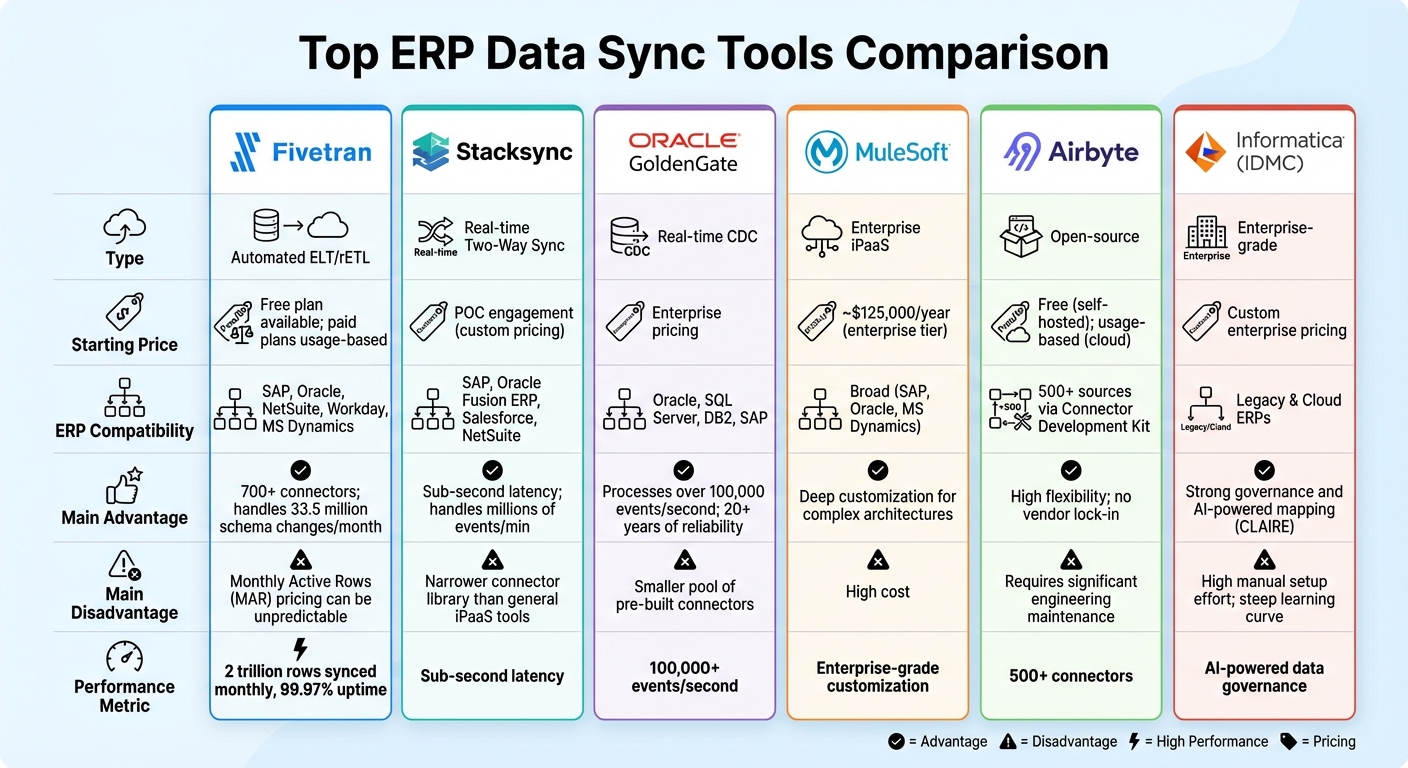
Top ERP Data Sync Tools Comparison: Features, Pricing, and Performance
After outlining the key features to look for in ERP data sync tools, let’s dive into some of the top solutions available today.
The right tool for your business will depend on your specific needs - whether you’re looking for one-way data transfers to a warehouse, real-time bidirectional synchronization, or seamless integration with older on-premise systems. Options range from fully managed, low-code platforms to more technical, open-source alternatives.
Comparison Table of Top ERP Data Sync Tools
| Tool | Type | Starting Price | ERP Compatibility | Main Advantage | Main Disadvantage |
|---|---|---|---|---|---|
| Fivetran | Automated ELT/rETL | Free plan available; paid plans usage-based | SAP, Oracle, NetSuite, Workday, MS Dynamics | 700+ connectors; handles 33.5 million schema changes/month | Monthly Active Rows (MAR) pricing can be unpredictable |
| Stacksync | Real-time Two-Way Sync | POC engagement (custom pricing) | SAP, Oracle Fusion ERP, Salesforce, NetSuite | Sub-second latency; handles millions of events/min | Narrower connector library than general iPaaS tools |
| Oracle GoldenGate | Real-time CDC | Enterprise pricing | Oracle, SQL Server, DB2, SAP | Processes over 100,000 events/second; 20+ years of reliability | Smaller pool of pre-built connectors |
| MuleSoft | Enterprise iPaaS | ~$125,000/year (enterprise tier) | Broad (SAP, Oracle, MS Dynamics) | Deep customization for complex architectures | - |
| Airbyte | Open-source | Free (self-hosted); usage-based (cloud) | 500+ sources via Connector Development Kit | High flexibility; no vendor lock-in | Requires significant engineering maintenance |
| Informatica (IDMC) | Enterprise-grade | Custom enterprise pricing | Legacy & Cloud ERPs | Strong governance and AI-powered mapping (CLAIRE) | High manual setup effort; steep learning curve |
This table offers a snapshot of the tools, but let’s explore how they perform in real-world applications.
Example Tools and Their Key Features
Fivetran is a leader in automated ELT solutions, pulling data from over 700 sources into cloud warehouses with minimal effort. The platform syncs more than 2 trillion rows each month and boasts 99.97% uptime. In 2023-2024, Pfizer adopted Fivetran to streamline global data replication, cutting clinical trial data processing times from hours to minutes.
"Fivetran provides a framework for standardizing data replication across all of Pfizer, enabling us to achieve real-time analytics."
- John Leone, Senior Manager of Global Platform Support Services at Pfizer
Fivetran also offers a 14-day free trial, even for premium ERP connectors like SAP and Workday.
Stacksync specializes in real-time, bidirectional synchronization for major ERPs like SAP and Oracle Fusion ERP. Unlike batch-based tools, it ensures data consistency across systems with sub-second latency. Its event queues can handle millions of executions per minute without losing records.
"Stacksync freed up significant engineering resources to focus on core product innovation."
- Yuval Hofshy, CTO
Oracle GoldenGate is a trusted choice for high-performance Change Data Capture (CDC), particularly in Oracle-centric environments. With over 20 years of reliability, it processes more than 100,000 events per second. For example, National Australia Bank modernized its data pipelines with GoldenGate, cutting data costs by 50% and improving machine learning performance by 30%.
MuleSoft provides extensive customization options for businesses with complex integration needs. While many organizations are transitioning to more automated tools, MuleSoft remains a solid option for those requiring deep architectural control. Its enterprise tier pricing starts at approximately $125,000 per year.
Best Practices for Implementing ERP Data Sync Tools
Implementing ERP data sync tools effectively relies on following solid deployment strategies.
Start with a Pilot Project
Kick off your implementation by running a small-scale test. This approach minimizes risks and avoids directly impacting production systems. Use sandbox ERP environments and mock API endpoints to simulate operations. Begin by syncing a limited data set to confirm field mapping accuracy, assess performance, and ensure compatibility. This controlled testing phase helps identify and resolve potential issues without jeopardizing live data.
Adopt Event-Driven Architectures
Event-driven architectures are increasingly becoming the standard for SaaS-ERP integration, particularly in scenarios requiring real-time updates. Instead of relying on periodic polling, these architectures use webhooks to trigger actions immediately when data changes. For instance, webhooks are ideal for critical financial transactions where speed is essential, while event queues work well for updates like inventory changes. This approach scales efficiently, with modern pipelines like Estuary Flow achieving delivery times under 100 milliseconds.
Ensure Compliance and Data Governance
Maintaining compliance and robust data governance is non-negotiable to avoid legal and reputational risks. Choose tools that support SOC 2 compliance, GAAP-aligned financial reconciliation, and OAuth 2.0 authentication. Implement role-based access controls to limit data visibility and maintain a single source of truth. Encryption for data in transit and at rest is essential, as is integrating AI-driven anomaly detection and predictive reconciliation for improved reliability. Documenting all data flows, dependencies, and recovery procedures ensures audit readiness and simplifies onboarding for new team members.
To prevent conflicting updates across platforms, establish a single source of truth for each data object - your ERP system often serves this role for financial records. Opt for delta (incremental) syncs instead of full syncs to lower infrastructure costs. Set automatic retries with exponential backoff to handle temporary failures and configure real-time alerts to notify your IT team if sync jobs exceed expected latency thresholds. When combined with the right tools and strategies, these practices strengthen your ERP synchronization efforts.
Selecting the Right ERP Data Sync Tool for Your Business
Choosing the right ERP data sync tool isn’t just about ticking boxes; it’s about finding a solution that matches your technical needs and business goals. Whether you’re a small team or a large enterprise, the right tool can make all the difference. For smaller teams, straightforward platforms that connect tools in minutes can be a game-changer. Larger companies, however, often require a more robust ETL or Reverse ETL setup with a central data warehouse to handle complex transformations using SQL. As Chris Lopez, Founding GTM at Ampersand, explains:
"Picking the right category early makes it easier to ship reliable ERP integrations at scale".
Integration Depth Matters
When it comes to integration, one size does not fit all. If your needs are simple, basic connectors may work fine. But enterprise ERP systems often demand support for custom fields and objects. You’ll also need to decide whether you require one-way data movement for analytics or a bi-directional sync to keep CRM and ERP data aligned in real time. For many businesses, syncing data every 15 minutes is sufficient and helps reduce costs compared to true real-time updates.
Operational Reliability Is Key
Reliability should be a top priority. The tool you choose must handle API rate limits, automatically retry failed syncs, detect schema drift, and resolve concurrent update conflicts. Features like Change Data Capture (CDC) are incredibly useful, as they ensure only modified records are synchronized. This reduces both API costs and latency. Additionally, make sure the tool meets compliance standards such as GDPR, CCPA, HIPAA, or SOC 2 if you’re dealing with sensitive data like financial records or patient information.
Understand the Costs
Pricing can be tricky, so it’s important to model your costs upfront. Some tools, like Fivetran, use a Monthly Active Rows (MAR) pricing model, while others, like Skyvia, charge based on the number of records, starting at $79 per month. Vlada Maksymiuk from Skyvia offers a word of caution:
"The cheapest tool today is often the loudest invoice tomorrow".
Don’t forget to account for hidden costs like implementation, customization, ongoing maintenance, and training when calculating total ownership.
If your ERP integration needs are especially complex, consider reaching out to experts. The Top Consulting Firms Directory connects businesses with specialists in digital transformation, IT infrastructure, and data analytics. These professionals can help ensure your ERP sync tool supports your operational needs and long-term growth plans. By carefully considering these factors, you’ll be better positioned to achieve a smooth and efficient ERP sync process.
FAQs
Do I need real-time sync or is 15-minute syncing enough?
The decision between real-time syncing and 15-minute syncing comes down to what your business requires. If your operations demand instant updates - think sales transactions or inventory tracking - real-time syncing is the way to go. It minimizes errors and ensures everything stays up-to-date without delay. On the other hand, 15-minute syncing is a better fit for activities like reporting or analytics, where a short delay won't disrupt workflows. Weigh how timing affects accuracy, efficiency, and overall customer experience to determine the most suitable choice.
How do I prevent two systems from overwriting each other’s updates?
To prevent overwriting updates during data synchronization, it's smart to use tools that include conflict resolution features. Methods like timestamp-based or version-based approaches can identify the most recent changes and prioritize them, ensuring everything stays consistent. You should also establish clear rules about which system's data should take priority in case of conflicts. These steps work together to keep your data accurate and aligned across all systems.
What should I pilot first to prove ERP sync ROI fast?
To see results quickly from ERP synchronization, begin with areas that offer clear, measurable benefits right away. Concentrate on integrating and automating core workflows such as supply chain, inventory management, or financial operations. These processes typically yield early wins by boosting efficiency, reducing costs, and speeding up decision-making. By focusing on these, you can demonstrate concrete ROI early in the implementation phase.