Real-time data integration is transforming how SaaS companies monitor and reduce customer churn. Unlike outdated batch methods that rely on delayed data, real-time tools provide instant insights into user behavior. This allows teams to act quickly on churn risks, improving retention and revenue. Four standout tools for this purpose include:
- Apache Kafka: High-speed messaging platform for massive event data, ideal for large-scale operations but requires technical expertise.
- CrateDB: Combines data ingestion, storage, and querying in one system, simplifying real-time analytics.
- ChurnZero: Focused on customer success with predictive churn insights and machine learning models.
- Velaris: AI-driven platform offering real-time health scores and seamless integration with popular tools.
Quick Comparison
| Tool | Data Speed | Query Speed | Integration Ease | Scalability | Cost Estimate |
|---|---|---|---|---|---|
| Apache Kafka | Millions of events/sec | <100ms (with add-ons) | Requires expertise | High (horizontal scaling) | Infrastructure + FTE |
| CrateDB | Millions of rows/sec | Sub-second | Medium (SQL support) | High (shared-nothing) | Managed cloud option |
| ChurnZero | Real-time event tracking | Low latency | Over 100 integrations | Customer success focus | ~$15,000/year |
| Velaris | No-code/low-code ingestion | Real-time health scores | Hands-on setup support | Simplifies workflows | Custom pricing |
Each tool serves different needs, from large-scale data handling to customer-centric insights. Choosing the right option depends on your team's size, technical skills, and budget. Real-time monitoring can significantly reduce churn, with even a 5% decrease boosting profitability by up to 95%.
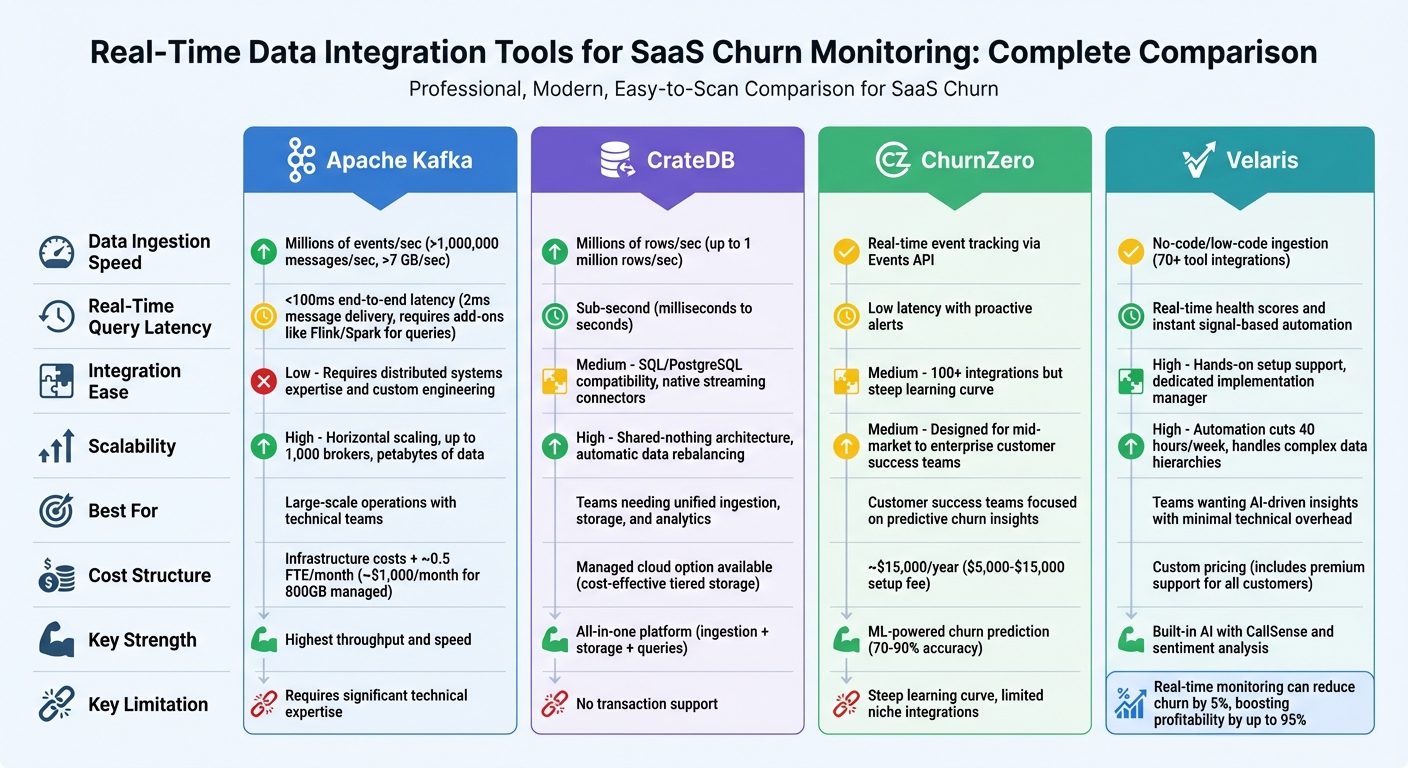
Real-Time Data Integration Tools for SaaS Churn Monitoring Comparison
What's SaaS Churn and How to Improve it? 🤔
sbb-itb-97f6a47
1. Apache Kafka
Apache Kafka is a high-throughput messaging platform built to handle enormous amounts of event data. It serves as a rapid conduit for real-time user activity data - every click, login, subscription update, or feature interaction flows seamlessly through Kafka's partitioned logs. This makes it an essential tool for churn monitoring, enabling the tracking of millions of user events simultaneously without slowing down the system .
Data Ingestion Speed
Kafka is designed for speed, capable of processing over 1,000,000 messages per second and managing dataflows exceeding 7 GB per second . Its end-to-end latency is typically under 100ms, ensuring that churn-related events are almost instantly available for analysis. To maximize this performance, Kafka uses batching (configured via settings like batch.size and linger.ms) and efficient serialization formats such as Apache Avro or Protobuf to minimize message sizes and reduce network load.
Real-Time Query Latency
While Kafka excels at delivering messages with latencies as low as 2ms, it is not a query engine. To analyze user behavior in real time, you’ll need to pair Kafka with processing tools like Apache Flink, Spark Streaming, or Kafka Streams . This combination allows for quick reactions to churn indicators, making it possible to intervene as soon as a customer displays signs of leaving.
Integration Ease
Operating Kafka at scale requires expertise in distributed systems. As Suresh Chaganti, Principal Data & MLOps Architect, points out:
"Kafka concepts like topics and partitions are straightforward, but operating clusters at scale requires distributed systems knowledge".
Kafka doesn’t natively collect data from SaaS frontends, so you’ll need additional tools, such as event collectors or SDKs, to bring user behavior data into its topics. Kafka Connect offers pre-built connectors for databases like MySQL, PostgreSQL, and Snowflake, reducing the need for custom ETL development . However, managing data schemas through Apache Avro and a Schema Registry is essential to maintain compatibility as data structures evolve. For teams lacking distributed systems expertise, managed services like Confluent Cloud (which provides $400 in free credits for the first four months) or AWS Managed Streaming for Apache Kafka (MSK) simplify the process by handling brokers, ZooKeeper, and listeners for you .
Scalability
Kafka is built to scale horizontally, with topics partitioned across brokers. This means you can increase throughput by adding more partitions as your user base grows. It also supports consumer groups, which distribute the workload across multiple instances. Each partition is consumed by only one member, enabling efficient parallel processing . Kafka clusters can scale up to 1,000 brokers and handle petabytes of data. In some cases, simply tuning partition counts has resulted in up to a 4x performance improvement.
Cost Structure
Although Kafka’s open-source software is free, there are hidden costs associated with the engineering resources needed for setup, administration, and maintenance. A production-ready Kafka cluster typically requires at least three servers for fault tolerance, with each server needing at least 8GB of RAM and 500GB of disk space. Managed services transferring 800 GB per month cost around $1,000/month. Additionally, increasing replication factors to improve data safety can drive up storage and bandwidth costs.
| Component | Specification | Impact on Costs |
|---|---|---|
| Minimum Cluster Size | 3 servers | Base infrastructure investment |
| RAM per Server | 8GB+ | Hardware costs scale with demand |
| Disk Space per Server | 500GB+ | Higher retention policies increase storage costs |
| Managed Integration | ~$1,000/month for 800GB | Predictable operational expenses |
2. CrateDB
CrateDB stands out by combining data ingestion, storage, and query processing into one platform. Unlike Kafka, which is centered on message delivery, CrateDB eliminates the need for multiple tools, streamlining processes like churn monitoring.
Data Ingestion Speed
CrateDB can handle up to one million rows per second, with automatic indexing that makes data ready for queries in milliseconds. Its shared-nothing architecture distributes the workload across all cluster nodes, scaling performance as new servers are added. The database also integrates seamlessly with Kafka, Flink, MQTT, and HTTP APIs, making it easy to pull in user events from various SaaS systems. For instance, Bitmovin uses CrateDB to ingest one billion lines of data daily, managing 140 TB of storage across tables with 60 billion events.
Real-Time Query Latency
Once data is ingested, it becomes queryable in under a second. This allows SaaS teams to act on live behavior, such as triggering churn alerts or updating customer health scores, without waiting for batch processing. CrateDB’s distributed SQL engine delivers sub-second response times, even for complex queries on billions of records. For example, GolfNow, which serves 4 million registered golfers, runs real-time queries on over 300 million rows hundreds of times per second to deliver instant search results. Daniel Hölbling-Inzko, Senior Director of Engineering at Bitmovin, highlights CrateDB's capabilities:
"It is through the use of CrateDB that we are able to offer our large-scale video analytics component in the first place. Comparable products are either not capable of handling the large flood of data or they are simply too expensive."
This speed makes CrateDB a powerful tool for SaaS churn monitoring.
Integration Ease
CrateDB’s PostgreSQL-compatible SQL interface simplifies querying structured and JSON data, removing the need for proprietary languages or complex ETL pipelines. This accessibility lowers the barrier for distributed search and analytics. Jeff Nappi, Director of Engineering at ClearVoice, explains:
"The fact that CrateDB uses SQL lowers the barrier to entry when using distributed search. And on top of that, with CrateDB you can replace MongoDB and Elasticsearch with one scalable package."
CrateDB supports multiple data types - relational, JSON, vector, and full-text - within a single system, reducing architectural complexity. Spatially Health, for example, replaced both Postgres and Cassandra with CrateDB to manage high-volume spatial queries at scale.
Scalability
CrateDB scales horizontally by adding commodity nodes, with automatic data rebalancing. There’s no need for manual re-sharding or complex index management, and both read and write performance increase linearly as the cluster grows. Bitmovin’s 140 TB of storage and AVUXI’s processing of 20 million daily events showcase CrateDB’s ability to handle massive workloads. This scalability ensures reliable real-time monitoring as data volumes expand.
Cost Structure
By integrating multiple systems - like streaming stores, time-series databases, and search engines - into one platform, CrateDB helps cut costs. It supports tiered data storage, balancing real-time performance with cost-effective management of historical data. This approach reduces infrastructure and engineering expenses, making it a more economical option than maintaining a fragmented data stack.
3. ChurnZero
Unlike Apache Kafka and CrateDB, which focus on handling and storing raw data, ChurnZero zeroes in on actionable insights for customer success. It’s a platform designed to use machine learning to monitor and predict customer churn in real time.
Real-Time Event Tracking
ChurnZero uses its Events API to track user actions as they happen. To do this, it requires specific parameters like eventDate, AccountId, and ContactId. Data can be ingested through native integrations, Fivetran, Hightouch, or direct API calls. For example, Hightouch enables seamless syncing of customer data from platforms like Snowflake, BigQuery, and Redshift into ChurnZero. The platform also supports incremental syncing for its core tables - Accounts, Contacts, and Events - ensuring that churn scores are updated as a priority. To avoid errors, make sure the App URL doesn’t have a trailing slash (use https://analytics.churnzero.net).
Churn Prediction Accuracy
ChurnZero’s Success Insights feature uses machine learning to uncover churn risks that traditional health scores might miss. The platform’s churn prediction models boast an accuracy rate of 70–90%, and real-time analytics can improve precision by up to 30%. Customers are categorized into risk levels, and the platform flags upcoming renewal dates to provide early warnings. Henry L., a verified user, shared:
"The platform provides analytics and insights to help businesses better understand their customer base, build relationships with customers, and identify opportunities to increase customer loyalty."
That said, the accuracy of predictions heavily depends on the quality and volume of data fed into the system.
Integration Ease
ChurnZero supports over 100 integrations to deliver actionable, data-based insights. The platform was recently highlighted in The Forrester Wave™: Customer Success Platforms, Q4 2023 Report for its strong integration capabilities. When syncing custom fields via API or middleware, at least one default field must be mapped to ensure proper record matching. Additionally, event models need unique primary keys to capture every event during real-time ingestion. Such integrations make it easier to handle growing data volumes without interruptions.
Scalability
For mid-market to enterprise SaaS companies, ChurnZero offers scalability through automated workflows and AI-driven insights. This allows businesses to grow their customer base without needing to significantly increase staff. AI-powered features have reduced onboarding times by 40% and helped some users achieve 3x growth in expansion revenue. However, scaling with ChurnZero isn’t entirely straightforward - it often requires a dedicated administrator and weeks of implementation, involving coordination across product, sales, and marketing teams.
Cost Structure
ChurnZero doesn’t publish its pricing publicly. Setup fees are typically between $5,000 and $15,000, with monthly costs estimated at $300/month for Growth plans, $500–$1,000/month for Scale plans, and over $1,000/month for Enterprise plans. For larger implementations with minimal customization, costs can climb to as much as $2,500 per user per month. Additionally, third-party tools like Fivetran may introduce usage-based fees for data syncing.
4. Velaris
Velaris positions itself as an "always-on intelligence layer", designed to interpret customer signals in real time. This allows businesses to act immediately on churn risks and opportunities for growth. While speed and precision are key, its integrated AI and seamless setup make it stand out.
Data Ingestion Speed
Velaris supports no-code/low-code integrations with over 70 tools, including Salesforce, HubSpot, Stripe, Slack, Zendesk, and Intercom. For companies with specialized tech stacks, custom integrations can be completed within six weeks. The platform consolidates both structured data (e.g., product usage, license consumption) and unstructured data (e.g., email tone, meeting transcripts, call notes) into a unified view.
As Burhan Kaynak, a Customer Success Manager, shared:
"The implementation was really easy and smooth. They have integrated with our Hubspot, Intercom and our product easily."
Churn Prediction Accuracy
Velaris doesn't just collect data - it uses built-in AI to provide real-time health scores that combine behavioral insights with sentiment analysis from call transcripts. Unlike platforms that tack on AI as an afterthought, Velaris integrates machine learning into its core. Features like CallSense analyze conversations and emotional context in real time. The platform powers over 1 million live automations, helping users boost efficiency by 25%. With its signal-based automation, Velaris can trigger playbooks instantly when it detects changes in customer engagement or adoption.
Integration Ease
Every customer, regardless of size or revenue, gets a dedicated implementation manager and Slack support during setup. This hands-on approach ensures smooth onboarding. Charlie Edwards, another Customer Success Manager, highlighted:
"The Velaris team are absolutely excellent in the time and attention they have given us as an organisation and have built a lot of custom integrations and automations to allow our team to do much more in the day."
Velaris also supports multi-layered data hierarchies, linking individuals to accounts and parent companies - a vital feature for enterprises tracking churn. Additionally, it meets high compliance standards, being ISO Certified, AICPA SOC2 compliant, and GDPR compliant.
Scalability
Automation is a major time-saver with Velaris, cutting an average of 40 hours of manual work per week for teams. Its Velaris Bridge feature facilitates automation across systems and language models, simplifying workflows as data volumes grow. Taran Hercules, Head of Client Success at Protex AI, remarked:
"Velaris has streamlined our operations and organised all of our messy data and processes. Our team has been able to become way more efficient and make informed decisions about customers."
With a 4.5/5 rating from over 100 reviews, users frequently commend its ability to handle complex data without requiring a dedicated admin.
Cost Structure
Velaris takes a personalized approach to pricing, offering quotes only after a demo. However, its premium support is a constant: every customer gets dedicated Slack channels and customer success managers, regardless of revenue. This level of service differentiates Velaris from competitors that scale support based on company size.
Strengths and Weaknesses
When it comes to real-time churn monitoring, each tool brings its own set of benefits and limitations, depending on factors like technical expertise, budget, and specific needs.
Apache Kafka is a powerhouse for handling massive volumes of data, capable of processing millions of events per second with sub-100ms latency. This makes it a great fit for high-demand environments. However, maintaining Kafka is resource-intensive, requiring about 0.5 full-time equivalent (FTE) per month. As John Wessel, CTO and Data Consultant, explains:
"Kafka is a low-level tool that doesn't directly address business problems... it prioritizes flexibility to accommodate diverse use cases, leaving the client applications to figure out how best to use its flexible APIs".
CrateDB simplifies operations by merging data ingestion and analytics into a single engine, making new data queryable within seconds. It also supports PostgreSQL and offers native streaming connectors, which ease integration efforts. However, its lack of transaction support can complicate error handling during connection failures.
ChurnZero focuses on real-time customer health tracking, offering proactive alerts to help teams act quickly. Still, users often report a steep learning curve and limited support for niche integrations. Additionally, its pricing - starting at approximately $15,000 per year - can be a barrier for smaller teams.
Here’s a side-by-side comparison of the three platforms based on key criteria:
| Tool | Data Ingestion Speed | Real-Time Query Latency | Integration Ease | Scalability | Cost Structure |
|---|---|---|---|---|---|
| Apache Kafka | Millions of events/sec | <100ms | Low (requires custom engineering) | High (horizontal scaling) | Infrastructure costs + ~0.5 FTE/month |
| CrateDB | Millions of events/sec | Seconds to milliseconds | Medium (SQL/PostgreSQL compatibility and native connectors) | High (shared-nothing architecture) | Managed cloud option available |
| ChurnZero | Real-time health tracking | Low (proactive alerts) | Steep learning curve | Designed for customer success teams | ~$15,000 per year |
The choice of tool often hinges on operational priorities and the need for real-time responsiveness. Tools like these are crucial for SaaS companies aiming to minimize churn and maximize revenue. Real-time solutions allow teams to act on churn signals immediately, unlike batch-oriented approaches that introduce 5–15+ minutes of latency, often leading to missed opportunities for intervention. It’s worth noting that 64% of enterprises prioritize seamless multi-source connections when selecting tools, while delays in onboarding new connectors account for 41% of failed implementations.
Conclusion
Selecting the best real-time data integration tool comes down to your team's size, resources, and budget. Apache Kafka and CrateDB are powerful options for managing large-scale data, but they may be overkill for smaller SaaS companies. As Oneprofile aptly states:
"For a team of 20 with no data engineer, the problem is simpler. You don't need a predictive model. You need the obvious signals in the right place".
For teams with fewer than 200 members, tools like Oneprofile offer a straightforward solution. These platforms can quickly set up a churn early-warning system - taking only about 30 minutes to sync billing, support, and product data directly to your CRM. This eliminates the need for complex data warehouses or streaming infrastructures. Considering that roughly 70% of customer churn is predictable, such a system can help businesses act promptly, avoiding the delays caused by data latency.
Cost is another critical factor. Enterprise-grade platforms can cost thousands of dollars monthly, while smaller-scale options typically range from $500 to $1,500 per month. For budget-conscious teams, Oneprofile even provides a free tier that allows up to 100,000 syncs . This makes real-time monitoring accessible without significant financial strain.
Ultimately, the key to effective churn monitoring lies in matching the tool's capabilities to your operational needs. If real-time context is essential, opt for tools with sync intervals of 5–15 minutes instead of relying on complex streaming setups. As Alex Boyd from ChurnZap wisely remarks:
"Analytics without action is just expensive reporting".
The right integration tool should empower your team to act swiftly, not just provide data for analysis.
FAQs
Do I really need streaming, or are 5–15 minute syncs enough?
When deciding between streaming and 5–15 minute batch syncs, it all comes down to your specific needs and how important it is to have up-to-the-minute data. Streaming is ideal for scenarios like real-time churn monitoring, where immediate updates allow for faster interventions. On the other hand, batch syncs might work just fine for tasks that aren't as time-sensitive. However, keep in mind that batch syncs come with delays, which can make it harder to act quickly when needed. If speed and responsiveness are a priority, streaming is usually the better choice. For simpler implementation and less urgency, batch syncs are often enough.
What data should I track to spot churn risk in real time?
Keeping an eye on usage metrics is key to identifying churn risk as it happens. Focus on factors like:
- Engagement levels: Are users actively interacting with your product?
- Feature adoption: Are they using the features you’ve built for them?
- Login frequency: Is there a drop in how often they log in?
- Overall account health: Are there signs of declining activity or issues?
By tracking these indicators, you can better understand user behavior and catch early signs of disengagement before it’s too late.
How do I choose a tool if I don’t have a data engineer?
If you don’t have a data engineer on your team, consider using user-friendly, automated tools that don’t require extensive technical expertise. Focus on ETL tools that offer visual interfaces, pre-built connectors, and simple workflows. These tools make it easier to handle data without advanced coding skills.
Also, prioritize tools that support event-driven or incremental sync. This allows you to gain timely insights into customer behavior and churn with minimal effort. These features empower non-technical users to manage real-time data integration smoothly, even without dedicated engineering support.