Tired of outdated hardware slowing down your business? Here’s the solution: a planned IT hardware refresh cycle can save time, cut costs, and improve security. By replacing devices every 3-5 years, you avoid expensive breakdowns, reduce downtime, and keep your systems secure. Here's how you can make it work:
- Audit your hardware: Identify devices nearing the end of their lifecycle based on performance, warranty, and usage.
- Set clear policies: Define replacement schedules based on device type and user needs (e.g., laptops every 3–4 years, servers every 4–6 years).
- Use ITAM tools: Automate inventory tracking, flag aging devices, and optimize replacements.
- Standardize models: Simplify support with fewer device types, reducing maintenance complexity.
- Plan rollouts carefully: Use phased deployments to minimize downtime and ensure smooth transitions.
- Dispose securely: Follow certified IT Asset Disposal (ITAD) practices to protect data and recover value.
Key takeaway: A proactive, data-driven approach to hardware refresh cycles ensures cost efficiency, better performance, and stronger security for your organization.
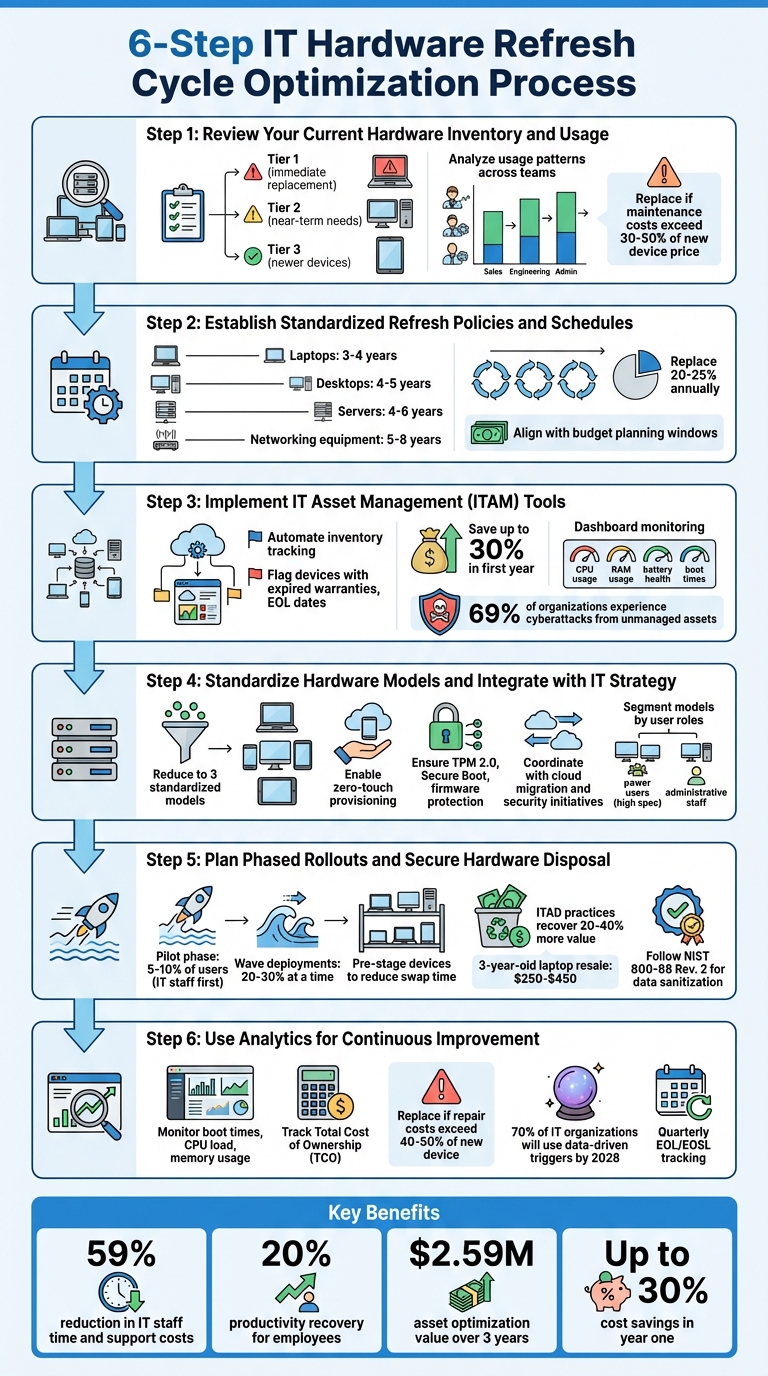
6-Step IT Hardware Refresh Cycle Optimization Process
[Webinar] Building your Hardware Refresh Plan!
sbb-itb-97f6a47
Step 1: Review Your Current Hardware Inventory and Usage
Start by taking a close look at your hardware inventory. The goal here is to identify devices that are nearing the end of their lifecycle. This step is essential for streamlining costs and ensuring your infrastructure runs smoothly.
Conduct a Complete Hardware Audit
Begin by collecting detailed information about every device in your setup. This includes purchase dates, warranty expiration dates, vendor support status (like EOL/EOSL), and performance metrics such as CPU usage, memory utilization, crash rates, and boot times.
Once you have this data, organize your devices into three categories:
- Tier 1: Immediate replacements. These are devices that are EOL, have expired warranties, or are showing active signs of failure.
- Tier 2: Near-term needs. These include devices that are still functional but out of warranty and may soon need attention.
- Tier 3: Newer devices. High-performing equipment that doesn’t need replacement in the foreseeable future.
Be sure to check for physical wear and tear, too. Look for issues like battery swelling, failing cooling fans, or cracked hinges - problems that might not show up in performance metrics but can signal imminent failure. Also, if maintenance costs for a device exceed 30% to 50% of the price of a new one, it’s likely time to replace it. With this audit complete, you’ll have a clear sense of your hardware’s condition and can start evaluating how different teams are using these devices.
Analyze Usage Patterns Across Teams
Not all teams use hardware the same way, so tailor your refresh cycles accordingly. For example, power users like developers, engineers, and designers typically need high-performance devices replaced every three years. On the other hand, administrative staff or those using kiosks can often manage with a five-year cycle.
IT asset management tools can help you dig deeper into usage data. Track metrics like CPU load, memory usage, and recurring error logs to spot devices that are struggling to keep up with demands. Set clear performance benchmarks - for instance, devices that consistently hit over 90% memory utilization, experience frequent application crashes, or have boot times that have doubled within six months are likely candidates for replacement.
This analysis can also help you optimize your resources. For example, a high-performance laptop that no longer meets the needs of a power user might still be suitable for general office tasks. Redeploying hardware in this way can stretch your budget and extend the lifecycle of your equipment.
Step 2: Establish Standardized Refresh Policies and Schedules
After mapping out your hardware inventory, the next step is to create clear replacement policies. This structured approach helps you avoid budget spikes, maintain consistent performance, and minimize downtime.
Define Optimal Refresh Cycles
Most organizations adopt a 3- to 5-year refresh cycle to balance cost, reliability, and performance. The specific timeline you choose will depend on the type of device and how it's used:
- Laptops: Typically replaced every 3–4 years due to battery wear and the physical demands of mobility.
- Desktops: Last around 4–5 years since they endure less physical stress.
- Servers: Often refreshed every 4–6 years, influenced by warranty expiration and advancements in power efficiency.
- Networking equipment: Can last 5–8 years, though upgrades may be needed sooner due to higher throughput demands or updated security protocols.
Each cycle length has trade-offs. A 3-year cycle ensures high performance and warranty coverage but requires higher upfront costs. On the other hand, a 5-year cycle reduces annual expenses but increases the risk of hardware failures and higher maintenance costs. For example, a nonprofit organization saved nearly $300,000 by extending the lifecycle of machines that were still performing well, based on employee feedback and performance metrics.
"The next generation of hardware refresh strategy is already here - and it's powered by data, not deadlines." - Nexthink
Instead of replacing all devices at once, consider a staggered approach. Replacing 20–25% of your hardware annually can smooth out costs and reduce the strain on your IT team.
Align Policies with Business Goals
Once you've determined your refresh cycles, ensure they align with your broader business objectives. Start by syncing replacement schedules with your budget planning windows. This alignment helps prevent unexpected expenses by tying refreshes to depreciation schedules and annual budgets. For leased equipment, cycles often follow the 24–36 month lease terms. Purchased assets, however, usually target 4+ years, offering more flexibility but requiring a larger upfront investment.
Security and compliance considerations should also guide your refresh policies. Older hardware may not support the latest operating systems or encryption standards, leaving your organization vulnerable. Coordinate refreshes with vendor End-of-Service-Life (EOSL) dates to ensure continued support and security patches. Companies that refresh servers every three years report a 59% reduction in IT staff time and support costs.
Your policies should also account for role-specific needs. High-performance machines are crucial for power users like developers and engineers, often requiring a 3-year refresh cycle. Meanwhile, administrative staff can often work effectively on a 5-year cycle. This approach reflects industry trends, as nearly 80% of businesses plan to refresh their PC portfolios by 2025. Outdated hardware impacts productivity, with employees losing about 20% of their time troubleshooting slow or unreliable devices.
Lastly, keep a close eye on warranty maturity. Aligning replacements with the end of manufacturer warranties can help you avoid costly repairs. For instance, the annual operating cost of an enterprise server can jump from $7,541 in its first three years to $22,511 per year afterward.
Step 3: Implement IT Asset Management (ITAM) Tools
Once you've completed a detailed audit and established your policies, the next step is to put IT Asset Management (ITAM) tools into action. Relying on spreadsheets for tracking may work initially, but as your organization grows, this method becomes prone to errors, lacks real-time updates, and quickly becomes overwhelming. ITAM platforms offer a better solution by providing visibility and automation to simplify your hardware refresh process.
Why ITAM Platforms Make a Difference
ITAM tools shift hardware refresh planning from guesswork to a precise, data-driven approach. These platforms automatically scan your network to catalog all hardware, ensuring no devices go untracked. This is especially important because, during initial inventory checks, many organizations find that 30% to 40% of their hardware is unaccounted for. For example, one enterprise discovered that 15% of its devices - worth around $500,000 - were either unused or missing.
By flagging underutilized devices and eliminating unnecessary purchases, ITAM platforms can save companies up to 30% in their first year of use. This is crucial, as 80% of IT costs occur after the initial purchase, including maintenance and inefficiencies.
"Companies that do ITAM well achieve around 30% cost savings in the first year by eliminating redundant purchases and reusing underutilized hardware." - Gartner
Modern ITAM tools also provide real-time dashboards that consolidate valuable metrics. These include details like assets with expired warranties, end-of-life dates, and performance data such as CPU and RAM usage. They can even monitor battery health, storage usage, and boot times - helping to identify devices that are starting to degrade before they fail completely.
Another critical advantage is improved security. 69% of organizations have experienced cyberattacks originating from unmanaged or unknown assets. ITAM tools help close these gaps by ensuring every device is accounted for and tracked against vendor end-of-life schedules, reducing risks associated with unsupported hardware.
Beyond these benefits, ITAM platforms also enable automation, which can significantly reduce manual effort and errors.
Automating the Refresh Process
The real strength of ITAM tools lies in their ability to automate tasks. These platforms use predefined rules to tag assets ready for replacement. For instance, they can flag devices that are older than five years, have battery health below 75%, or have depreciated to 25% of their original value. This eliminates the need for IT staff to manually sift through large inventories.
Take the example of a hospital that partnered with AMI in January 2025. By using the AssetTrack platform, they automated their refresh management process. Their "Hardware Refresh Forecast Report" now updates automatically every January 1st, showing exactly how many devices need replacement by model type and providing a financial breakdown for the next five years. This system removed the guesswork and ensured outdated equipment didn’t linger on the network.
Automation goes even further. Some ITAM platforms integrate with smart lockers for device provisioning and returns. Once a refresh is approved, a pre-configured device is placed in a locker for 24/7 self-service pickup. This reduces manual IT labor from days to just minutes. The system also tracks returns and initiates certified data wipes when a device is deposited.
For organizations with remote or distributed teams, automation can streamline phased rollouts. For example, you can schedule monthly replacements for a set percentage of your fleet - like 1/12th each month. The system calculates "Next Refresh Dates" by adding lifecycle thresholds (e.g., four years for laptops) to the original purchase date stored in the inventory. This approach aligns perfectly with proactive refresh strategies, keeping everything on track without overwhelming IT teams or budgets.
Step 4: Standardize Hardware Models and Integrate with IT Strategy
Simplify Support with Standardized Models
Once you've implemented ITAM tools, the next logical step is to streamline your hardware selection. Supporting a wide variety of devices can quickly become a logistical headache for your IT team. Imagine having to manage a dozen different laptop models - each with its own unique drivers, replacement parts, and quirks. It's a recipe for inefficiency. Reducing this variety to just three standardized models can significantly cut down on complexity and reduce the need for an extensive inventory of spare parts.
Standardization not only simplifies support but also boosts efficiency. When your IT team becomes highly familiar with a limited number of configurations, they can troubleshoot and resolve issues much faster. It also opens the door to "zero-touch provisioning", where pre-configured devices are shipped directly to employees, eliminating the need for manual setup by IT staff.
Another benefit is improved software compatibility. With everyone using the same hardware, security patches and software updates roll out smoothly across the entire fleet, avoiding those pesky "one-off" bugs that only affect certain models. Standardization also gives you negotiating power when purchasing devices - bulk orders of standardized models often come with better pricing and more favorable vendor terms. In short, standardizing hardware not only makes day-to-day support easier but also sets the foundation for aligning your hardware strategy with broader IT goals.
Coordinate Refreshes with Cloud and Security Initiatives
Standardized hardware becomes even more impactful when you align refresh cycles with cloud and security initiatives. A uniform hardware base not only simplifies IT operations but also ensures compatibility with modern cloud environments and security frameworks.
Hardware refreshes shouldn't be treated as isolated events. Instead, tie them to larger IT projects like cloud migration or strengthening your cybersecurity posture. For example, modern cloud-based tools and AI-driven applications require hardware capable of handling heavy workloads and advanced processing demands. Similarly, implementing Zero Trust security architectures calls for devices equipped with built-in security features.
Focus on devices with hardware-based security features, such as TPM 2.0, Secure Boot, and firmware protection, to meet today's security standards and compliance requirements. It's also important to align hardware refreshes with critical deadlines like operating system end-of-support dates. For instance, with Windows 10 support ending in October 2025, any devices that can't run Windows 11 should be marked for immediate replacement. Maintaining an end-of-life (EOL) calendar that tracks these deadlines across your hardware assets can help you stay ahead of potential issues.
To make the most of your budget, consider segmenting your standardized models into tiers based on user roles. High-performance laptops might be necessary for power users like developers and could follow a three-year refresh cycle. On the other hand, administrative staff handling basic tasks might do just fine with more affordable models refreshed every five years. This approach balances performance needs with financial constraints while preserving the benefits of standardization.
Step 5: Plan Phased Rollouts and Secure Hardware Disposal
Minimize Downtime with Phased Rollouts
Once your hardware is standardized and aligned with your IT strategy, it’s time to replace outdated devices. To avoid disruptions, roll out the replacements in phases. This approach ensures smooth operations while tackling the technical challenges that come with large-scale deployments.
Start small with a pilot phase, involving 5–10% of your users, focusing on IT staff and tech-savvy employees. This allows you to identify and resolve deployment issues early on. As Todd Leach, CCO at Synetic Technologies, puts it:
"Refreshing the IT department first lets you work out bugs in deployment procedures before rolling out to the rest of the organization".
During the pilot, thoroughly test processes like device imaging, application compatibility, helpdesk scripts, and user communication templates.
After the pilot, move to wave deployments, replacing 20–30% of devices at a time. Organize these waves by department or location to manage workloads effectively and refine your process between waves. Pre-stage devices by unboxing, imaging, and configuring them beforehand to cut onsite swap time from hours to minutes. Be prepared for a spike in helpdesk activity - volume may triple after each wave. Assign dedicated teams to handle this surge and prevent disruptions.
Adopt Secure IT Asset Disposal (ITAD) Practices
As you deploy new devices, don’t overlook the importance of securely disposing of outdated hardware. Proper IT asset disposal (ITAD) safeguards sensitive data, ensures compliance, and helps recoup value. Structured disposal schedules can recover 20–40% more value compared to uncoordinated methods. For instance, a 3-year-old business laptop can sell for $250–$450 on secondary markets. In a 500-device refresh, this could mean recovering $125,000 to $225,000.
Start by physically tagging and serializing each device and its components. Use a two-person verification system during removal - one person handles the equipment while another cross-checks serial numbers with your inventory to prevent losses. For data sanitization, follow NIST 800-88 Rev. 2 standards, which outline Clear, Purge, and Destroy methods based on data sensitivity. For modern storage devices like NVMe and SSDs, adhere to IEEE 2883-2022 protocols, as traditional methods like overwriting or degaussing may not work for flash-based media.
When selecting an ITAD vendor, choose those with R2v3 or e-Stewards certifications to ensure compliance with environmental and export regulations. Always request a serialized Certificate of Data Destruction and a Certificate of Recycling for every asset - these are critical for audit compliance. Remember, hardware loses about 15–20% of its value annually in secondary markets, so delaying disposal by six months can significantly reduce recovery value.
Step 6: Use Analytics for Continuous Improvement
Monitor Post-Refresh Performance
Once your hardware refresh is complete, the next step is to assess whether it delivered the results you were aiming for. Monitoring performance is key to understanding what worked, what didn’t, and how you can fine-tune your approach for future cycles.
Keep an eye on critical metrics like boot times, CPU load, and memory usage. For example, if memory utilization consistently exceeds 90% or you notice a spike in application crashes, it’s a clear sign to adjust your strategy. Tools like Digital Employee Experience (DEX) data can also help pinpoint devices that don’t need immediate replacement, even if they’ve hit traditional refresh cycle milestones. By focusing on software optimizations for such devices, you can significantly cut down on refresh costs.
Financial data is just as important as technical metrics. Track your Total Cost of Ownership (TCO) by comparing the costs of repairing aging devices to the cost of replacing them. If repair expenses exceed 40–50% of the price of a new device, it’s time to rethink your strategy. Gartner predicts that by 2028, 70% of IT organizations will rely on data-driven triggers for PC replacements rather than sticking to fixed timelines. For example, one nonprofit saved nearly $300,000 by using real-time performance metrics and employee sentiment data to extend device lifecycles beyond the standard three-year window.
Combining technical metrics with employee feedback is especially valuable. Automated logs might miss subtle issues that employees experience daily. A study by Omdia in 2026 on SHI's Intelligent Refresh Program showed that a data-driven approach to device lifecycles created $2.59 million in asset optimization value over three years. It also led to a productivity boost equivalent to 20 full-time employees by the third year. Using this kind of performance data, alongside market trends, can help you refine your refresh strategy even further.
Track Vendor and Market Trends
A successful hardware refresh strategy requires staying informed about vendor and market developments. Timing your purchases strategically can help you avoid unnecessary costs and disruptions.
Keep a quarterly schedule of End-of-Life (EOL) and End-of-Service-Life (EOSL) dates for all hardware and software. This ensures you’re prepared to replace devices before they become security risks or parts become unavailable. Aligning hardware updates with major OS releases or security patch deadlines can also help you avoid running unsupported systems.
Post-refresh data can reveal patterns, like which vendor models are prone to failure or generate more help desk tickets. Use these insights to guide your next round of procurement. Additionally, tracking IT Asset Disposition (ITAD) reports can show which vendors offer the highest resale value, helping you make smarter budget decisions.
Consider segmenting your workforce into refresh tiers based on actual performance data. For example, power users like developers might need new devices every three years, while task-based users could extend their device usage to five years without impacting productivity. This tiered approach not only smooths out capital expenditures but also ensures employees have tools tailored to their needs. By continuously analyzing data, you can validate your replacement decisions and refine your procurement strategies, setting your hardware refresh cycles up for long-term success.
Conclusion: Optimizing Hardware Refresh Cycles for Long-Term Success
Refreshing your hardware isn’t just about swapping out old devices - it’s about making smart, forward-thinking decisions that bring measurable benefits. By using the six steps covered in this guide, you can move away from last-minute, crisis-driven spending and adopt a predictable, data-driven approach. This shift helps lower total ownership costs while boosting both security and productivity.
A proactive refresh strategy can significantly reduce operating costs and reclaim valuable time for your team. In fact, businesses can see substantial savings and productivity improvements, with employees recovering about 20% of their lost efficiency. This regained time allows your workforce to focus on driving growth and innovation.
"A well-executed IT hardware refresh planning initiative is not only about replacing old equipment - it's a strategic endeavor that ensures business continuity, security, and competitiveness." - Loma Technology
While a standard 3–5 year refresh cycle works for most devices, it’s crucial to let real-time performance data guide your decisions. High-priority infrastructure might need more frequent updates, while less critical equipment can often stretch beyond traditional timelines if performance metrics support it. Aligning these updates with fiscal planning ensures smooth execution and optimal resource use.
By continuously monitoring performance and refining your strategy based on actual data, you can maintain a modern, secure, and cost-efficient IT environment. Keeping an eye on vendor lifecycles and adjusting your approach ensures your organization stays competitive and well-prepared for the future.
For more tailored IT strategies and expert insights, check out Top Consulting Firms Directory.
FAQs
How do I choose the right refresh cycle for each device type?
When deciding on the ideal refresh cycle for your hardware, it's important to consider the lifecycle, performance, and specific operational requirements of each device type. Generally, hardware is updated every 3–5 years, taking into account factors like depreciation, warranty coverage, and potential performance drops over time.
For a more customized approach, assess key aspects such as the device's current age, warranty status, and any associated security risks. Servers and network infrastructure often have longer or staggered refresh cycles because of their complexity and critical importance to operations. Ultimately, your refresh strategy should balance performance, security requirements, and budget constraints.
What data should trigger a replacement before the set schedule?
When it comes to replacing hardware earlier than planned, there are a few key triggers to watch for: hardware failures, performance issues, and warranty expiration. If you notice your systems slowing down, support costs climbing, or warranties running out, it’s likely time to consider an upgrade. Older hardware often leads to more downtime, higher security vulnerabilities, and increased maintenance expenses. Taking a proactive approach to replacement can help keep operations running smoothly and minimize potential risks.
How can I refresh hardware without disrupting users or downtime?
To update hardware smoothly and without causing disruptions, careful planning and a phased approach are essential. Begin by conducting a comprehensive inventory to pinpoint which devices require upgrades. Stick to a standardized replacement cycle, such as every 3-5 years, and stagger the upgrades to reduce any potential impact on daily operations.
Automating provisioning processes can save time, while clear communication of maintenance schedules ensures everyone is informed and prepared. Additionally, using remote management tools can help streamline the upgrade process, keeping productivity intact. The combination of thorough planning and automation is critical to avoiding downtime and minimizing interruptions for users.