Mobile CRMs are no longer optional - they’re essential tools for businesses in 2026. With over 8 billion smartphone users worldwide and the mobile CRM market projected to reach $24.98 billion this year, having a tailored CRM can save your team time, reduce errors, and shorten sales cycles. But not all CRMs are created equal. To truly make your CRM work for your team, focus on these seven must-have features:
- Offline Access: Work without internet by storing data locally and syncing later.
- Customizable Dashboards: Display only the most relevant information for quick decisions.
- Real-Time Notifications: Stay updated on key events and leads instantly.
- Integration Capabilities: Sync with tools like email, calendars, and ERP systems to streamline workflows.
- Task and Activity Management: Organize tasks, log activities, and automate repetitive processes.
- Advanced Analytics and Reporting: Access real-time insights and predictive metrics for smarter decisions.
- AI-Powered Personalization: Automate recommendations, lead scoring, and dynamic pricing to boost efficiency.
These features help teams save 5–10 hours per week, reduce sales cycles by up to 14 days, and ensure no opportunities are missed. Start by identifying which features will have the biggest impact on your team’s productivity.
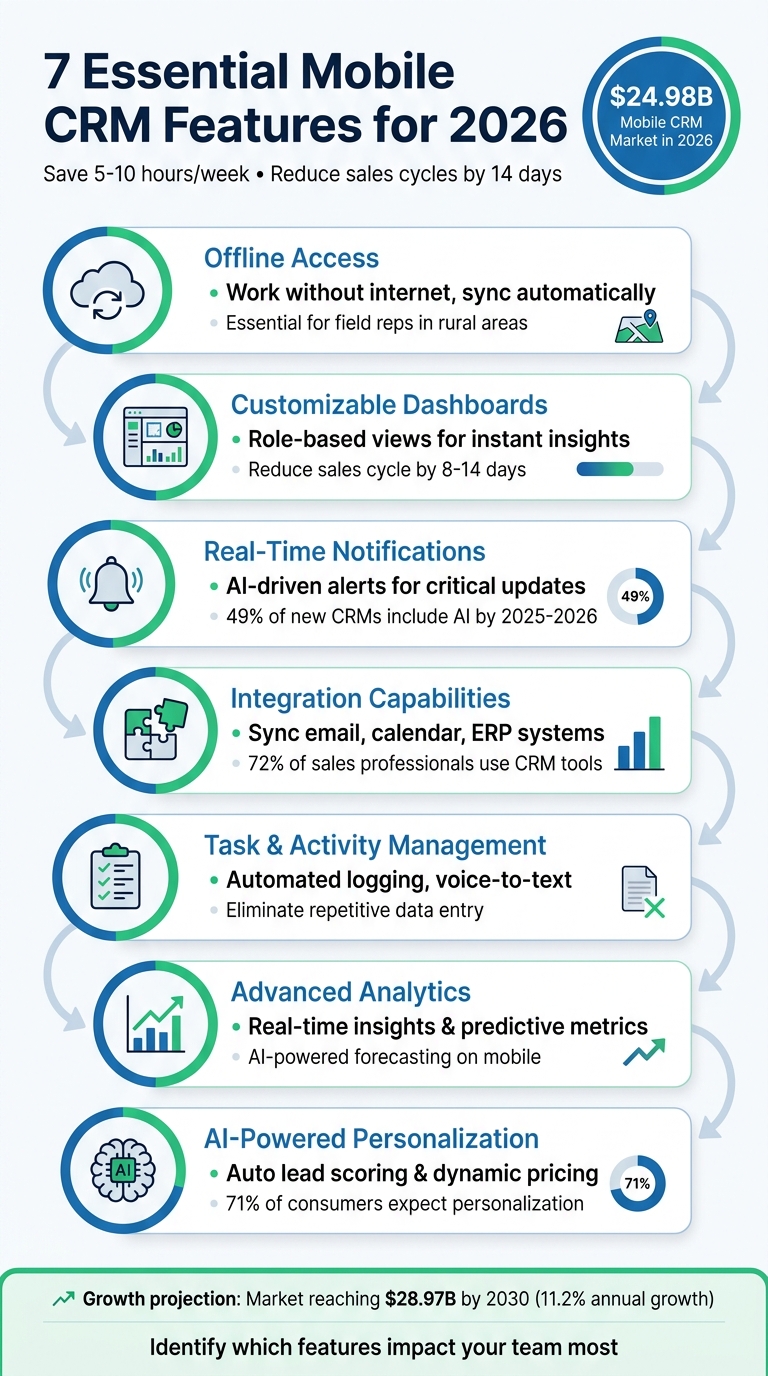
7 Essential Mobile CRM Features That Save 5-10 Hours Weekly
1. Offline Access
Boosts Productivity and Keeps Teams Connected
Just because the Wi-Fi cuts out doesn’t mean the work stops. With offline access, your team can keep logging meeting notes, updating deal stages, and adding new contacts - even without an internet connection. This feature ensures that downtime, which used to frustrate traveling sales reps, is a thing of the past.
How does it work? Offline mode stores essential data locally on the device and syncs it automatically once the connection is restored. This eliminates the risk of losing information and saves your team from the hassle of entering data twice. For field reps working in rural areas or places with spotty coverage, this is a must-have.
"With offline functionality, you can be sure that no details are missed. Hence, look out for this feature when you are selecting a mobile CRM. We would say it is non-negotiable!" – Lystloc
Enhances Workflow and Reduces Errors
Productivity isn’t just about staying busy - it’s about capturing details in real time. Offline access allows reps to immediately document key insights after a client meeting, even in areas with poor connectivity. Capturing data on the spot minimizes errors and helps avoid forgetting important details later.
Different CRM platforms offer varying levels of offline functionality. For example, tools like Salesforce and HubSpot provide robust offline features, enabling users to create tasks and update deal stages seamlessly. On the other hand, platforms like Pipedrive offer more basic offline options, such as viewing records and taking notes. Some, like monday CRM, have faced challenges with saving edits or creating duplicate entries when reconnecting. To ensure smooth syncing, test offline features by switching to airplane mode before committing to a platform.
sbb-itb-97f6a47
2. Customizable Dashboards
Improves User Experience and Workflow Efficiency
Imagine this: your sales rep is standing in a client's lobby with almost no time to prepare. They need immediate access to key details - like account history, open deals, and recent interactions. A customizable dashboard makes this possible by displaying only the essentials on a single screen, cutting out the need for endless clicking and searching.
The secret lies in role-based personalization. A field rep, for example, benefits from seeing their pipeline and upcoming tasks. Meanwhile, a manager might prioritize team performance metrics and approval requests. When the dashboard is tailored to show only what's relevant, the CRM becomes a powerful, easy-to-use tool. This setup not only saves time but also supports quick, informed decision-making.
"With Lark, we automated complex workflows without writing a single line of code. It's secure, mobile, and built for how we work today." – Arvin Reyes, Head of IT at 7-Eleven Philippines
Customizable dashboards tackle inefficiencies head-on by replacing clunky, one-size-fits-all interfaces with streamlined views that align perfectly with user needs. Paired with offline access, these dashboards deliver a seamless mobile CRM experience, keeping teams productive no matter where they are.
Enables Data-Driven Decision-Making
Custom dashboards don’t just make life easier - they also empower smarter decisions. Real-time access to key metrics like pipeline value, conversion rates, and deal progress allows managers to make adjustments on the fly, even while in the field. Modern dashboards now go a step further, offering predictive insights like deal health scores and win probabilities right on the home screen.
The mobile CRM market is expanding at a rate of 11.2% annually and is expected to hit $28.97 billion by 2030. Features like AI-powered dashboards are a big driver of this growth. By 2025–2026, nearly 49% of new mobile CRM solutions will include AI-driven suggestions, offering actionable recommendations based on your data. This evolution is shifting CRMs from static data repositories to active tools that assist in selling.
To get the most out of your dashboard, focus on displaying only the most critical metrics and use role-based access to minimize distractions. A well-optimized dashboard can shave 8 to 14 days off your average sales cycle by ensuring the right information is always at your fingertips when decisions need to be made.
3. Real-Time Notifications
Boosts Productivity and Keeps You Connected
Real-time notifications take your mobile CRM from being a passive tool to an active assistant that ensures you stay on top of critical updates, no matter where you are. Picture this: a key lead takes action, or a meeting is just around the corner - instant alerts ensure you’re always in the loop. Field agents, for instance, can receive push notifications directly on their lock screens, saving them from the hassle of constantly checking the app.
Advanced systems like Salesforce's Einstein and Freshsales' Freddy AI take this a step further. These AI-driven platforms send helpful nudges, flagging deals that are stalling, suggesting the next steps, or prioritizing leads using scoring algorithms. The result? Your team can act faster and smarter. In fact, CRM systems equipped with such features can save employees between 5 and 10 hours of manual work every week.
Integrates Seamlessly with Everyday Tools
The true potential of notifications shines when your mobile CRM integrates effortlessly with the tools your team already relies on. For example, syncing with calendars and collaboration apps ensures alerts about meetings or deals are delivered without a hitch. For field teams, location-based triggers are a game changer - imagine being notified when you’re near a prospect’s office or getting a reminder to log a visit as soon as you arrive at a client’s location. These integrations turn your CRM into a hub that keeps your entire business coordinated and efficient.
Drives Quick, Data-Informed Decisions
Notifications don’t just inform - they empower action. When a lead’s status changes or there’s a shift in customer behavior, real-time alerts based on data insights enable your team to make swift, informed decisions.
"The sales and marketing teams can access the dashboards on the go and ensure they are connected to real-time data and insights. This will help them monitor sales metrics, track customer interactions, and adjust strategies instantly from anywhere." – Freshsales
AI-powered notifications are gaining traction fast. By 2025–2026, nearly 49% of new mobile CRM implementations will include AI-driven recommendations that suggest specific actions based on predictive analytics. Instead of relying on outdated methods, your team will receive actionable insights - like which lead to focus on or when to follow up - delivered straight to their devices. Setting up alerts for high-priority events, such as stalled deals or high-value leads engaging with your emails, ensures your pipeline stays active and opportunities don’t slip through the cracks.
4. Integration Capabilities
Supports Integration with Business Tools
Integration transforms your mobile CRM into a central hub for essential business tools. By syncing with email providers like Gmail and Outlook, it automatically logs calls, meetings, and messages - eliminating the need for repetitive data entry and ensuring no critical details are overlooked. When connected to collaboration platforms such as Slack or Lark Messenger, your team can initiate group chats or video calls directly from a client profile, keeping the momentum going without toggling between apps.
Top-tier mobile CRMs also integrate with back-office systems like ERP, HRMS, and customer support platforms. This means field reps can instantly access invoices, order histories, active support tickets, and even employee performance metrics. With 72% of sales professionals actively using CRM tools, consolidating information from multiple systems into one platform has become crucial for staying ahead. This seamless connectivity not only improves efficiency but also reduces errors, creating a smoother workflow.
Improves Productivity and Accessibility
Integration can save employees 5 to 10 hours of work each week by removing the need for manual data entry. Real-time syncing between mobile and desktop ensures that updates made in the field are immediately visible to the entire team, enhancing collaboration and minimizing mistakes. For example, when a field rep closes a deal on their mobile device, automated triggers can instantly send approval requests through messengers or update project management boards without requiring additional input. This kind of instant coordination allows teams to act quickly and make well-informed decisions.
Enables Data-Driven Decision-Making
Integration doesn’t just save time - it also empowers smarter decisions by consolidating data from various sources. Breaking down data silos allows your mobile CRM to provide a full 360-degree view of each customer by pulling information from accounting, marketing, and support systems. Companies with poor mobile CRM experiences report 23% lower data accuracy, which can lead to missed opportunities and flawed strategies. Integrated analytics give field reps access to real-time performance graphs and customer feedback, enabling them to adapt their approach on the fly. In fact, using a CRM has been shown to reduce the average sales cycle by 8 to 14 days, largely due to having the right information available at the right time.
5. Task and Activity Management
Enhances Workflow and User Convenience
Task and activity management turns your mobile CRM into a one-stop hub for keeping your workflow organized and accessible. Instead of juggling between different tools for tasks, emails, and notes, you can handle everything - logging calls, updating contact records, and scheduling follow-ups - all from a single platform. This is especially useful for field reps who need to quickly capture details between meetings, whether it’s jotting down notes from a client discussion or updating the status of a deal while on the move.
Many modern mobile CRMs also include AI-powered features that nudge users to follow up with inactive leads or suggest the next best steps. These intelligent tools help teams focus on the most pressing tasks, ensuring nothing slips through the cracks. The convenience extends further with automated logging and voice-assisted updates, making task management even more seamless.
Boosts Productivity and Accessibility
Automated activity logging is a game-changer, capturing calls, emails, and meetings and updating contact timelines automatically. This eliminates much of the repetitive data entry, keeping records accurate and saving valuable time.
Features like voice-to-text transcription and offline functionality make data entry even easier. Agents can dictate notes while on the go, and the CRM will transcribe them automatically - even without an internet connection. These tools ensure that every interaction is recorded, no matter where you are. With offline access and real-time notifications, mobile CRMs ensure field reps stay connected and efficient, no matter the circumstances.
6. Advanced Analytics and Reporting
Enables Data-Driven Decision-Making
Advanced analytics transforms your mobile CRM into a powerful decision-making tool. With mobile-optimized dashboards, managers can visualize sales data and track team performance from anywhere. This flexibility allows for quick strategy shifts without the need to return to the office. By leveraging historical data, the system can predict customer behavior, segment markets, and even highlight commonly paired products.
Features like offline access and fully customizable dashboards ensure decisions are always based on real-time, actionable insights. Tracking key metrics such as conversion rates, email open rates, and sales cycle lengths becomes effortless - right from your phone. These tools also calculate customer lifetime value and uncover data relationships, providing critical support for long-term planning.
Improves User Experience and Workflow Efficiency
Visual dashboards simplify complex data into easy-to-understand charts and trackers, all designed for quick, one-handed use. AI-powered tools further reduce administrative tasks by summarizing recent meetings, preparing call scripts, and creating detailed account profiles. This means more time is spent selling and less time on manual data entry.
"The mobile app allows your team to use AI on the go to compile account profiles, summarize activities from recent meetings, and prepare call scripts, which means less manual data entry." - Jennifer Taylor, Product Demand Generation Specialist, Lark
Predictive insights, such as sales forecasts, help users focus on high-priority tasks and address potential issues proactively. Custom views, filters, and tags created on desktop sync seamlessly with mobile, ensuring a smooth, uninterrupted workflow across devices. With nearly half of new mobile CRM implementations in 2025–2026 expected to include AI-driven suggestions, these intelligent features are quickly becoming essential.
Supports Integration with Business Tools
Advanced analytics becomes even more powerful when paired with seamless integration across business tools. Mobile CRM systems can pull data from platforms like QuickBooks, NetSuite, Mailchimp, HubSpot, and Zendesk, creating a unified view of your operations. This integration shifts the CRM from being a simple repository to acting as an "operations assistant" that actively helps run your business.
"Integrations aren't 'nice to have.' They're the difference between a CRM that runs the business and a CRM that stores the business." - Manoj Bhuva, CRM Development Expert
Real-time data syncing eliminates delays, ensuring reports and forecasts are always based on the latest information. When setting up your mobile CRM, prioritize an API-first architecture to enable smooth data flow with tools like ERPs or payment gateways. Mobile dashboards should focus on answering specific, actionable questions - like "Which deals are at risk today?" - rather than overwhelming users with dense, hard-to-navigate reports.
Sage CRM: Customizing the Mobile Interface: Tailoring the screens
7. AI-Powered Personalization
AI-powered personalization takes mobile CRM to the next level by using advanced analytics to create real-time, tailored interactions.
Enhances User Experience and Workflow
With AI, mobile CRM interfaces adapt to individual work habits, improving usability and efficiency. For instance, modern systems can reorganize widgets based on how users interact with them, providing a more personalized layout. Predictive interfaces also come into play, offering smart suggestions and pre-filled forms that help users save time.
Here’s a telling statistic: 71% of consumers expect personalized experiences, while 76% feel frustrated when they don’t get them. Mobile CRMs address this by analyzing user engagement patterns to determine the best times and channels for outreach. A great example is Starbucks and its "Deep Brew" AI platform. This tool suggests menu items based on factors like location, weather, and past orders, all through its mobile app.
Drives Data-Backed Decision-Making
AI doesn’t just personalize - it also empowers decision-making. AI-powered lead scoring, for example, ranks prospects by analyzing behavioral signals. Tools like Freshsales use predictive models to identify leads with high purchase intent or to forecast risks like customer churn. This allows businesses to address potential issues before they escalate. Yves Rocher, for instance, saw an 11x increase in purchase rates and 17.5x more clicks on recommended items within a minute of implementing Bloomreach Engagement.
Dynamic pricing is another AI-driven feature, adjusting prices based on factors like demand, competition, and customer behavior. This helps sales teams structure better deals. During Black Friday in November 2023, Bash, a fashion platform, used Bloomreach Clarity’s conversational shopping agent to achieve a 35.2% boost in online conversion rates and a 39.8% rise in revenue per visit.
These capabilities don’t operate in isolation - they integrate seamlessly into broader business systems.
Integrates with Business Tools
AI personalization becomes even more effective when it taps into your existing tools and platforms. By analyzing data from sources like Gmail, Outlook, and Slack, AI ensures a consistent and tailored experience across various channels, including mobile apps, email, and social media.
"AI-driven hyperpersonalization is transforming mobile experiences by utilizing customer data, predictive analytics, and data analytics to deliver highly customized, real-time interactions." – Łukasz Kincel, Head of Innovation, Nomtek
Features like voice-to-text simplify workflows by automatically logging notes, cutting down on manual data entry. For businesses looking to dive into AI personalization, a smart starting point is to focus on impactful areas - like using generative AI to create push notification variants and testing them against current approaches to measure success.
Conclusion
To optimize your mobile CRM, concentrate on these seven essential features. Offline access keeps your team productive even in areas with limited internet. Customizable dashboards ensure everyone sees the data that matters most. Real-time notifications help reps act at the right moment, while integration capabilities eliminate redundant data entry. Task management tools capture critical details instantly, advanced analytics provide up-to-the-minute insights, and AI-powered personalization turns your CRM into a proactive assistant. Together, these features create a seamless, efficient experience.
The numbers highlight the growing importance of mobile CRM. By 2030, the market is expected to hit $28.97 billion, with an annual growth rate exceeding 11%. And with over 8 billion smartphone users globally by 2026, mobile-first functionality is no longer optional - it’s essential for staying competitive.
To get started, identify which of these features will have the biggest impact on your team’s workflow. Be strategic with notifications to avoid overwhelming users - stick to high-priority alerts like lead assignments and task deadlines. Encourage your team to log interactions immediately for accuracy, turning your CRM into their go-to resource.
If you’re unsure how to tailor your CRM to your business needs, expert advice can make all the difference. The Top Consulting Firms Directory connects businesses with IT and CRM consultants who specialize in customizing systems to fit specific workflows and industry demands. These professionals can help you sidestep technical issues and maximize your CRM’s potential.
"The right mobile CRM doesn't just mirror your desktop - it makes your workday lighter when you're away from it." – Michael Scheiner
FAQs
Which 1–2 mobile CRM features should we customize first?
Begin by tailoring offline access and integration capabilities to meet your needs. With offline access, field teams can stay productive even when there's no internet connection. Meanwhile, integration capabilities allow for effortless data syncing with other systems, ensuring operations run smoothly and without interruptions. These two features are key to keeping workflows efficient and connected.
How can we prevent offline sync from creating duplicate records?
To keep duplicate records at bay during offline sync, assign a temporary unique ID to each record created offline. Once syncing begins, the server can use this ID to check for existing records and avoid duplication. On top of that, you can set up duplicate prevention measures, like alerts or blocking duplicate entries during manual data input. These methods help streamline synchronization and keep your data organized and error-free.
What should we integrate with a mobile CRM first?
One of the key features to prioritize in a mobile CRM is offline access. This allows users to continue working seamlessly, even in areas with poor or no internet connection. Whether you're traveling, in a remote location, or experiencing network issues, offline access ensures that productivity doesn't take a hit. With this capability, you can view and update important data anytime, ensuring your work remains uninterrupted regardless of connectivity challenges.