If your team needs fast drafting, pick Google Docs. If you need a durable team wiki with Jira links and tighter control, pick Confluence. For many mid-market teams, the best model is Docs first, Confluence second.
I’d frame the decision around 4 checks:
- Editing speed - Google Docs is stronger for live writing, comments, and review during meetings
- Structure and search - Confluence is stronger for spaces, page trees, and long-life documentation
- Permissions and governance - Confluence gives more control at the space and page level
- Ecosystem fit - Google Docs fits Google Workspace, while Confluence fits Jira-centered delivery teams
Cost is close enough that it usually does not decide the outcome. Google Workspace starts at $6/user/month and Confluence Standard sits around $5.42 to $6.05/user/month in the U.S. In most cases, I’d make the call based on workflow fit, not license price.
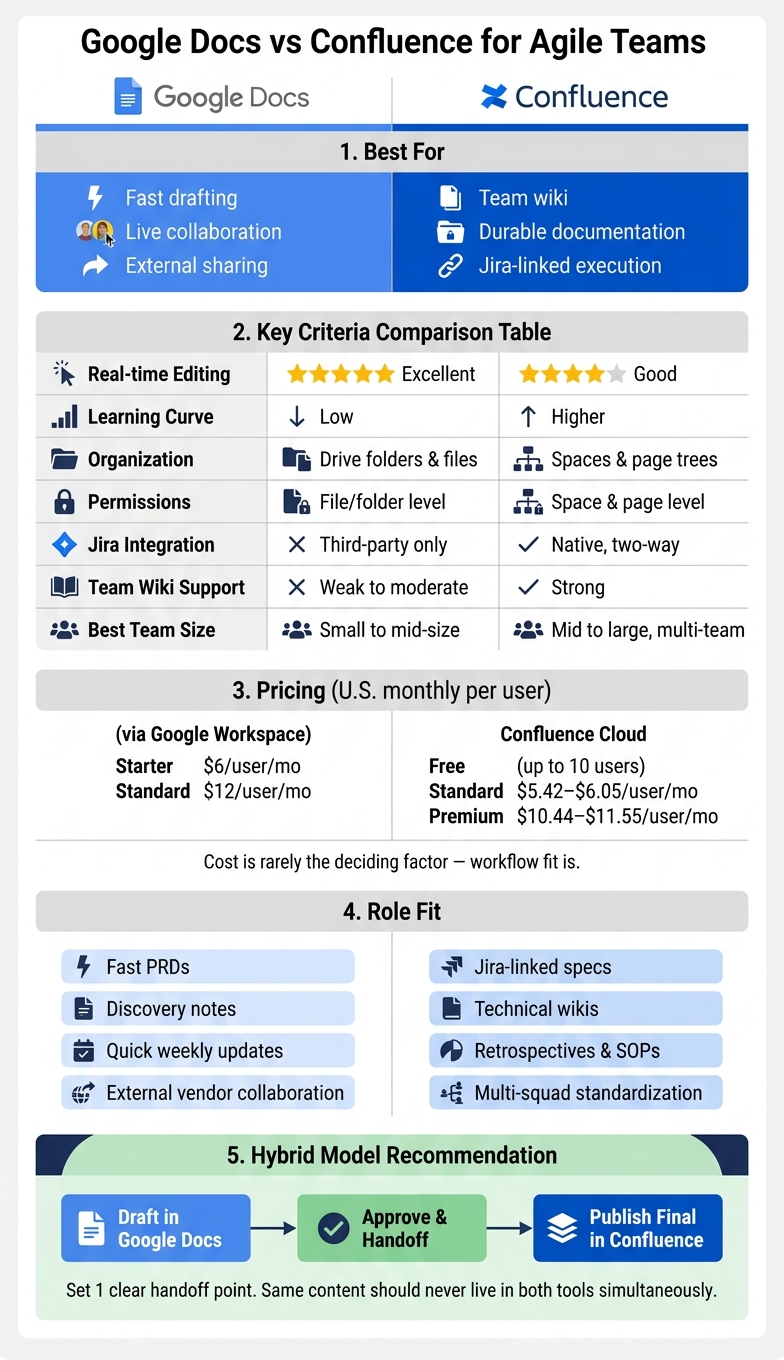
Google Docs vs Confluence for Agile Teams: Side-by-Side Comparison
Confluence vs Google Docs: Why they switched from Google Docs to Confluence
sbb-itb-97f6a47
Quick Comparison
| Criteria | Google Docs | Confluence |
|---|---|---|
| Best use | Live drafting and review | Team wiki and durable documentation |
| Editing | Strong real-time co-editing | Good, but more process-oriented |
| Organization | Drive folders and files | Spaces and page trees |
| Permissions | File and folder sharing | Space and page controls |
| Jira fit | Limited without add-ons | Native integration |
| Learning curve | Low | Higher |
| Best for | Small-to-mid teams moving fast | Multi-team groups needing order |
| Common model | Drafting | Final source of record |
My short take: if you run product and delivery reviews in live documents, Google Docs will feel better day to day. If leadership needs one place for specs, SOPs, decision logs, and Jira-linked execution, Confluence will hold up better over time. If you want both, set 1 clear handoff point so teams draft in Docs and publish final versions in Confluence.
Google Docs for agile teams
Editing speed, comments, and live collaboration
Google Docs is the better fit when the job is live decision-making and fast drafting. Its live co-editing lets multiple people work in the same file at the same time with little delay.
That matters in sprint planning, discovery, and retrospectives, where the team needs to write while the discussion is still moving. Suggestions mode lets people propose edits without replacing the original text. Inline comments keep feedback attached to the exact sentence or paragraph in question. You can also @mention a teammate to pull them into a thread, and comments can turn into assigned action items.
That speed handles creation. Structure determines whether the document still works after the meeting ends.
Training time is low. Most teams already know Google Docs, so new hires and outside contractors can usually contribute on day 1.
Organization, permissions, and team visibility
Google Docs works well for drafting, but file control gets harder as volume grows. Agile docs often start in a meeting and still need to be usable after the sprint ends. Live collaboration only helps if people can find the document later.
Docs relies on Drive folders rather than a wiki-style setup. That can work for smaller teams. As the team grows, though, files can end up spread across personal drives and shared folders.
Shared Drives are usually the better choice for team-owned docs. They keep team documents available after employees leave. Since Google Docs does not include a native wiki setup, teams also need clear naming rules and folder discipline if they want search to stay useful.
Permissions are simple: view, comment, or edit at the file or folder level. For most teams, that covers the basics. It does not give you the same level of control as a wiki platform.
When Google Docs is the right fit
Use Google Docs when speed matters more than long-term knowledge structure. If your team already runs on Google Workspace, the links with Gmail, Calendar, and Google Meet keep documents close to the conversations where work happens.
It works well for product squads writing lightweight PRDs and for teams that work often with outside partners. Google Docs is at its best when collaboration needs to be fast and light. It starts to fall short when those same documents need to serve as a lasting team wiki. When the goal shifts from drafting to long-term knowledge management, Confluence handles that structure better.
Confluence for agile teams
Confluence is the better fit when the job is long-life team documentation, not just fast drafting. Google Docs is faster for quick edits. Confluence is better at turning day-to-day notes into documentation teams can still use months later.
Page structure, spaces, and wiki management
Confluence organizes content through spaces and page trees. Spaces are set up for a team, project, or department. Page Trees let teams nest related documents in a parent-child structure, so connected docs stay together.
That structure starts to pay off as page count grows. It makes navigation simpler and keeps documentation from turning into a loose pile of files. Confluence also includes agile templates for product requirements, meeting notes, retrospectives, and decision logs. That helps teams use the same format for repeat work and cuts down on inconsistency.
The risk is simple: without ownership, pages age out fast. Assign an owner to each space and archive inactive pages on a set cadence.
This is where Confluence tends to win - when documentation has to stay useful after the sprint is over.
Comments, permissions, and governance
Confluence supports inline comments tied to specific text, along with page-level comments. The bigger difference is permissions. Teams can set access at the space level and lock down individual pages when a document needs tighter control.
That matters when product, engineering, and delivery teams should not all have the same level of access. In companies with many teams, that level of governance makes it easier to control who can view or edit sensitive material.
When Confluence is the right fit
Confluence earns its place when documentation needs to outlast the sprint. Jira integration connects pages to issues and keeps traceability in place. Those Jira links help keep decisions tied to execution.
It also fits organizations building an internal wiki that multiple teams depend on, such as onboarding guides, SOPs, architecture references, and runbooks.
Next, compare both tools on speed, structure, comments, permissions, and cost.
Head-to-head comparison by agile criteria
The main tradeoff is drafting speed vs. long-term structure.
Editing speed, structure, and discoverability
Google Docs is better for fast, live drafting. Confluence is better for structured documentation that needs to hold up over time. That’s the core split.
Google Docs handles simultaneous editing with very little lag, which makes it a strong fit for working sessions, PRD drafts, and meeting notes. Confluence is less about raw drafting speed and more about putting work into a system that teams can revisit later.
Search and findability follow that same pattern. Google Docs search works well across Drive, but file sprawl can become a problem as teams and shared drives multiply. Confluence relies more on page hierarchy, spaces, and wiki navigation, which can make knowledge easier to find later if the system is maintained.
| Criteria | Google Docs | Confluence |
|---|---|---|
| Real-time editing | Excellent for simultaneous drafting | Good, but built for structured workflows |
| Learning curve | Low for most users | Higher - spaces, templates, and macros take time |
| Organization model | Folders and files in Drive | Spaces, nested pages, and wiki navigation |
| Team wiki support | Weak to moderate | Strong |
| Cross-team discoverability | Can decline as files spread across drives | Better for centralized, durable knowledge |
Speed matters early. Control and system design matter later. In practice, permissions and integrations often determine whether a document stays useful after the meeting ends.
Comments, permissions, and integrations
Both tools handle comments well, but the review model is different.
Google Docs keeps review simple. Suggestions mode is fast, familiar, and easy to use, which helps when teams need quick turnaround on drafts. Confluence supports inline comments too, along with page-level comments and page-based review workflows. That gives teams more process, which can help when documentation needs signoff or tighter coordination across functions.
Permissions are a bigger separator. Google Docs uses file- and folder-level sharing. It’s flexible, but simpler. Confluence gives more control at the space and page level. That matters when product, engineering, and delivery teams should not all have access to the same material.
For integrations, Confluence has the edge if Jira sits at the center of delivery work. It supports native, two-way integration, so teams can link pages directly to issues and embed Jira macros inside documentation. Google Docs typically relies on third-party connectors for Jira.[3]
| Criteria | Google Docs | Confluence |
|---|---|---|
| Inline comments | Strong and easy to use | Strong |
| Review workflow | Suggestions mode - simple and fast | Page-based review workflows |
| Permission granularity | Flexible, but simpler | Stronger space and page-level controls |
| Jira integration | Basic - third-party connectors | Deep native integration |
| Slack integration | Common via Google Workspace workflows | Common via Atlassian and Slack workflows |
| Google Workspace fit | Native | Works with Workspace, but not natively |
Cost and role fit in the United States
For U.S. teams, cost rarely decides the deal on its own. Role fit usually does.
Google Workspace starts at $6/user/month for Business Starter and $12/user/month for Business Standard.[2][4] Confluence Cloud includes a free plan for up to 10 users, with Standard at $5.42-$6.05/user/month and Premium at $10.44-$11.55/user/month.[1][3] The pricing is close enough that workflow fit tends to matter more than license cost.
A simple way to frame it: Google Docs works well when teams need speed, low friction, and broad familiarity. Confluence fits better when the goal is standardization, documented process, and Jira-linked execution across multiple teams.
| Role | Google Docs | Confluence |
|---|---|---|
| Product managers | Fast PRDs, discovery notes | Jira-linked specs |
| Engineers | Technical notes, lightweight drafts | Technical wikis, Jira-linked pages |
| Delivery leads | Quick weekly updates | Retrospectives, SOPs |
| Program teams | Best when simplicity matters across smaller teams | Better for standardization across multiple squads |
The recommendation depends on which side of the tradeoff matters more: fast drafting now, or documentation that stays organized and usable later.
Which tool to choose: final recommendation
Google Docs, Confluence, or a hybrid stack: how to decide
Pick the tool that fits how your team makes decisions and ships work. In practice, this comes down to 3 things: speed, structure, and Jira fit.
Choose Google Docs if your team is small, already runs on Google Workspace, and needs to move fast. It works best when low-friction collaboration matters more than strict controls. It also makes onboarding simple and helps when you need to loop in external vendors or freelancers without much setup.[2][4]
Choose Confluence if your engineering team lives in Jira, you need granular permissions, or you are building a knowledge base that has to stay usable as it grows. It fits teams that need tighter control over documentation, clearer governance, and direct links into the Atlassian ecosystem.[3][4][1]
For many teams, the practical choice is a hybrid model. Draft in Google Docs while ideas are still moving. Then publish the final version in Confluence once the doc is approved. Use Confluence for specs, SOPs, and technical documentation tied to Jira. The key is simple: set one clear handoff point so the same content does not sit in both tools at the same time.[2][3][1]
Key takeaways for product and delivery leaders
- Google Docs: best for fast drafting, review cycles, and external collaboration.
- Confluence: best for governed, Jira-linked team knowledge.
- Hybrid: draft in Docs, publish in Confluence, and assign 1 owner per Confluence space.
FAQs
When should an agile team use both tools?
Use both when your team needs structured documentation and fast, real-time collaboration.
Confluence fits best as a centralized wiki for long-lived docs such as product specs, requirements, and runbooks, especially for teams already working in Jira. Google Docs is the better fit for quick drafts, meeting notes, research, and other ad hoc files where fluid editing matters most.
How do teams avoid duplicate docs in a hybrid setup?
Teams cut duplicate docs in a hybrid setup by putting clear information architecture and governance in place. In Confluence, that usually means assigning a space owner, using consistent naming conventions, and standardizing templates for recurring content.
Teams should also prune or archive stale pages on a regular cadence. If they don’t, overlapping documentation weakens searchability and erodes trust.
Which tool scales better as documentation grows?
Confluence is the better fit when documentation becomes a core operating asset. It handles growth better, especially when you need a large, structured knowledge base that people can search, govern, and maintain over time. Features like spaces, templates, tighter permissions, and deep Jira integration make it better suited for long-term documentation.
Google Docs works well for fast, real-time co-editing. But if your goal is to manage structured documentation and operational knowledge at scale, Confluence is the stronger choice as teams, processes, and content volume increase.