If people do not practice the new way of working, change stalls. My takeaway is simple: gamified training works best when I tie each mechanic - points, badges, scenarios, progress bars, and level-based paths - to one job task, one risk, and one business metric.
Here’s the short version:
- Gamification is not a game build. It is training with game-style mechanics layered into it.
- It helps with 3 common rollout problems: resistance, low confidence, and weak digital readiness.
- Practice matters more than content volume. Simulations and branching exercises give people a safe place to learn by doing.
- Not every mechanic fits every change. Leaderboards may fit sales teams, while level-based paths fit ERP and CRM rollouts.
- Completion is not adoption. I would track assessment scores, error rates, practice frequency, and time-to-task.
- Program design starts before content build. Role impact maps, risk heat maps, LMS setup, xAPI, SCORM, SSO, and LRS tracking all shape the plan.
- The main mistake is rewarding clicks instead of skill. If badges and points do not reflect mastery, people stop taking the program seriously.
One stat in the article stands out: gamified eLearning is tied to 85% higher engagement and better skills assessment results. That does not mean every rollout needs points and leaderboards. It means people need repeat practice, fast feedback, and visible progress.
If I were briefing an executive team, I’d put it this way: use gamification to cut post-launch errors, shorten time to proficiency, and show who is ready before go-live.
Change Management Gamification CMExec - Virtual Demo Version
sbb-itb-97f6a47
Change Barriers That Gamified Training Can Address
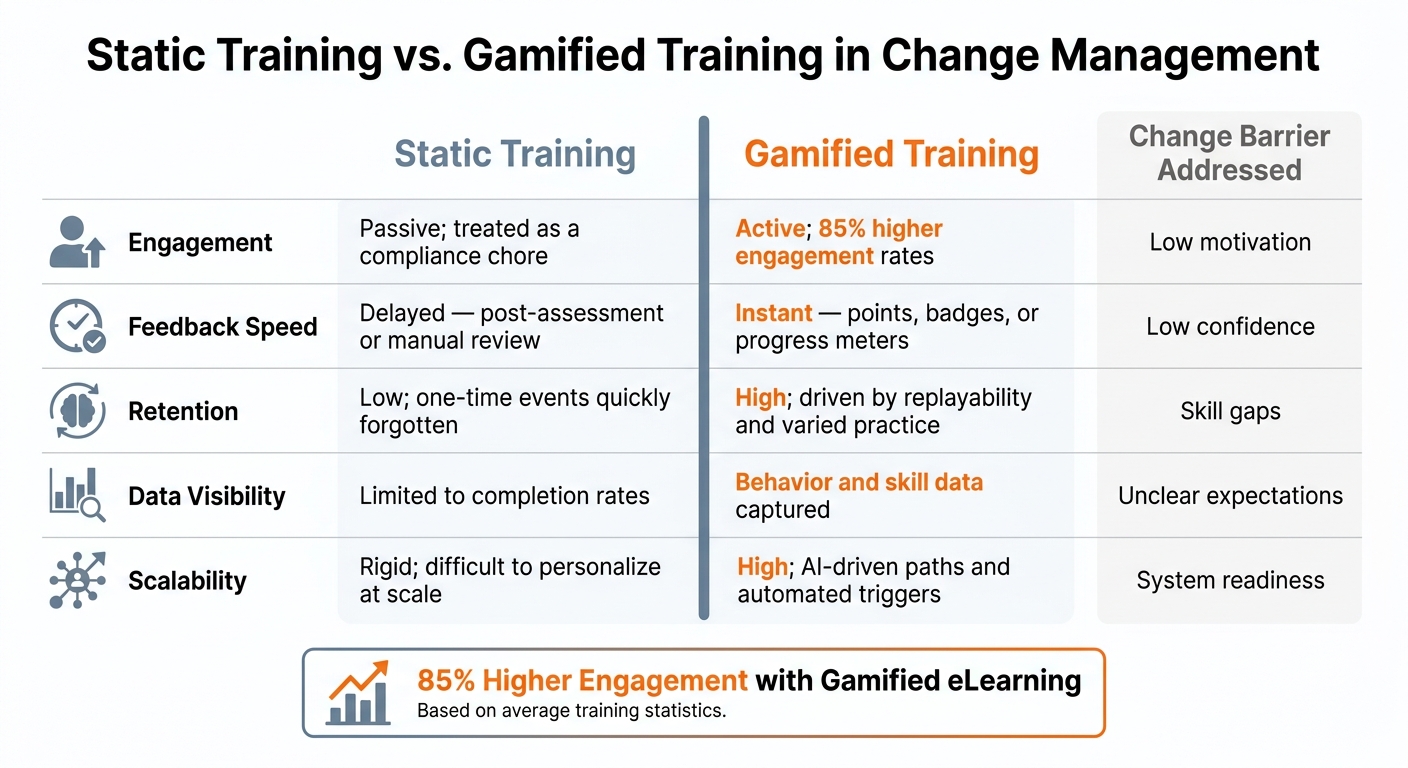
Static Training vs. Gamified Training: Change Management Comparison
Change programs usually break down when people aren't ready to act in a new way. In most cases, three problems show up fast: resistance, low confidence, and weak digital readiness. Gamified training helps because it turns those problems into hands-on practice, fast feedback, and visible progress.
Resistance, Low Confidence, and Poor Communication
Employee skepticism is one of the most common reasons rollouts stall. If people don't understand why the change is happening, training starts to feel like a box-checking exercise instead of something that will help them do their jobs better.
Low confidence makes that worse. When training stays too abstract, employees leave with ideas but not much hands-on ability. They know the concept, but they haven't practiced the work. That gap between knowing and doing tends to show up right after go-live, when mistakes suddenly matter.
The main issue isn't awareness. It's engagement.
Short, repeatable challenges with instant feedback deal with both problems at once. A live progress meter, a badge for getting a scenario right, or team recognition for steady improvement gives people proof that they're moving forward. That lowers uncertainty and builds confidence step by step. It also makes change sponsorship more visible across teams, which helps with weak communication.
Training Gaps in Digital Skills and System Readiness
System rollouts expose skill gaps almost immediately. Employees with low digital literacy or limited hands-on time in a new platform often struggle when training relies on static manuals or slide decks. They may know the steps on paper, but applying them in a live system is a different story.
What helps is practice - not more reading.
Scenario-based tasks and repeatable system simulations let employees make mistakes in a safe setting, see what happens, and try again. Progressive module unlocks, where advanced modules open only after a learner shows basic competency, also reduce overload and keep skill-building in sequence.
Static Training vs. Gamified Training: A Direct Comparison
A side-by-side view makes the difference clear. Gamified training closes these gaps better than static delivery because it gives people more chances to practice, react, and improve in the moment.
| Feature | Static Training | Gamified Training | Change Barrier Addressed |
|---|---|---|---|
| Engagement | Passive; often treated as a compliance chore | Active; 85% higher engagement rates | Low motivation |
| Feedback Speed | Delayed - post-assessment or manual review | Instant - points, badges, or progress meters | Low confidence |
| Retention | Low; one-time events are quickly forgotten | High; driven by replayability and varied practice | Skill gaps |
| Data Visibility | Limited to completion rates | Behavior and skill data | Unclear expectations |
| Scalability | Rigid; difficult to personalize at scale | High; AI-driven paths and automated triggers | System readiness |
Core Gamification Mechanics That Drive Adoption
Once you know the barrier, pick the mechanic that fits the behavior you want to change. Not every game mechanic belongs in change training. The ones worth using tie straight to a business result - higher completion rates, better system proficiency, or fewer post-launch errors.
Points, Badges, Leaderboards, and Progress Tracking
Points and experience points (XP) work best when they reward repetition, not just a one-time finish. Give XP for repeat practice, not only completion, to keep people engaged during long ERP or CRM rollouts.
Badges do a different job. They mark milestones or show mastery of a specific skill, like completing core data entry tasks in a new system. When used well, they help managers spot who has mastered the workflow and who may need extra support.
Leaderboards can work in competitive cultures, but they need care. In some U.S. teams, public rankings can push participation. In private or team-based settings, team scoring is often a better fit. The point is simple: use rankings to motivate, not shame.
Progress tracking often gets less attention than it deserves. Progress bars help cut drop-off during long rollouts. Level-locked paths also help reduce overwhelm by requiring base-level competency before employees move into more advanced modules.
Missions, Scenarios, and Simulations Tied to Job Tasks
One of the best mechanics in change management training is a well-built simulation. Here, realism matters more than novelty. A scenario that mirrors an actual workflow in an ERP or CRM system gives employees practice they can carry straight into live work.
Use branching scenarios when one decision changes downstream work, customer impact, or compliance risk.
Linking Mechanics to Measurable Change Outcomes
Every mechanic in a gamified training program should tie to something you can measure. If it doesn't connect to a business result, cut it.
Map each mechanic to one measurable outcome.
| Mechanic | Best Change Scenario | Supported Business Outcome |
|---|---|---|
| Points/XP | CRM adoption; routine system training | Higher completion rates; daily active usage |
| Badges | New operating models; certification milestones | Verified skill acquisition; readiness visibility |
| Leaderboards | Sales team rollouts; competitive team cultures | Peer motivation; participation rates by department |
| Branching Scenarios | New process training; decision-heavy workflows | Improved decision-making; fewer post-launch errors |
| Progress Tracking | Long-term digital transformation projects | Reduced drop-off; time-to-proficiency |
| Level-Locked Paths | ERP rollouts; complex multi-phase systems | Sequential mastery; reduced user error |
Track the metrics that matter here - completion, proficiency, error rate, and time to task. That is how you connect in-game performance to day-to-day operating results. Then use those metrics to refine rollout design and support decisions. Those same metrics also guide consultant-led design and delivery.
How Consultants Design and Deliver Gamified Change Programs
From Change Assessment to Gamified Learning Design
Once mechanics are tied to outcomes, consultants turn adoption risk into design requirements.
Good consulting work starts with a change readiness assessment before training design begins. In plain terms, that means building role impact maps and risk heat maps to show which employee groups are most likely to disengage or struggle. At this stage, consultants also check technical readiness - including whether the current setup supports SCORM, xAPI, and single sign-on.
From there, instructional designers turn those risk profiles into learner personas that shape scenario and mechanic selection. Those inputs help decide which roles need practice, which systems need support, and which metrics will define success.
Use Cases for ERP, CRM, and Operating Model Changes
The same design logic shifts based on the platform and the operating model.
The most common consulting use cases are ERP migrations, CRM adoption programs, and post-acquisition operating model standardization. Each one is handled with a different mix of level-locked paths, frequency-based point systems, or branching simulations based on the specific adoption risk.
Across all three scenarios, milestone-based learning tied to measurable KPIs - completion rate, assessment scores, and error rate post-launch - gives executives a clear view of whether the program is working, not just whether employees finished the modules.
Finding Advisory Partners for Change and Training Execution
For executives looking at outside support, the hard part is often finding firms that bring together change management, instructional design, and LMS implementation. Those three skill sets do not always sit under one roof. The Top Consulting Firms Directory can help narrow a long list of possible partners by specialty before issuing an RFP.
The table below shows the main service types to look for when evaluating a consulting partner for a gamified change program:
| Service Type | Typical Deliverables | Key KPIs |
|---|---|---|
| Change Readiness Assessment | Risk heat maps, role impact maps, learner persona profiles | % Employee Readiness, Initial Engagement Rate |
| Gamified LMS Implementation | Configured platform (SSO, xAPI), custom branded interface | Adoption Rate, System Login Frequency |
| Simulation & Mission Design | Branching scenario storyboards, narrative scripts, avatar assets | Course Completion Rate, Scenario Success Rate |
| Adoption & Impact Measurement | LRS data integration, analytics dashboards, ROI reports | Skill-Based Assessment Scores, Productivity Lift |
Tie every deliverable to adoption and productivity metrics.
How to Build a Gamified Training Program That Works
Set Objectives, Choose Mechanics, and Measure Adoption
After you pick the right mechanic, the next job is simple: tie it to measurable adoption.
Completion tells you something, but it does not prove people can do the work. A finished module is a signal - not evidence of adoption. That’s why success metrics need to be defined in day-to-day terms: practice frequency, assessment scores, mastery, and time to proficiency.
Match the mechanic to the change you need. For ERP and CRM rollouts, level-locked paths work well because they move people through the system in a controlled way. For work that depends on judgment, branching simulations make more sense because they test decisions, not just recall. Badges can help too, but ONLY when they stand for verified mastery.
You’ll also want an LRS in place from day one. It connects learner actions to business data, which makes it easier to spot weak points early - before go-live.
Common Design Mistakes That Undermine Program Credibility
Weak design choices can kill trust fast, even if the content itself is solid.
Badges, leaderboards, and rewards fall flat when they track activity instead of competence. If people get credit for clicks rather than skill, the program starts to feel hollow. And once that happens, adoption tends to stall.
Role-based learning paths matter. A finance user, a sales rep, and an operations manager may all work in the same rollout, but they do not face the same risks. Their training should reflect the tasks and decisions each group needs to handle on the job. Use LMS automation and competency tracking to route learners by role and skill level.
One more thing: confirm reporting capabilities before choosing a platform. If the system can’t show who learned what, where they struggled, and how that maps to job performance, you’re flying half-blind.
Conclusion: Key Takeaways for Executives
Gamification works only when mechanics, scenarios, and feedback loops are tied to actual adoption barriers and measurable business outcomes. Design for behavior, measure adoption, and keep refining the program based on the data.
FAQs
How do I choose the right gamification mechanics for my rollout?
Choose mechanics that fit your change goals, training gaps, and the behaviors employees need to build - like resilience, adjusting to change, or using new digital tools.
Storytelling gives people context. Simulations let them practice in a low-risk setting. Feedback loops help them see progress as they go. Team challenges and recognition can support better collaboration.
It also helps to look at budget and customization. If the experience feels personal, memorable, and within reach, people are more likely to stick with it.
What metrics best show real adoption after training?
Focus on behavioral change, not just course completion. The metrics that matter most are adoption rates, performance gains like higher productivity, fewer errors, and faster task completion, along with compliance audits and usage stats.
360-degree feedback and manager reviews can help show whether those new behaviors stick over time. Frameworks like ADKAR can also help track progress, especially Ability and Reinforcement.
When should we use simulations instead of simple quizzes?
Use simulations when theory alone isn’t enough - especially for decision-making, behavior change, and empathy building. Quizzes are fine for basic assessment. But simulations do a better job with messy, high-stakes situations.
They give employees room to test their instincts, see what happens next, and learn from different choices in a safe setting. That’s why they work well for change programs, process shifts, and building the “ability” stage in models like ADKAR.