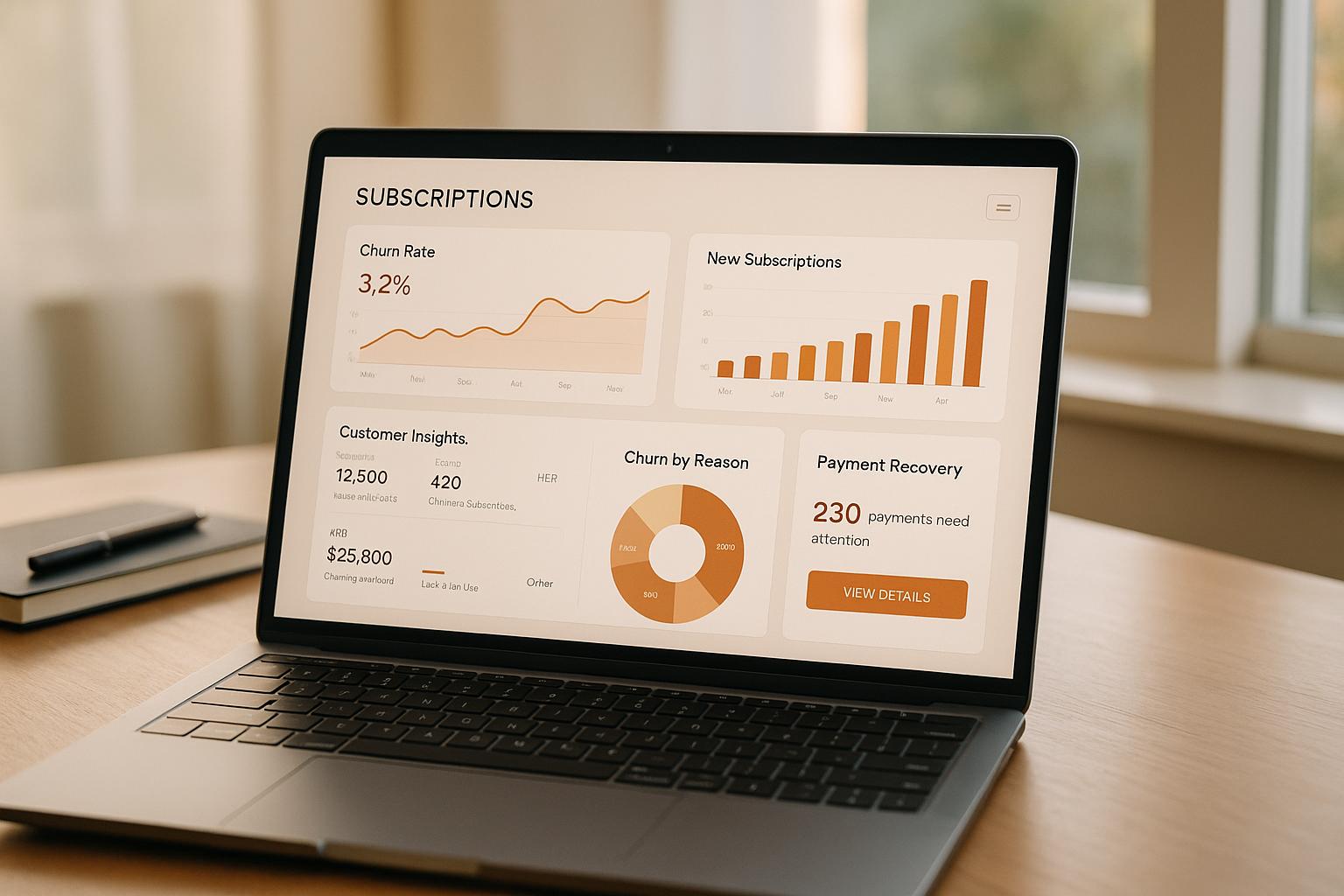
ERP reporting integration connects systems like SAP, Oracle, and NetSuite with reporting tools to streamline data analysis. This eliminates manual processes, reduces errors, and provides real-time insights for businesses. Here’s what you need to know:
- Key Features to Look For: Native ERP connectivity, real-time data sync, self-service reporting, and compliance with U.S. standards like SOC 2.
-
Top Platforms:
- Domo: Best for enterprises needing scalable analytics and fast deployment.
- insightsoftware: Ideal for finance teams preferring Excel-based reporting.
- Cleo Integration Cloud: Focused on supply chain visibility and B2B operations.
- Celigo: Designed for NetSuite users requiring automated workflows.
- Workato: Event-driven automation for real-time ERP integrations.
- Why It Matters: U.S. companies face challenges like compliance, data quality issues, and complex ERP systems. These tools reduce reporting time by up to 50% and improve operational efficiency.
Quick Comparison:
| Platform | Best For | ERP Support | Focus Area | Compliance |
|---|---|---|---|---|
| Domo | Large enterprises | SAP, Oracle, NetSuite | Scalable analytics | SOC 2 |
| insightsoftware | Finance teams | 140+ ERPs | Excel-based reporting | Strong audit features |
| Cleo | Supply chain managers | APIs, EDI, MFT | B2B and supply chain operations | High uptime |
| Celigo | NetSuite users | NetSuite | Cloud integration workflows | SOC 2 |
| Workato | Automation-focused teams | SAP, Oracle, NetSuite | Event-driven automation | Enterprise security |
Choose a platform that aligns with your ERP system and business needs. Testing with your data and workflows is crucial for success.
Streamlining Data-driven leadership: How Integration platforms become the tools for BI & Reporting
Key Criteria for Evaluating ERP Reporting Platforms
A strong integration platform is the backbone of operational clarity and efficiency. However, not all ERP reporting platforms are created equal. When evaluating options, focus on three critical areas: ERP connectivity, reporting features, and compliance with security standards.
ERP Connectivity and Native Integration
A reliable ERP reporting platform starts with seamless connectivity to your existing systems. Seek out platforms with certified, pre-built connectors for major ERPs like SAP (ECC and S/4HANA), Oracle (EBS, JDE, and Cloud), Microsoft Dynamics (BC and F&O), and NetSuite. These native connectors are far more efficient than generic ODBC connections, reducing setup time and the risk of data flow disruptions.
How a platform retrieves data is just as important. Modern platforms leverage API-based incremental syncs, which can process updates in seconds, compared to the slower full-table loads of older systems [8]. Some even offer sync intervals as short as 15 minutes, ensuring your dashboards remain up-to-date [8][9].
For businesses operating in hybrid environments - part cloud and part on-premise - hybrid deployment support is a must. Platforms with tools like Microsoft Integration Runtime provide IT teams with the flexibility to adapt their infrastructure incrementally, avoiding the need for a complete system overhaul [5][1]. Acquisitions create the same hybrid problem on a compressed timeline, since the acquired company usually runs a different ERP and nobody wants to freeze reporting during the migration. Running post-merger integration for revenue systems in stages, with the reporting layer connected to both ERPs before either one is retired, keeps the monthly close intact while the consolidation happens underneath.
Reporting Capabilities
The best reporting platforms offer real-time drill-down capabilities, allowing finance teams to dive from high-level general ledger balances into specific invoices or journal entries without leaving the dashboard [2][7]. This transparency eliminates the back-and-forth often required to resolve data discrepancies.
Another key feature is cross-source data blending, which combines ERP data with information from other business systems [6][8]. This creates a comprehensive view of performance, moving beyond isolated snapshots. As Richard Dirkson, Vice President and Controller, explained:
"Spreadsheet Server is a tool that scales. It adapts and allows us to focus on the outcomes we are trying to achieve instead of just the data." - Richard Dirkson [4]
Additionally, self-service data management empowers finance teams to manage dimensions, hierarchies, and KPI mappings on their own, reducing reliance on IT [6].
Governance and Compliance Standards
For U.S.-based companies, governance and security are non-negotiable. A robust platform should include role-based access control (RBAC) and detailed audit trails to ensure compliance and prevent unauthorized access [2][6][7].
In terms of compliance, SOC 2 Type II certification is the minimum standard for any cloud-based reporting provider in the U.S. [9]. For industries managing sensitive technical data, additional certifications like ISO 27001 or support for export controls such as ITAR or EAR may be necessary [5][6]. Authentication protocols like Token-Based Authentication (TBA) and OAuth 2.0 are also critical for securing ERP-to-reporting connections [9].
"Compliance with the security policies and standards associated with application and data integration, along with user authentication, is vital to eliminate vulnerabilities." - Orbit Analytics [7]
The table below highlights the differences between modern integration platforms and traditional reporting methods across these criteria:
| Criteria | Legacy Reporting | Modern Integration Platforms |
|---|---|---|
| Data Access | Static exports or slow ODBC loads | Real-time API or incremental sync [8] |
| IT Dependency | High (requires scripting/consultants) | Low (self-service for finance) [4][2] |
| Data Scope | Siloed ERP data | Cross-functional (ERP + CRM + HR) [6][8] |
| Governance | Manual spreadsheet mappings | Role-based access and audit trails [2][6] |
| Compliance | Ad hoc | SOC 2 Type II, ISO 27001, TBA/OAuth 2.0 [9] |
Next, we’ll take a closer look at the leading platforms that excel in these areas.
Top Platforms for ERP Reporting Integration
Now that you know what to prioritize, let’s dive into platforms that consistently meet the mark.
Domo
Domo is a cloud-based business intelligence platform designed for speed and scalability. With over 1,000 pre-built connectors for major ERPs like SAP, Oracle, and NetSuite, it delivers live data instantly - no need for custom pipelines. Its "Magic ETL" tool allows non-technical users to visually transform and combine data, while its Workbench ensures secure, encrypted on-premise ERP syncs without requiring a VPN [10].
Handling massive datasets, Domo processes over 100 trillion rows daily by updating only changed records, reducing the load on ERP systems [12]. Laura Ziupsnyte, a BI Developer at All Response Media, shared:
"What used to take 2.5 days now takes one hour." [10]
Gordon Plutsky, VP of Insights and Performance Marketing at IDG Communications, added:
"Domo is one of those platforms where the power is within the connectors. You could literally get a subscription to Domo tomorrow, plug in five to ten connectors, and get meaningful data by the end of the day with minimal to no input from IT." [12]
Domo also integrates with Amazon SageMaker for automated machine learning and has earned a 4.5/5 rating on Gartner Peer Insights (based on 489 reviews as of January 2026). It’s recognized as a Leader in the Embedded Analytics Value Matrix [14].
Best fit: U.S. mid-market and enterprise companies requiring fast deployment, broad data integration, and scalable AI-driven analytics.
insightsoftware
insightsoftware brings ERP reporting directly into Microsoft Excel, making it a favorite for finance teams. It supports over 140 ERPs and data sources, including SAP FICO, Oracle EBS, JD Edwards, and Microsoft Dynamics. This setup allows users to create refreshable, drillable reports without leaving Excel [4].
Alasdair Walton, Finance Director for Europe, praised its functionality:
"The drill-down functionality is superb. When compiling a report, if a problem is discovered, we can simply drill down, find the problem, fix it, and resolve it." [11]
With over 500,000 users globally, insightsoftware has proven especially effective in regulated industries. For instance, AVR Realty reduced its reporting time by 50%, enabling accountants to generate reports independently, bypassing IT [4].
Best fit: Finance and accounting teams in regulated U.S. industries who want robust ERP reporting while staying within Excel’s familiar environment.
Cleo Integration Cloud
Cleo Integration Cloud focuses on supply chain management, offering end-to-end operational visibility. It combines EDI, API, and managed file transfer (MFT) into one platform, giving logistics teams insight into workflows like order-to-cash and procure-to-pay [13]. Its AI-driven "Cockpit" identifies issues - such as SKU mismatches or pricing errors - in real time, while automated data mapping simplifies onboarding for new trading partners.
Cleo delivers a 99.95% uptime across billions of transactions and boasts a 95% customer renewal rate. Customers have reported impressive results, including a 94% drop in EDI error rates (from 4% to 0.24%) and a 60% reduction in issue resolution times [13].
Best fit: U.S. manufacturers, distributors, and retailers managing complex B2B networks and supply chain reporting needs.
Celigo
Celigo is an iPaaS platform tailored for businesses using NetSuite. It simplifies connecting cloud applications and automating data flows. With a robust library of pre-built integration templates, it supports workflows like order management, fulfillment, and financial consolidation. Its flow-based integration builder allows operations and IT teams to map data between NetSuite and other tools like Salesforce, Shopify, and Workday - without heavy development work.
Best fit: U.S. mid-sized companies using NetSuite that need dependable, automated data integrations with other cloud applications.
Workato
Workato specializes in event-driven automation, enabling ERP integrations that trigger real business actions. For example, when a new invoice is posted in SAP or a purchase order is approved in Oracle, Workato can automatically notify stakeholders, update connected systems, or launch approval workflows in real time. Its "recipe" model simplifies cross-functional process automation with pre-built templates, reducing IT dependency.
Best fit: U.S. companies seeking ERP integrations tied to real-time event triggers and automated workflows critical to their operations.
sbb-itb-97f6a47
Platform Comparison and Best-Fit Scenarios
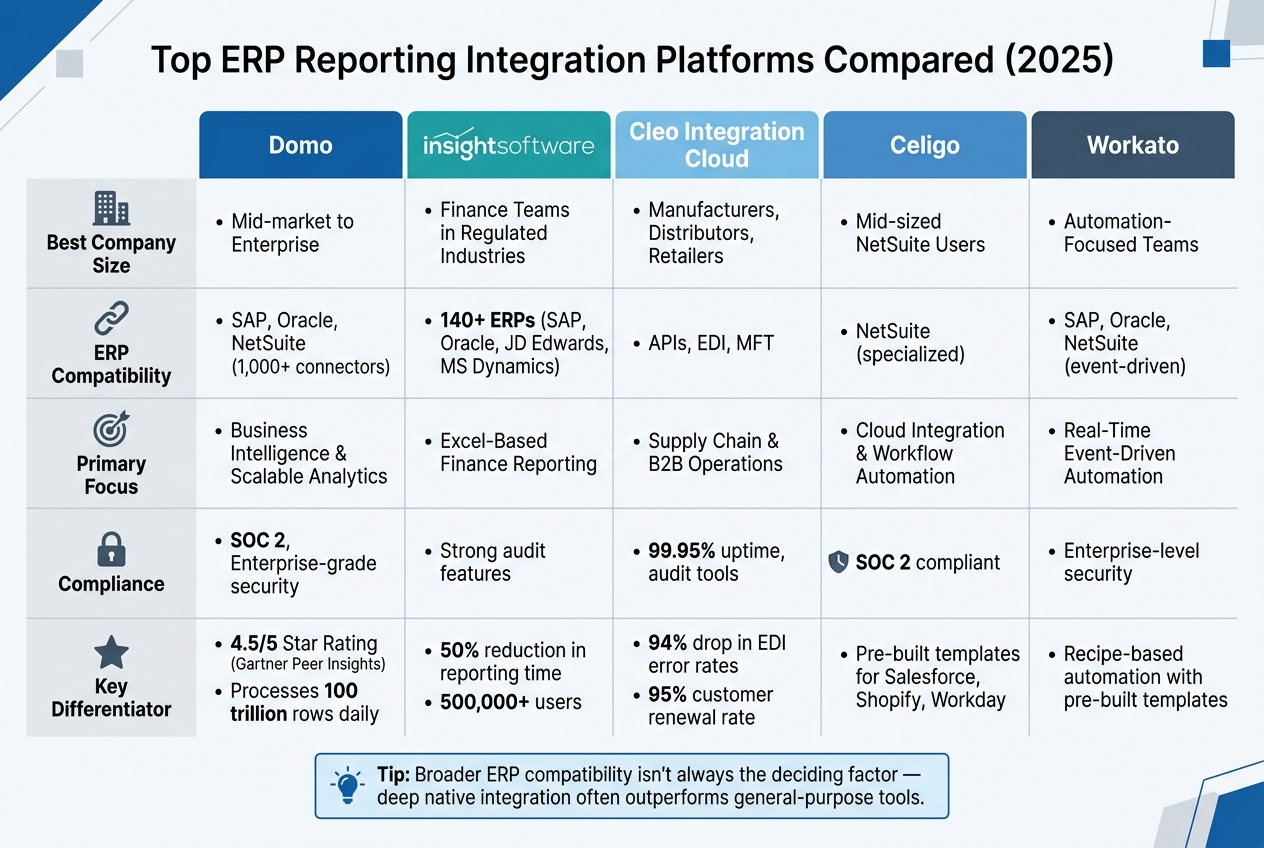
Top ERP Reporting Integration Platforms Compared (2025)
Every platform addresses specific integration challenges, and choosing the wrong one can lead to wasted time and resources. On the other hand, selecting the right tool improves data accessibility, ensures compliance, and strengthens operational efficiency. Below are tailored recommendations to match each platform’s strengths with various business needs.
Scenario-Based Recommendations
By focusing on each platform's features, these scenarios highlight which tool is likely to work best for your organization.
For mid-sized U.S. manufacturers or distributors using NetSuite, Celigo excels at simplifying integrations centered around NetSuite workflows. It minimizes development efforts when connecting cloud applications. If your team relies on integrations that trigger workflow actions - like automated approvals or notifications - Workato is a strong choice with its event-driven approach.
Finance teams in regulated industries (e.g., healthcare, insurance, or financial services) will find insightsoftware particularly effective. Its features are built to meet strict audit and compliance requirements.
For large enterprises with complex, multi-entity structures, Domo stands out with its scalable analytics capabilities, designed to handle large-scale data environments. Meanwhile, organizations prioritizing supply chain operations will benefit from Cleo Integration Cloud, which enhances B2B transaction visibility and streamlines data exchanges.
Comparison Table
| Platform | Best Company Size | ERP Compatibility | Focus | Compliance |
|---|---|---|---|---|
| Domo | Mid-market to Enterprise | Works with major ERPs like SAP, Oracle, and NetSuite | Business intelligence and analytics | Enterprise-grade security (e.g., SOC 2) |
| insightsoftware | Mid-market to Enterprise | Supports 140+ ERPs [4] | Finance reporting | Strong compliance features |
| Cleo Integration Cloud | Mid-market to Enterprise | Optimized for ERP systems using APIs, EDI, and MFT | Supply chain and B2B operations | Reliable uptime and audit tools |
| Celigo | Mid-sized | Specially designed for NetSuite | Cloud integration and automation | SOC 2 compliant |
| Workato | Mid-market to Enterprise | Integrates with SAP, Oracle, and NetSuite via event-driven triggers | Workflow automation | Enterprise-level security practices |
When deciding, remember that broader ERP compatibility isn’t always the key factor. For example, if your company operates a single system like NetSuite, a platform with specialized, deep integration (like Celigo) might outperform a general-purpose tool with less native support.
Conclusion: Choosing the Right ERP Reporting Platform
Key Takeaways
When selecting an ERP reporting platform, focus on what aligns with your ERP system, team dynamics, and business goals. Native connectivity is crucial - platforms designed specifically for your ERP (like Celigo's specialized NetSuite integration) often outperform generic solutions.
For U.S. businesses, self-service reporting and auditability are non-negotiable. Finance teams empowered to create and refine reports independently can operate more efficiently. In regulated sectors such as healthcare, financial services, and life sciences, having the ability to drill down from overarching dashboards to individual transactions is essential for compliance. Advanced reporting tools can also significantly boost efficiency, cutting reporting time by up to 90% and reducing budgeting cycles by as much as 80% [2].
Before making a final decision, it's wise to test the platform with your actual data, ERP system, and workflows. To maximize the benefits of these tools, consider bringing in expert consulting support.
Using Consulting Support
Expert guidance plays a critical role in ensuring a smooth ERP reporting integration. Once your priorities are set, professional consultants can help ensure that your implementation is scalable and meets audit requirements.
"We transitioned from a spreadsheet intensive complex data model to a much more visualized and summarized data system... allowing us to capture so much more information and use it to better analyze our data." - John Herrera, CRO, Maintex [3]
Even the most advanced platforms need skilled implementation to unlock their full potential. Not sure where to begin? The Top Consulting Firms Directory is a great resource for finding experts in ERP integration and reporting. Whether you need full-scale implementation or targeted assistance with data modeling or compliance, this directory connects you with the right professionals.
FAQs
How do I choose the right platform for my ERP?
To choose the best ERP platform, consider how effectively it aligns with your industry-specific workflows, operational demands, and integration requirements. Begin by pinpointing inefficiencies or challenges in your current processes. A scoring model can help you evaluate factors like functional capabilities, overall costs, and the complexity of implementation. Pay close attention to the integration architecture, availability of APIs, and compliance features. If you need additional support, consulting with specialists can provide valuable insights to ensure the platform aligns with your growth and transformation objectives.
Will ERP reporting integration slow down my ERP system?
Integrating reporting tools with your ERP system can actually boost performance when handled the right way. Manual processes often lead to delays and mistakes, but automation can streamline workflows, cutting down on bottlenecks and errors. Many modern platforms rely on API-driven workflows, which provide real-time updates to keep your data accurate without putting extra strain on your ERP system. This approach helps reduce the time spent on reporting while improving the overall reliability of your system.
What compliance requirements should I check (e.g., SOC 2)?
When linking reporting tools with ERP systems, it's crucial to check compliance frameworks to protect data and maintain accuracy. Some key standards to look for include:
- SOC 1: Focuses on financial controls.
- SOC 2: Covers security and privacy measures.
- ISO 27001: Addresses information security management.
- SOX compliance: Ensures proper reporting for public companies.
Additionally, industries with specific privacy needs may require adherence to regulations like GDPR or similar frameworks. It’s also a good idea to see if the platform offers independent audit reports - these can make compliance evaluations much easier.